| ||||||||||||||||||||
|
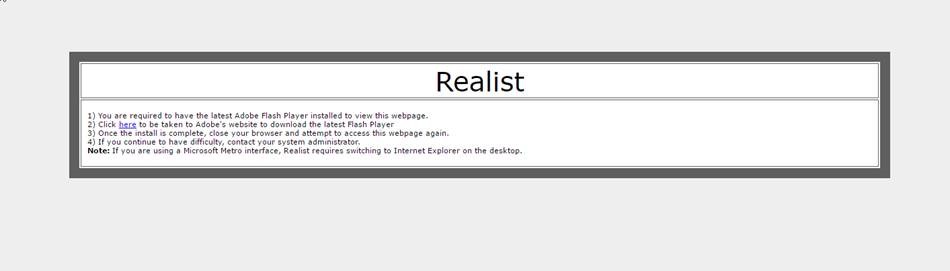
Apple Safari 10 – Changes to Adobe Flash affecting Realist This is for Apple Laptops/Desktops running Mac OS 10.10 (Yosemite) , 10.11 (El Capitan), 10.12 (Sierra) that have updated to Safari 10. At this time, these settings are not needed for iPads. With recent updates to Apple’s Safari 10 browser, Apple has changed the way that Safari runs Adobe Flash Content. The default is actually for all flash content to be disabled. If you are running Safari and want to use the Realist System, you must enable Adobe Flash. If you do not, you’ll see the following message when trying to access Realist:
Below, you’ll find some instructions on adding this exception to Chrome’s settings. If you need assistance, please contact technical support at 614-475-4000 Mon-Fri 8:30a-5:00p or by email at techsupport@columbusrealtors.com To enable Adobe Flash within Safari 10.
| ||||||||||||||||||||
|
New Google Chrome version 57 – Changes to Adobe Flash affecting Realist 03/14/2017 This change affects both Mac & PC. With the release of Google’s new version of Chrome, 57, Google has changed the way that Adobe Flash processes within the browser. For those that use the Realist system within Chrome, you’ll need to make some adjustments to your browser to continue to let Realist run. If you do not make this change, you’ll receive the following error when trying to utilize Realist:
Below, you’ll find some instructions on adding this exception to Chrome’s settings. If you need assistance, please contact technical support at 614-475-4000 Mon-Fri 8:30a-5:00p or by email at techsupport@columbusrealtors.com To add Realist as an Adobe Flash Exception.
| ||||||||||||||||||||
|
Flex Mobile Web – New Design – March 8 On March 8, Flexmls Mobile Web will have an updated design for its search screens. The new design does not change any functionality and it will appear for searches in Flexmls mobile web as well as the search function for client portals on Flexmls mobile web. The new design is based on the current interface for the new Flexmls portals, reducing the differences between platforms. Flexmls Mobile Web for Agents
| ||||||||||||||||||||
|
Discounted Cameron Mitchell Gift Cards – Ends March 8 Cameron Mitchell gift cards remain available in $25, $50 and $100 increments. The 20% off discount will be applied to your total order. Order forms can be found HERE. Your order form can be emailed to Kelly Simmons (ksimmons@columbusrealtors.com) or faxed to (614) 337-7559. Deadline: All order forms and payment must be received by Wednesday, Mar. 8 at 5pm.
| ||||||||||||||||||||
|
Changes to Exclusive Right to Sell Listing Contract – Section 6 The Exclusive Right to Sell Listing Contract has been modified. The following text has been added at the end of the Section 6: Seller acknowledges that photos and/or videos may be taken of the property. It is the intent of the MLS committee that this change serve as notification to sellers that photos and videos may be taken for multiple purposes including marketing and comparison. They may be taken by various parties such as agents, inspectors, appraiser, and even prospective buyers. These changes are included in the latest version of the Exclusive Right to Sell Listing Contract. The version of the form can be identified by the revision date printed at the bottom of the form. The latest revision that includes this change will be labeled “2/17”. Full text of section 6:
| ||||||||||||||||||||
|
Crime Alert: Beware of ‘Survey’ e-mail From Columbus REALTOR® Crime Alerts: A number of real estate licensees notified the Ohio Division of Real Estate & Professional Licensing about receiving an e-mail with the subject line “Real Estate Coaching Survey for OH lic.” encouraging participation in an online survey. Please be aware that the survey e-mail is not coming from — nor is it being conducted — by the Division. The e-mail is identified as being sent by “Survey Club.” More info http://ohiorealtors.org/2017/02/21/division-made-aware-of-misleading-email-being-received-by-real-estate-licensees/ This, plus other alerts can be found by following this link:
| ||||||||||||||||||||
|
Crime Alert: Bogus Caller Claiming to be Homeowner Debbie Garrison with Century 21 Excellence Realty reported that a cleaning company had contacted her to let her know that someone claiming to be the owner of one of her listings (in Groveport) had requested a meeting with the cleaning company to get an estimate on cleaning the property. The cleaning company was suspicious of the caller and contacted Debbie to see if the request was legitimate, and it wasn’t. The homeowner had not contacted the cleaning company and mentioned to Debbie that someone had tried to get in to her home and when she opened the door was told that they thought the property was vacant. A police report has been filed. Just want REALTORS® to be on the lookout for what could be potential criminal intent. Click the link below to see all recent alerts:
| ||||||||||||||||||||
|
Realist Downtime: Scheduled Maintenance – Saturday, Feb. 18 – 11pm CoreLogic will be performing system maintenance the evening of Saturday, February 18, 2017 beginning at 11:00 PM through 4:00 AM Sunday morning. Realist may be intermittently unavailable during this maintenance period.
| ||||||||||||||||||||
|
New Function: Delete Multiple Photos – February 21 On February 21, you will be able to delete multiple photos (up to 50 at once) from the Photo Upload screen. Here’s how it will work: Please note: you will not be able to delete the primary photo. The option to delete multiple photos will only be available from the current Photo Upload screen. If you use the Original Photo Upload screen, you can only delete one photo at a time.
| ||||||||||||||||||||
|
New Hot Sheet Design Layout – February 21 On February 21, the layout of the Hot Sheet page will be updated to make it more modern. This is part of an ongoing effort by FBS to freshen the user interface in Flexmls and make it more usable. To run the hot sheet, go to Daily Functions menu and select Hot Sheet. The new hot sheet page has two sections: the 24-Hour Hot Sheet at the top of the page and the Custom Hot Sheet at the bottom of the page. 24-Hour Hot Sheet Please note, if you run the 24-Hour Hot Sheet on a Monday, it also displays listing events from the past 72 hours (over the weekend). Custom Hot Sheet
|