| ||||||||||||||||
|
Android Users: Flexmls Pro Login Issues *This only applies to Flexmls Pro used on Android Devices* We have had many reports recently of Android users having issues with Flexmls Pro. These issues have been reported to FBS and it is not just in our market the issue appears. If you are seeing an issue, please continue to some steps for a resolve. When FBS provides a fix, it will likely come as an update to the app you’ll simply download via your Play Store updates. The Issue If you are a user of FBS’s app, Flexmls Pro and are seeing white or blank screens when attempting to log into your app to view the MLS, here are some instructions that can help. Please note, with Android based devices, these instructions may not *exactly” match your particular device. Please use these instructions below as a basic guild line.
Here’s an example from a real device: The below is based off a Google Pixel 3A XL. Please note, your device may be similar but not exactly the same:
This link will take you to a generic page that goes over the generic steps for the process above. This link is NOT about Flexmls Pro specifically, but the general steps you can use on Android. This link provided for visuals. Link is also listed below:
| ||||||||||||||||
|
New Realist for 2020 – What’s New About It? Register now for New Realist Training webinar to be held live this coming Monday. Date: Monday, April 13, 2020 Learn about the new features, new interface, and updates that are available now in Realist. Adobe Flash is no longer a required install in order to use Realist! IMPORTANT: Please visit the link and make sure your computer is ready to view the webinar PRIOR to the start time.
| ||||||||||||||||
|
Virtual Open Houses: Video Overview Now Available Video now available: Add Virtual Open House links in MLS. Original post: Your Columbus REALTORS® MLS staff has been working hard to bring you innovative options to keep our central Ohio housing market strong. We are happy to announce that our MLS vendor has responded to industry needs with a new option: Virtual Open House links. How is a Virtual OPEN HOUSE different than a Virtual TOUR? CAUTION: Get written permission from the seller BEFORE you start streaming! Show that home virtually instead of in-person! 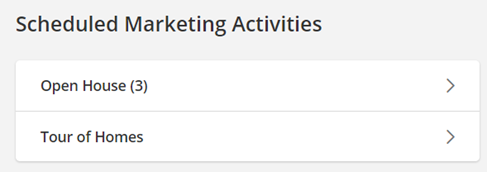 As an alternative to in-person open houses, you can now enter a link to a STREAMING, Virtual Open House using a variety of online communication services such as Facebook Live, GoToMeeting, or Microsoft Teams. Homebuyers or agents can join your Virtual Open Houses/Tour of Homes. The live attendees can view video streamed from your phone and ask questions during the “virtual walkthrough”. 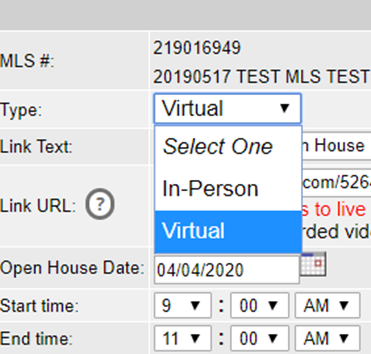 There is help text right on the Add/Edit screen to remind agents that only online streaming sources can be entered in the URL address field.  If you enter a URL that is not recognized as a live streaming/conferencing service, Flexmls will pop-up a warning. There is a link to the list of recognized URL addresses for known web conferencing services (ie GoToMeeting, Facebook Live, etc.) right on the warning bubble. 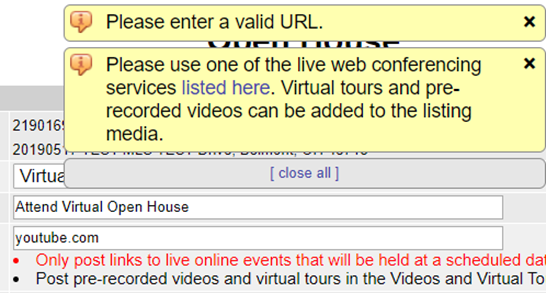 There will certainly be a few “bumps in the road” and definitely some “growing pains”, but the new Virtual Open House is here now, and here to stay. For additional information and the full details of this new feature in Flexmls, click here. Full URL – https://flexmls.com/flexmls-academy/product-news/introducing-virtual-open-houses-tours-of-homes/ Original post: 20200406
| ||||||||||||||||
|
Alert: Targeting Homeowners Read details here: https://columbusrealtors.com/alerts/default.aspx
| ||||||||||||||||
|
In Memoriam: Robert “Bob” Nygren See full obituary here: https://www.dignitymemorial.com/obituaries/boca-raton-fl/robert-nygren-9101238
| ||||||||||||||||
|
In Memoriam: Jeffrey Monebrake See full obituary here: https://www.snyderfuneralhomes.com/obituary/jeffrey-w-monebrake/
| ||||||||||||||||
|
Alert: Unethical Solicitation Read details here: https://columbusrealtors.com/alerts/default.aspx
| ||||||||||||||||
|
Value Added ‘Distance’ Learning To help members during this unusual time of social distancing, there will be no charge for CE webinar classes held from April 3 to May 31, May 2020. Education is critical to your success and we are working to provide you valuable service during this crisis.
| ||||||||||||||||
|
Dues Deadline Delayed For those members who opted to separate payment of their dues into two installments, the deadline for your second half dues payment has been extended 60 days (from June 30 to Aug. 30). This would include local REALTOR® dues, MLS dues and eKey fee (if applicable).
| ||||||||||||||||
|
Survey – Video, Virtual Tours and Virtual Open Houses Attention Commercial & Residential REALTORS®
|
