| ||||||||||||||
|
MLS Policy Tip: For Sale Signs Cannot Be Visible in Photos Pictures on the MLS cannot be branded in any way. This applies explicitly to your “For Sale” sign. MLS photos are available to the public through MLS email and broker-operated websites. For this reason, For Sale signs are considered very volatile and are subject to an immediate $100 fine. It doesn’t matter if the signage or other branding is on the primary or secondary photos. It is an MLS policy violation and you will receive a fine. Please check your listings photos for possible violations for yard signs or any other branding on your photos. Please review the actual MLS policy below. 1.03.05 – Unallowable Data on Photos and Public Documents No marketing devices of any type (e.g., logos, readable for sale signs, company names, phone numbers, Web sites, Open House Overlay, email addresses including embedded, overlaid or digitally stamped information etc.) shall appear on or with any photos or public documents except for the following:
| ||||||||||||||
|
In Memoriam: Mable Clellen See full obituary here: http://www.hillfuneral.com/westerville-funeral-home/obituaries-services/obits-photos/709
| ||||||||||||||
|
Status in MLS: Confused? Read this. The MLS Listing Status Guide has been created and approved by the MLS Committee and MLS Board of Directors. These definitions are intended to help all MLS members understand and correctly use MLS statuses when editing or searching listings in MLS. Download the MLS Listing Status Guide here. The status definitions have also been added to the MLS edit screens. For example, when you change a listing to Contingent status, the definitions will appear on the screen to help you determine the correct status for your listing. 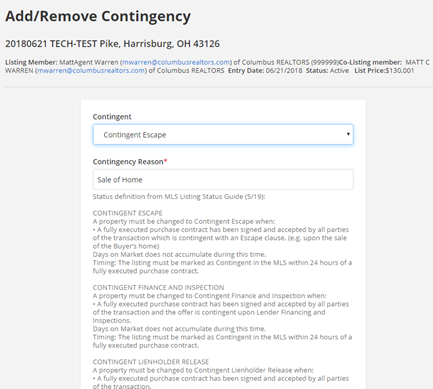 Published 20190627
| ||||||||||||||
|
Flexmls: New Login Screen in July The Flexmls process is being standardized across platforms. The new login screen will have a two step process. New two step login process: The The new login process will be consistent whether you are on Flexmls Mobile or Flexmls Web. Your username and password are the same. Only the process to login will change. Login update schedule: Current login screen (one step process): 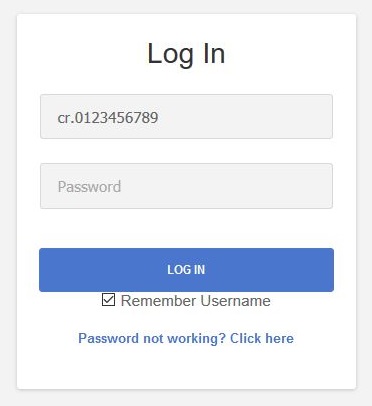 New login screen (2 page process): 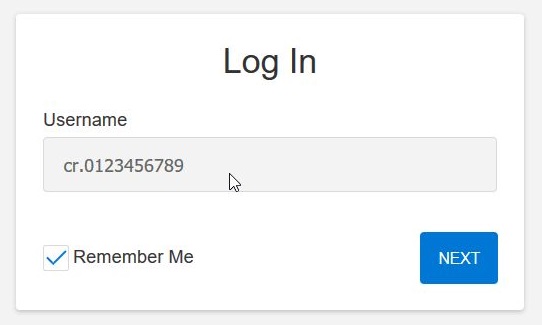 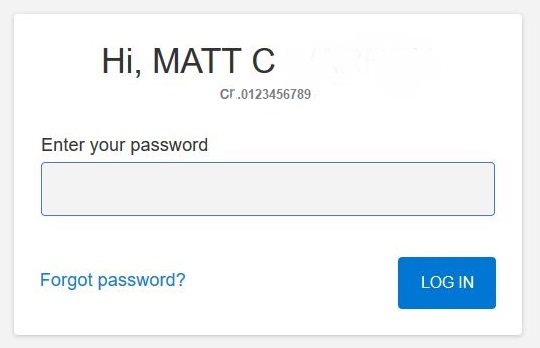 Separating the entry of user names and passwords will improve security and makes it easier to integrate third-party apps into Flexmls. This change is also part of a larger effort to create a more consistent Flexmls experience across all platforms.
| ||||||||||||||
|
Holiday: Closing at 3pm July 3rd, Closed July 4th & 5th The Columbus REALTORS association will close early at 3pm on July 3rd and offices will be closed in celebration of Independence Day on July 4th and 5th, 2019. Office will reopen for normal business hours on Monday, July 8th. Have a great Independence Day! Schedule:
| ||||||||||||||
|
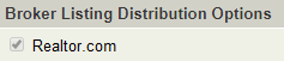
Realtor.com: Broker Distribution – Override Default Changed IMPORTANT UPDATE – JUNE 18, 2019: The “Agent can override” default has been set to OFF for all offices. This means that the broker’s “Send listings by default” will apply to all listings in that office. The checkbox for Realtor.com will be locked on add/edit. If a broker wishes to allow agents to override the broker’s “Send listings by default” setting they must enable “Agent can override” for that feed on the Broker Distribution Preferences page. When enabled, agents will be able to use a checkbox on Add/Edit screen to choose whether each individual listing displays on Realtor.com. Original announcement of Realtor.com Broker Distribution preference follows: MLS participant brokers can now control their listing feed to Realtor.com by using a checkbox setting to “disable the feed” on the Broker Distribution Preferences page. The default setting for Realtor.com feed has not changed. Listings will continue to be fed to Realtor.com unless the feed is manually disabled by the broker as detailed below. Adding Realtor.com simply gives the broker more direct control over their listing feed from MLS to Realtor.com. If a broker wishes to STOP sending listings to Realtor.com, they must disable the feed on the Broker Distribution Preferences page. Brokers can login to flexmls, then go to Menu > Preferences > Broker Distribution to access the settings discussed below. Broker Distribution Preferences page summary: 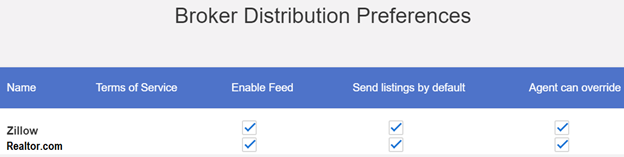 Enable Feed: Allows listings to be fed to Realtor.com when checked. (Main On/Off setting for this feed.) Send listings by default: Listings will be fed to Realtor.com by default when checked, unless agent override is allowed. Agent can override: Individual listing agents can override the broker’s office-wide setting for Realtor.com when this is checked. There will be a checkbox on the Add/Edit screen that the agent can check/uncheck for each individual listing. Agent override checkbox will appear on on Add/Edit screen:
 Questions? Contact MLS Technical Support (614) 475-4000 techsupport@columbusrealtors.com The Broker Distribution functionality within Flexmls provides a way for participant brokers to control listing distribution to select third party portals. When Broker Distribution Preferences was added in 2018, Zillow Group was the only destination on the list. As of May 2019, Realtor.com has been added.
| ||||||||||||||
|
Flexmls Downtime: Scheduled Maintenance – June 17th – 3am FBS will update MLS system hardware in the early morning hours of Monday, June 17th. This work is expected to take up to 60 minutes between 3:00a-4:30a (Eastern). The flexmls system will be unavailable during this time. Downtime Schedule:
| ||||||||||||||
|
Surveillance in Real Estate: Is this a problem? Please review the Legally Speaking article below from OAR regarding video and audio surveillance during listing appointments. Links to additional resources appear at the bottom of this story (NAR or OAR login may be required). Legally Speaking: Video and audio home surveillance Mar 14, 2019 By Lorie Garland, Ohio REALTORS Assistant Vice President of Legal Services Q: During a listing appointment the seller disclosed to my agent that there are video and audio surveillance equipment on his property. The seller stated his intent to record showings, because he wants to hear what buyers and agents are saying about his property. Is it legal for the seller to do this? Does the listing agent need to disclose to buyer agents that the showings are being recorded? A: Ohio law addresses both audio and video recordings. Under Ohio law a seller is permitted to use surveillance equipment to video record on his property. The equipment used is commonly referred to as a “nanny cam.” There are, however, limitations on that right to record. A seller should not record in locations where there is an expectation of privacy, for example a bathroom. Audio recordings, though, have stricter requirements. Under Ohio law, in order to legally make an audio recording, at least one person being recorded must consent to being recorded. Therefore, for a seller to use surveillance equipment to audio record conversations during a showing of their property, one of the individuals at the showing would have to consent to the recording. For most showings this would be either the buyer’s agent or the buyer. The fact that the seller knows about the audio recording would not be sufficient since the seller is not typically present during showings, and therefore is not a party to the conversation being recorded. Violations of the above provisions are a 4th degree felony under Ohio law. There are two ways to approach listing a property with video and audio surveillance equipment present. The first approach is to request that the seller turn off their surveillance equipment during showings or anytime the property is being accessed where the conversation of others will take place (i.e. an inspection, appraisal). This requirement could be limited to audio recordings or apply to all surveillance equipment and could be included as a term of the listing agreement. The other approach is to disclose the use of surveillance equipment and obtain consent to any audio recording. Notification of surveillance equipment could be made through the MLS or any other method used to communicate property access information. Also, a surveillance equipment notice should be posted at the property. Consent to an audio recording would need to be obtained prior to a showing or granting access to others pursuant to your duties under the listing agreement. Consent to audio recordings should be obtained in writing. For a showing, written consent would be required from the buyer’s agent or the buyer. If the buyer’s agent is providing the consent it should only be given with the knowledge and written authorization of the buyer. The bottom line is that a brokerage should adopt a policy on listing property with surveillance equipment and communicate that policy to all licensees. If a property has surveillance equipment, the seller should be made aware of Ohio law in this area and the existence of any surveillance equipment should be disclosed to others and proper consent to audio recordings obtained. Buyer agents should caution their clients regarding property surveillance equipment and should never do or say anything in a property that they would not want the seller to know. Additional Resources: (NAR/OAR login may be required) https://www.nar.realtor/legal/video-and-audio-surveillance-state-law-survey https://www.ohiorealtors.org/blog/583/nars-window-to-the-law-video-and-audio-surveillance-issues/ https://www.realtor.com/news/trends/buyers-under-surveillance/ https://www.ohiorealtors.org/blog/1073/legally-speaking-video-and-audio-home-surveillance/ Watch a quick NAR video about surveillance (skip to 3:08 if you don’t want to see the rest of the video)
| ||||||||||||||
|
In Memoriam: Donna Falter See full obituary here: https://www.shaw-davis.com/notices/Donna-Falter
| ||||||||||||||
|
In Memoriam: Max Copeland See obituary here:
|
