| ||||||||||||||
|
Land Users: CIE Export field is now required Do you have commercial land listed on MLS? Do you want it to be displayed in CIE/Catylist? The CIE Export Y/N field was recently added to Land property type. Please make sure to select “Yes” if you want to deliver your listing to Catylist from MLS for all Commercial, Office, Industrial and Business Op listings and now commercial LAND listings. If the listing should not be made available to CIE/Catylist, simply select “No”. NOTE: CIE Export is not intended for Residential lots. COCIE (CIE) is the Central Ohio Commerical Information Exchange. “CIE Export Y/N” is a required field in MLS for all Commercial, Office, Industrial, Business Op added to MLS in June 2018. It is now available for Land as well. The field determines whether the listing will be made available to Catylist. The field appears on the Edit Listing screen below the Printing Services field on the “Details” tab. The CIE Export field does not display on listing reports. PLEASE NOTE: Summary:
| ||||||||||||||
|
In Memoriam: Steven Mattson See obituary here:
| ||||||||||||||
|
In Memoriam: Maggie Huff See full obituary here:
| ||||||||||||||
|
In Memoriam: Peg Yerke See full obituary here:
| ||||||||||||||
|
Flexmls Web: Quick Search Screen Improvements – April 18 FBS will make a couple of changes to the search screen in Flexmls on April 18, 2019. These changes are based upon user feedback after the recent update. New Search Detail Pop-up The ability to quickly see the currently selected criteria using the “i bubble” at the top left was removed with the recent Flexmls update. This Search Detail functionality will return in a new location. You will now access the Search Detail pop-up by clicking the 3-dot icon at top right then Search Detail in the drop-down menu. 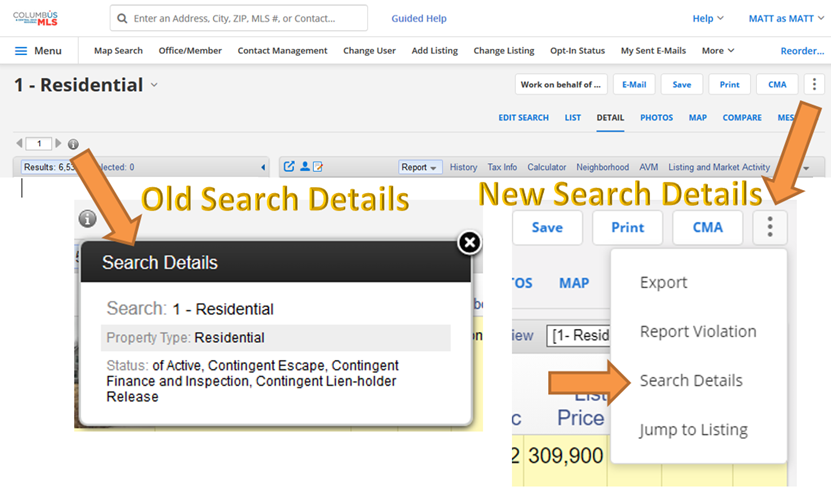 Empty Space at the Top of Search Screen Removed The redesigned layout of the search screen created a blank, unused gray bar at the top of the search screen. This blank gray area will be removed to allow additional space for map search and criteria fields. 
| ||||||||||||||
|
Policy Reminder: Don’t Forget to Upload Required Documents for Your Listing Several fields in the MLS, when marked “yes”, require the appropriate document be uploaded and attached to the listing. It is very important to include these documents to accurately describe the additional features of the property for sale. These documents help to inform all potential buyers of these property-specific features. This will increase the perceived value of the property for sale. Failure to upload these required documents can also result in an MLS fine. Review the official MLS Policy below. 1.02.15 – Required Document Not Attached to Listing Fine with Warning Documents that are required to be attached to listings must be uploaded within 5 business days of the listing entry date. These documents include:
The required documents can be found at www.columbusrealtors.com on the MLS Worksheets, Forms, & Contracts page.
| ||||||||||||||
|
Homesnap Training at the Real Estate Exchange – April 17 Did you miss the live Homesnap training last month? Here is your chance to get up-to-speed on Homesnap. There will be three live, 30-minute Homesnap training break-out sessions at the Real Estate Exchange (Formally Sales Associates Day) on April 17th. Register Now to attend the Real Estate Exchange 2019 on April 17th. 
| ||||||||||||||
|
Flexmls Pro for Android and Flexmls Mobile Web: Saved Search Changes – April 11 The Saved option on the home page will be renamed Saved Searches to match the labeling in Flexmls Web. 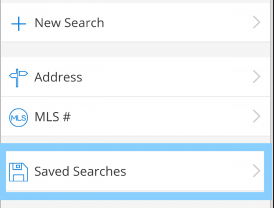 Links have been added at the top of the Saved Searches page to easily access favorite and draft searches. You can sort the list of saved searches by most recent, least recent, or search name. A saved search can easily be marked as a favorite by clicking on the star grey star. 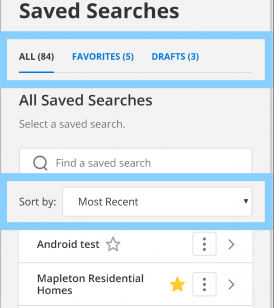 The More menu (three dots) to the right of each search gives you one-click access to view details, rename, or delete that saved search. 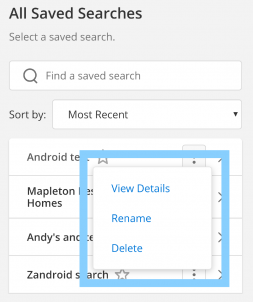
| ||||||||||||||
|
Flexmls Web: Saved Search Name Will Now Be Displayed – April 4 Current Behavior: 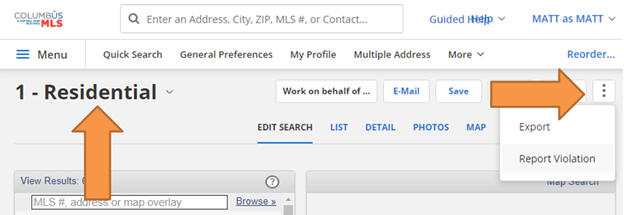 Updated Behavior April 4th: 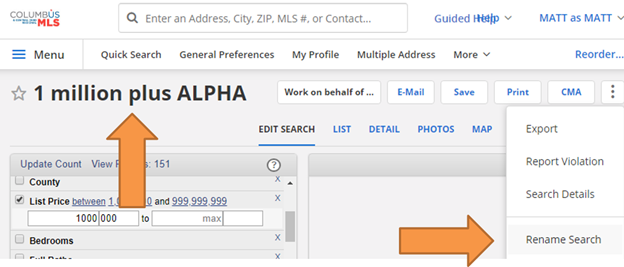
| ||||||||||||||
|
Real Estate Exchange Tradeshow – April 17th – Register Now Have you heard? The Real Estate Exchange (Formally Sales Associates Day) is on April 17th at Hilton Columbus at Easton. Click here for more details.
|
