Welcome Screen News Archive
Note: Most posts prior to 11/2012 are not available in the archive.

Back to MLS Welcome Screen


You searched for: Year of 2021

Search Results:
· Delayed Showings Must Use Coming Soon Status   03/05/2021
· Columbus Realtors – Phone System Migration   03/02/2021
· Delayed Showings? Coming Soon Status Must Be Used Instead of Showing Start Date   02/26/2021
· Policy Violation Manual Updated – Effective March 1, 2021   02/23/2021
· Crime Alert: Prank caller claiming to have X-rated material about an agent   02/17/2021
1 6 7 8 9 10


Archives by Year:

Note: Most posts prior to 11/2012 are not available in the archive.

Archives by Subject:

In Memoriam: Jerri Bebout

Please see the below link

In Memoriam – Columbus Realtors

Back To Top
 

03/08/2021

Delayed Showings Must Use Coming Soon Status

Please Note: Showing rules and requirements (eg showing instructions in property description) are applied to Coming Soon’s “Active on MLS” date. Coming Soon status MUST BE USED as the replacement for Showing Start Date.
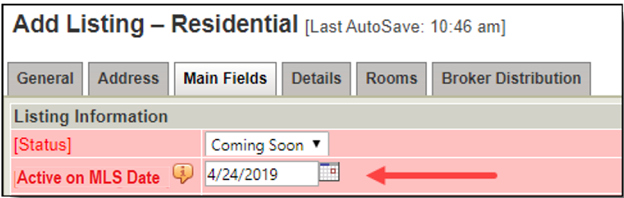
The image above shows the Status field on Add/Edit.  Active on MLS date field appears when Coming Soon status is selected. 

  • Coming Soon status is the ONLY WAY to “delay showings” (until the Active on MLS date).
    • Fines will be assessed for listings that state “no showings until” that are not in Coming Soon status. All MLS showing requirements will be applied to Active on MLS date as it has replaced Showing Start Date.
  • The Active on MLS date is the date upon which showings will begin.
    • Maximum of 30 days from Listing Entry (List) Date.
  • Coming Soon status must be selected at time of entry. It cannot be selected after the listing is entered.
    • Yard signs require a “Coming Soon” rider while in Coming Soon status.
  • The “Active on MLS” date field appears after Coming Soon status is selected. 
    • The Active on MLS date appears at the top right corner of the MLS reports, but only while the listing is in Coming Soon status.
  • The Coming Soon status can be converted to Active status sooner (using “End Coming Soon” button.)
    • The “End Coming Soon” button converts the Coming Soon listing to Active immediately.
    • If “End Coming Soon” is used, it is recommended that time should be allowed for Subscription Auto-email notifications to be sent prior to showings.
    • Listings cannot be placed back into Coming Soon status after it has been made Active.
    • If showings are not available for an active property, the property must be made “Temp Off Market” (unless Curb Offers Only is indicated)
  • The Active on MLS date can be moved further into the future.
    • Coming Soon status can be used for a maximum of 30 days from Listing Entry (List) Date.
  • Days on Market do not accumulate during the Coming Soon period.
  • Advertising is allowed.
  • Showings of any kind are not permitted before the Active on MLS date.
    • This includes buyer inspections.
  • Coming Soon status listings will be included in Subscription Auto-emails. (Listing email will be sent to clients.)
    • IMPORTANT NOTE: Agents must add Coming Soon status to the saved search in order for the Subscription email to include those listings.
  • Showing Start Date is completely replaced and no longer visible after March 1, 2021.
    • The Delayed Showing Authorization form (for Showing Start Date) is no longer required.
  • REMINDER:  Coming Soon status must be selected at time of listing entry if showings are to be delayed.

20200305 rev. 0

Back To Top
 

03/05/2021

Columbus Realtors – Phone System Migration

Columbus Realtors is currently in the process of migrating to a newer phone system to better serve our members. Until the final tweaks and updates are applied, members may experience dropped calls or other disruptions when calling into Columbus Realtors.

We are working to minimize the impact of these disruptions and thank you for your patience.

Back To Top
 

03/02/2021

In Memoriam: Jon Moorehead

Please see the below link.

In Memoriam – Columbus Realtors

Back To Top
 

Delayed Showings? Coming Soon Status Must Be Used Instead of Showing Start Date

Please Note: Showing rules and requirements (eg showing instructions in property description) are applied to Coming Soon’s “Active on MLS” date. Coming Soon status MUST BE USED as the replacement for Showing Start Date.

EFFECTIVE IMMEDIATELY:

New listings:

  • Coming Soon must be used if showings will be delayed (until the Active on MLS date).
    • Delayed showings are prohibited for Active listings.
  • Coming Soon status must be selected at time of entry. It cannot be selected after the listing is entered.
  • The “Active on MLS” date field appears after Coming Soon status is selected. 
  • The Active on MLS date is the date upon which showings will begin.
  • Showing Start Date has been hidden on the MLS Add/Edit screen.  Use Coming Soon/Active on MLS date instead.

The image above shows the Status field on Add/Edit.  Active on MLS date field appears when Coming Soon status is selected. 

Current listings:

  • Showings are not allowed until BOTH of the following dates have passed:
    • the Showing Start Date originally entered at the time of listing which is displayed on the MLS reports until March 1.
    • the Active on MLS date (for Coming Soon listing status).
  • Listings in the Coming Soon status can be made active early by clicking “End Coming Soon” on Add/Edit.
    • Showing Start Date cannot be moved to an earlier date.
    • If “End Coming Soon” button is used, it is recommended that that time should be allowed for Subscription Auto-email notifications to be sent prior to showings.

GOING FORWARD FROM MARCH 1, 2021:

  • Coming Soon is the ONLY WAY to “delay showings” (until the Active on MLS date).
    • Fines will be assessed for listings that state “no showings until” that are not in Coming Soon status. All MLS showing requirements will be applied to Active on MLS date as it has replaced Showing Start Date.
  • The Active on MLS date is the date upon which showings will begin.
    • Maximum of 30 days from Listing Entry (List) Date.
  • Coming Soon status must be selected at time of entry. It cannot be selected after the listing is entered.
    • Yard signs require a “Coming Soon” rider while in Coming Soon status.
  • The “Active on MLS” date field appears after Coming Soon status is selected. 
    • The Active on MLS date appears at the top right corner of the MLS reports, but only while the listing is in Coming Soon status.
  • The Active on MLS date can be moved earlier (using “End Coming Soon” button.)
    • The “End Coming Soon” button converts the Coming Soon listing to Active immediately.
    • If “End Coming Soon” is used, it is recommended that time should be allowed for Subscription Auto-email notifications to be sent prior to showings.
    • Listings cannot be placed back into Coming Soon status after it has been made Active.
    • If showings are not available for an active property, the property must be made “Temp Off Market” (unless Curb Offers Only is indicated)
  • The Active on MLS date can be moved further into the future.
    • Coming Soon status can be used for a maximum of 30 days from Listing Entry (List) Date.
  • Days on Market do not accumulate during the Coming Soon period.
  • Advertising is allowed.
  • Showings of any kind are not permitted before the Active on MLS date.
    • This includes buyer inspections.
  • Coming Soon status listings will be included in Subscription Auto-emails. (Listing email will be sent to clients.)
    • IMPORTANT NOTE: Agents must add Coming Soon status to the saved search in order for the Subscription email to include those listings.
  • Showing Start Date is completely replaced and no longer visible after March 1, 2021.
  • REMINDER:  Coming Soon status must be selected at time of listing entry if showings are to be delayed.

20200210 rev. 1

Back To Top
 

02/26/2021

Policy Violation Manual Updated – Effective March 1, 2021

You can now download the latest review of the MLS Policy Violation Manual.  The manual has been updated for changes effective March 1, 2020.

Changes include the following:

1.01.04 – Incorrect Sub-Type  – Data Maintenance Fee with Warning

Warning, $50, $100, $500

Listings entered in MLS must display the correct sub-type, e.g., condominiums may not be entered as single-family homes and vice versa. Single Family properties that have a shared wall(s) with another dwelling must be entered as Single-Family Shared Wall. Single Family properties that are free-standing (do not share attached wall(s) with another property) must be entered as Single-Family Freestanding. Condominiums that have a shared wall must be entered as Condo Shared Wall. Condominiums that are free-standing must be entered as Condo Free Standing. New build properties without a building permit must be entered in MLS with the sub-type selected as Build-to-Suit Single Family or Build-to-Suit Condo. Mobile homes must be entered as Other Residential with or without Deeded Land. Leasehold must be used for properties that have a long-term lease on the land.

1.02.01 – Unallowable Data in Property Description – Fine with Warning

Warning, $100, $200, $500

No branding, self-promotion, URLs, or contact information of any kind is permitted in the Property Description field. Comments specific to buyers or buyer-related information, including financing concerns, are also prohibited.  The comment “Back on Market – See Agent to Agent Remarks” is permitted. MLS staff is authorized to delete wording as needed to make the Property Description compliant with this policy.  Specific showing instructions are not allowed with the following exceptions: References to the actual Coming Soon status/Active on MLS date (i.e., “No showings until Dec 14 – floor refinishing”), the phrase “curb offers only”, and Notice to Show instructions such as “24 hours or more notice to show”. Name of builder or model is permitted only for resale properties. New construction and Build-to-Suit properties cannot display the builder or model name in this field. Note: If Active on MLS date is changed, Property Description should be updated

1.02.16 – Active on MLS Date for Coming Soon – Inaccurate Remarks/Description – Fine with Warning

Warning, $100, $200, $500

Any mention of the date upon which showings begin in the Property Description or in the Agent to Agent Remarks must match the information as it exists in the Active on MLS date for Coming Soon listings. In situations where the Active on MLS date was properly extended in the listing data, but the information was not updated in the Property Description and/or the Agent to Agent Remarks, the information will be changed and the listing agent will be notified.

1.03.03 – Unauthorized use of MLS or Other Copyrighted Photo –  Fine with No Warning

$500, $2500, $5000

Other than county auditor photos, members cannot advertise, distribute, display or in any way re-use any other person’s photos without proper authorization from the photographer or copyright holder who supplied them.  A first offense will include the $500 fine and a required education component.

1.03.06 — Unacceptable language in MLS Text Fields –  Fine with No Warning

$100, $200, $500

Use of unacceptable language in any MLS field is prohibited. Unacceptable language is defined in the MLS Rules and Regulations.

1.04.07 – Display of Sexually Explicit Materials –   Fine with No Warning

$2500, $3500, $5000    

Any sexually explicit images on a listing will be removed and a fine will be assessed of $2500 for the first offense, $3500 for the second offense and $5000 for the third offense. An ethics complaint by the chair of the MLS Board Chair shall be filed with each offense.

1.05.04 – Showing a Listing During a No Showings Allowed Period – Fine with No Warning

$1000, $2500, $5000, Suspension (Plus)

This fine will be assessed for showing a listing:

  • Before the Active on MLS date (for Coming Soon).
  • While in the Temporary Off Market Status.

Fine assessed to both the listing and buyer agents.

NOTE: Effective immediately, the Coming Soon status with a future Active on MLS date MUST be used if showings are delayed until a future date. Showing Start Date will be completely removed on March 1, 2021.

Back To Top
 

02/23/2021

In Memoriam: Larry P. Mitchell

Please see the link below.

In Memoriam – Columbus Realtors

Back To Top
 

02/19/2021

In Memoriam: Donald Bush

Please see the link below.

https://www.columbusrealtors.com/pages/memoriam/

Back To Top
 

02/17/2021

In Memoriam: Larry P. Mitchell

Please see the link below.

https://www.columbusrealtors.com/pages/memoriam/

Back To Top
 

Crime Alert: Prank caller claiming to have X-rated material about an agent

Please see the below link.

https://www.columbusrealtors.com/pages/alerts/

Back To Top