| ||||||||||||||||||||
|
MLS Taxes: Time to Update “Tax (Yrly)” and “Tax Year” It’s that time of year again to update your listings with the latest property tax information for the 2017 tax year. Many county auditors have updated their tax records already, or will finish their process in the next few weeks, for each parcel in their taxing districts for the 2017 tax year. Voter approved school and bond levies impact those figures each year along with auditor reassessments or owner appeals of property valuation. Most real estate taxes change annually. It is important that REALTORS®, clients and even sellers be kept apprised of these ever changing figures. While Realist can auto-pop the Yearly Taxes and Tax Year for you when you first enter the listing, it cannot automatically update them when those figures change. This routine remains an important manual operation for REALTORS® to complete at the beginning of each year. For listings that are not in a CANCELLED or CLOSED status, these fields can be edited along with other listing fields by editing the listing values through LISTING INFORMATION. This action can be taken by the broker/office admin or by the listing/co-listing agent.
| ||||||||||||||||||||
|
New Way to Select Property Type for Quick Search New Way to Select Property Type for Quick SearchBeginning Thursday, January 18, the property type used for your last search will be the default for the next search your create. This means you will not have to select “Residential” every time you start a new Quick Search. It will default to the “last used” property type. You can always pick a different property type, but this will save you time. When starting a Quick Search or a Map Search, you will go directly to the search page where you can immediately start entering search criteria. If you’d like to select a different property type (Land/Farm, Multi-Family, etc), you can do that directly from the Quick Search screen. This change saves time and provides a logical workflow by eliminating the need to select a property type before going to the Quick Search screen.
When you use the menu or favorites link to begin a Quick Search or Map Search, you’ll go directly to the Quick Search screen.
You can begin entering search criteria, or your can change the property type using the Quick Search Template drop down menu. To change the property type for your Quick Search Template, click the current Quick Search (located at the top of the search criteria, ie “Residential”) and select a different property type from the list.
The next time you begin a Quick Search, the system will load the last property type you used. So if your last search used a Residential template, the next time you begin a Quick Search, you’ll begin on a blank Residential Quick Search template. Please note, specific search criteria (list price, location, square footage, etc.) will be cleared whenever you change Quick Search templates. The new workflow for selecting a Quick Search template provides a more intuitive workflow and saves time when starting a new search. Most users use the same property type the majority of the time. Having to select “Residential” every time you start a search is a waste of time if you almost always want a Residential Quick Search. You click on Quick Search and go directly to the search screen where you can begin entering search criteria or, if necessary, you can change your Quick Search template to the appropriate property type.
| ||||||||||||||||||||
|
Virtual Tours Open in a New Window Virtual Tours Open in a New Window The process for adding Virtual Tours to a listing will remain the same. Select a listing to Edit, and select the Virtual Tour option. The option Open all Virtual Tours in a new window will no longer appear. Instead, all Virtual Tours will automatically open in a new window. When other users view listings and click the Virtual Tour option on the Photo tab, a link will display to view the Tour in a new window. Opening all Virtual Tours in a new window will make the behavior consistent for all Virtual Tours. Since Flexmls is a secure website, linking to Tours hosted on insecure sites, like YouTube, requires them to open in a new window rather than within the Flexmls Photos tab. In order to keep behavior consistent and intuitive, all Virtual Tours will automatically follow the same behavior and open in a new tab.
| ||||||||||||||||||||
|
New MLS Listing Distribution Dashboard January 3, 2018 MLS Participating Brokers will soon be able to direct the MLS to send their listings to Zillow. Following extended negotiations, the Columbus and Central Ohio Regional MLS has entered into an agreement with the Zillow Group that the MLS will enable a new feature for Broker Listing Distribution. The new feature allows any MLS Participating Broker, including those regional members in Delaware and Licking County, to opt-in to a feed that will provide their listings to Zillow. The new dashboard, after testing, should be fully operational within a few weeks, and will include listings that are in either active or contingent status. Participating Brokers should watch for instructions from MLS staff about how to access the new dashboard and how to opt in to the feed. In the meantime, any questions should be directed to MLS Director Bryan Dean at bdean@columbusrealtors.com. Buyers and sellers alike should be reminded that the best place to find the most accurate and complete display of real estate currently for sale today is by visiting a REALTOR® website.
| ||||||||||||||||||||
|
Coming 1/3/18: Improved Sharing in Flexmls Pro Mobile Website Coming 1/3/18: Flexmls Pro Mobile Web: Improved Sharing Workflow
When you’re using Flexmls Pro Mobile Web, the workflow to share listings will be streamlined, making it easier and more intuitive to share listings. The new functionality will be similar to the existing functionality found in Flexmls Pro for iOS, reducing the differences between platforms. When Will it Change Who Will be Affected Additionally, as soon as Columbus MLS is updated to the latest version of Flexmls Pro for Android, you will also be able to use the new workflow on your Android app. What Will Change
Email and Text allow you to send the listing directly to the selected contact, while More generates a link you can share from available apps on your mobile device. Why Flex is Making This Change
| ||||||||||||||||||||
|
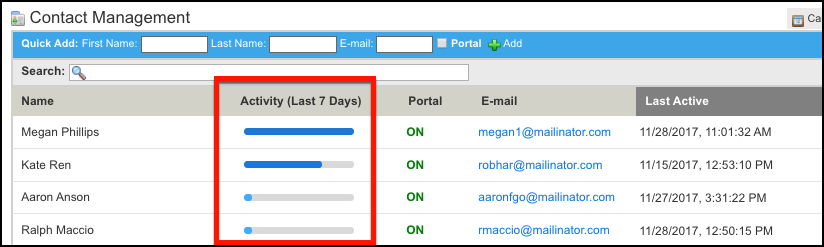
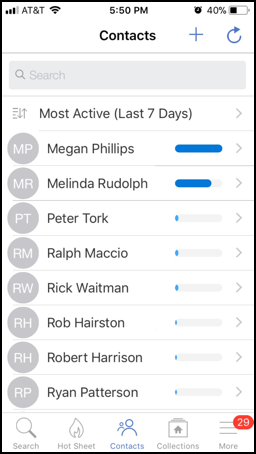
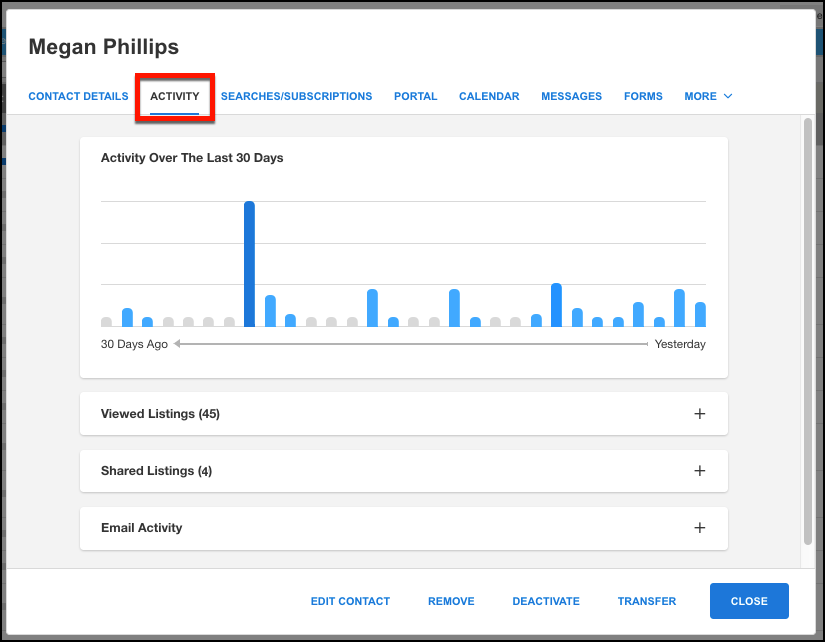
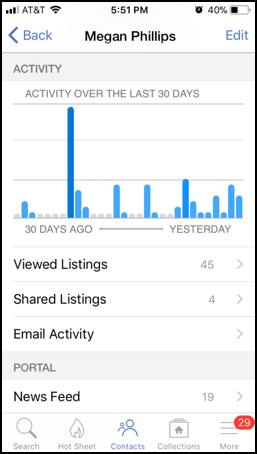
Coming Soon 12/19/2017 – Contact Activity Tracking Updated details from our vendor, FBS, coming to all MLS systems using the Flexmls system. We see the process of visually changing the Contact Management screen has started already. See below details from their information release below: Soon your Contact Management screen will serve as a convenient central hub for viewing Contact Activity, allowing you to see your most active contacts with a quick glance–no more digging through email notifications to try to determine which clients are viewing the listings you send them. The new Contact Activity tracking keeps all of your contacts’ activity in one place, and a single glance at the activity graphs lets you quickly assess which clients are active or inactive and prioritize your followups more efficiently. Whether you are using Flexmls Web, Flexmls Pro Mobile Web, or the Flexmls Pro app, you’ll be able to easily identify the contacts you may need to connect with. A Contact Activity bar will indicate which contacts have been the most active in the past seven days, and looking at a contact’s details lets you see their activity over the last 30 days and drill down to see listings that they have viewed, listings they’ve shared with others, and their email activity for subscription and manual emails. Portal activity is also included in Contact Activity, so if your contact relies on the Portal to view listings, you’ll know that they are actively looking at listings with the portal that you provided for them. WHEN WILL IT CHANGE WHO WILL BE AFFECTED WHAT WILL CHANGE Contact Management The past seven days’ worth of activity is also available on the Contacts screen in Flexmls Pro Mobile Web, Flexmls Pro for iOS, and the upcoming version of Flexmls Pro for Android. Tap the sort option at the top to sort by Most Active, Least Active, First Name or Last Name. Note: When you sort by Contact Activity, the sort applies to the browser or app that you’ve used to sort your contacts. The next time a member uses the same browser or app, it will remember and use the last sort that they applied. If they use a different browser, have cleared their browser’s cache, or access Contact Activity (Last 7 Days) from a different device, the most recent sort will not apply. Contact Detail The same information is available when viewing a contact’s details in Flexmls Pro Mobile Web, Flexmls Pro for iOS, and the upcoming version of Flexmls Pro for Android. Each section below the Activity Over The Last 30 Days graph is expandable.
WHY ARE WE MAKING THIS CHANGE Using these tools alone is good, but they are even more powerful when used together as they provide more opportunities to interact with and understand your clients. Contact Activity keeps track of all of their activity in one place and lets you see it with a quick look at the Contact Management screen so you can immediately see the results of all of the Flexmls tools you use to communicate with them. You won’t need to dig through email notifications to see who opened up emails, and you won’t have to wonder which clients are actively looking at listings using the Portal; instead, that information is easy to see and readily available, letting you prioritize and plan your next moves.
| ||||||||||||||||||||
|
Election Results: 2017 MLS Committee Congratulations to the winners of the 2017 MLS Committee Election. The people who are slated to serve on the MLS Committee in their Company’s respective listing category are below: 26-100 Listing Category 101-500 Listing Category 501-1000 Listing Category
| ||||||||||||||||||||
|
Voting Ends 11:59 AM 11/30/17 – Attention MLS Brokers – MLS Committee Election On 11/20/17, eligible MLS Participants (Broker of Record/Designated REALTOR®) were sent a unique link to their online ballot for 2018 MLS Committee members. If you are the official MLS Participant (Broker of Record/Designated REALTOR®) for your company and did not receive this email, please check your Junk (or spam) folders. An alternative would be to visit www.CRelections.com, click ‘Help’ and enter your name and email address. Provided that your email address matches the one we have on file, your voting credentials will be sent to you immediately. Original Post on 11/20/17
| ||||||||||||||||||||
|
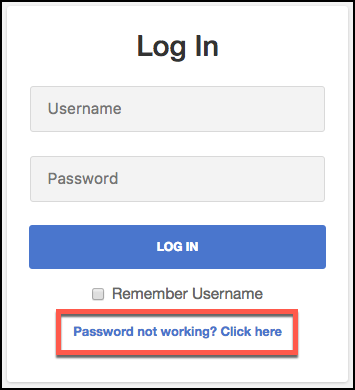
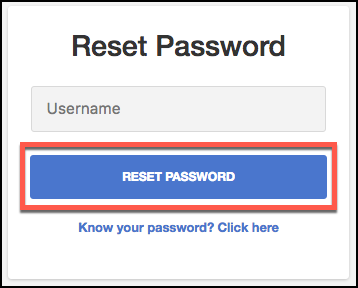
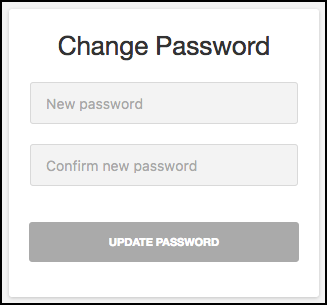
Coming 11/29/17: Flexmls Web: Improved Workflow to Change Password and Increased Password Security New update coming from our vendor to all systems using Flexmls (including us in Columbus). See details below: What is happening? In an effort to improve security, the process for resetting your password from the login screen will be more intuitive and user-friendly. Additionally, the minimum requirements for your Flexmls password are getting stronger. When you set a new password, it will require a minimum of 6 characters (containing at least one character and one number) and you will no longer be limited to using only 8 characters. WHEN WILL IT CHANGE Note: You will not be forced to change your password on November 29, and you can continue to use your current password, even if it does not meet the new minimum strength requirements. You will only be required to use a password that meets the minimum strength requirements when you change your password after November 29. WHO WILL BE AFFECTED Whether you are changing your password as a result of an MLS requirement to update it every few months or you’ve forgotten your password and are requesting a new one, the new password must be between 6 and 100 characters and contain a minimum of one number and one character. WHAT WILL CHANGE When changing your password, you will receive a prompt to meet these requirements if the new password you’ve entered doesn’t meet the minimum strength requirements. Request a New Password
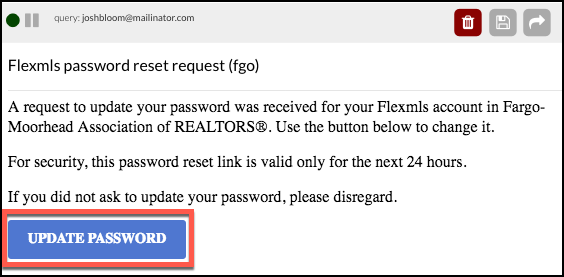
Check your email for a Password Reset Request and click the Update Password link.
Please note the following concerning the Update Password link:
· If you request multiple password resets, any one of the emailed links will work (or you can ignore them and choose to keep using your current password).
WHY ARE WE MAKING THIS CHANGE
| ||||||||||||||||||||
|
Realist Downtime: System Update – Thursday, Nov. 16 – 1:00am CoreLogic will install Realist version 1.17 on the morning of Thursday November 16th. Realist may be unavailable between 1:00 AM and 5:00 AM during the installation process. Two notable changes with this update: • Updates the Change Region with additional logic to display the most recent Sale Date in in counties where Recording Date data is not provided • Remove Bird’s Eye button
|