| « Previous 1 … 36 37 38 39 40 … 60 Next » | ||
|
Realist Downtime: Scheduled Maintenance – Saturday, April 30 – 11 pm CoreLogic will be performing Realist system maintenance on the evening of Saturday April 30, 2016 from 11:00 pm to 12:00 am EDT. Realist may be intermittently unavailable during this maintenance period.
| ||
|
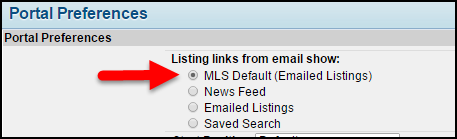
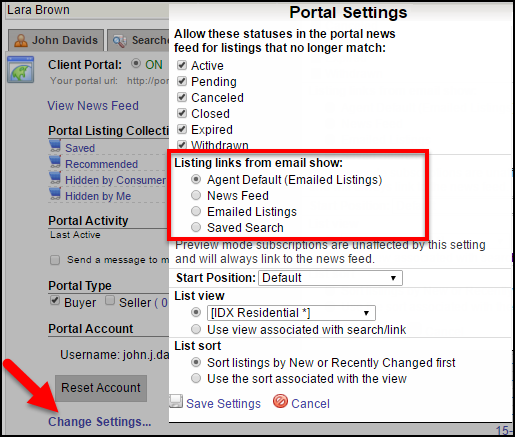
Newsfeed and Portal Changes: May 4 – Choose Landing Page for Subscription Email On May 4, users will be able to decide what happens when their client clicks a link in subscription email. The link can go to the news feed as it does now (this will remain the default), only the listings in the email that was clicked, or all of the listings that match the saved search. In addition to this, the Portal menu design will change to allow easier access to the user’s saved searches. Users Can Customize Their Portal Preferences
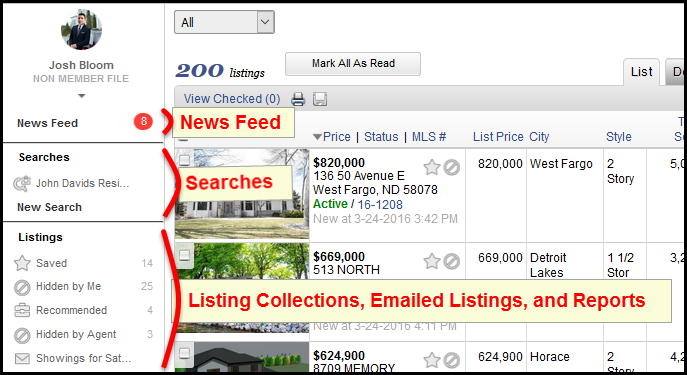
· Saved Searches – Subscription links will open to the selected listing within the Saved Search that generated the email. Your contact can use the menu to navigate to their News Feed, different Saved Searches, Saved Listings, Custom Collections, and more. Set the Subscription Landing Page for a Specific Contact Please Note: This selection applies to the selected contact only and takes precedence over your general Portal Preference setting. Preview Mode and the Subscription Landing Page Updated Portal Menu Design Please note: Only the order of the menu items is changing; labels and custom collections will remain the same. This design change applies to all MLSs, regardless of what the preference User can set their contacts’ subscription emails to open in the news feed, emailed listings or saved search is set to.
| ||
|
Browser Compatibility Warning: April 26 – New SHA-2 Security Will Require Up-to-date Web Browser On April 26, the Flexmls system will begin using new security (SSL) certificates. This upgrade is necessary because all major browsers are already, or soon will be, restricting access to sites that don’t use SHA-2 certificates. You can read more about this issue here and here. Click here to test your browser’s compatility with SHA-2: http://www.flexmls.com/securitytest Please test each computer and browser you use to access the Flexmls system. Different browsers on the same computer or different computers running the same browser need to be tested independently. How will this affect users? What if my browser fails and is not compatible? Once the computer and browser have been updated to the most recent version, check the test page again and you should pass.
| ||
|
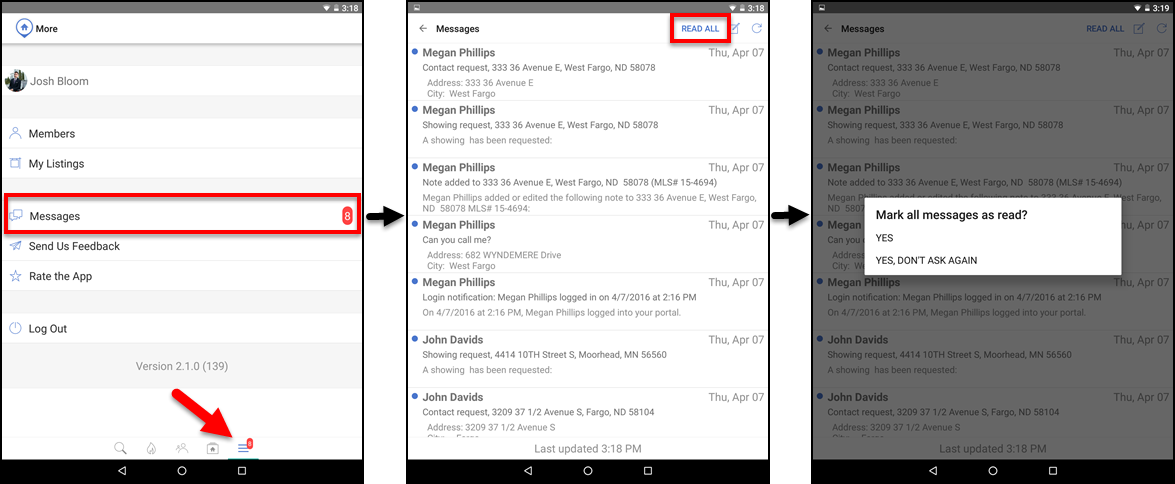
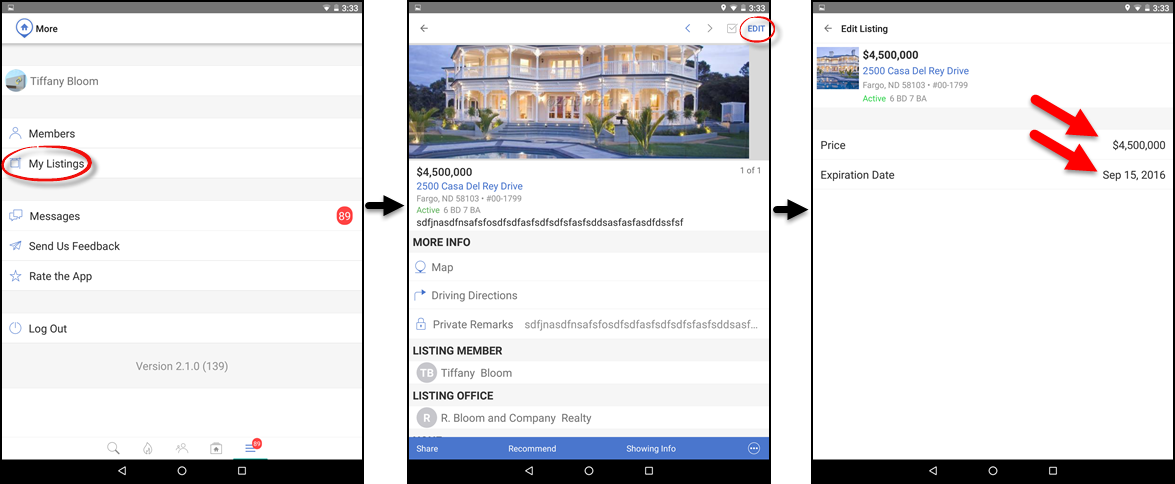
Flexmls Pro: New Android Version 2.1.0 – April 25 On April 25, Flexmls Pro version 2.1.0 for Android will be released and available in the Google Play Store. The latest version will include the ability to mark all messages as having been read, the ability to change the price and expiration date for your listings, clickable phone numbers, and more. Mark All Messages as Read
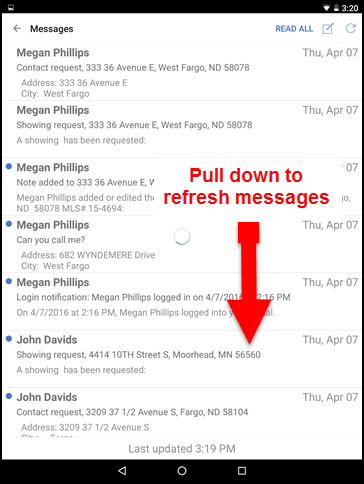
If you select YES, all of your current messages will be marked as having been read. The next time you tap READ ALL when checking your messages, you will receive the same confirmation dialogue box. If you select YES, DON’T ASK AGAIN, all of your current messages will be marked as having been read, and the next time you tap READ ALL when checking your messages, you will not receive a confirmation dialogue. Instead, all messages will automatically be marked as read. To cancel, tap the screen anywhere outside of the confirmation dialogue box. To refresh your messages, tap the screen and pull down.
Listing Maintenance: Price Change and Expiration Date
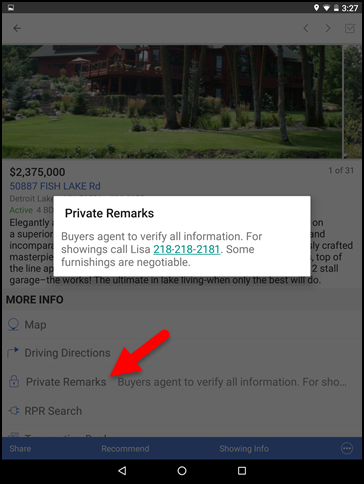
Interactive Phone Numbers on Detail Screen
Other Changes
| ||
|
Flexmls Network Upgrade: April 14 – 5am – Intermittent Slowness; Possible Downtime FBS will be upgrading our network infrastructure on Thursday, April 14th. The work is scheduled to begin at 5:00AM and should last about an hour. The flexmls system is expected to remain available during this window but there could be intermittent outages or delays as traffic is shifted over to redundant links.
| ||
|
New Residential Fields – April 20: HOA/COA – Y/N and Manufactured Housing – Y/N On April 20, 2016, 2 new fields will be added to the Residential property type in the MLS. The 2 new fields are:
| ||
|
Trainers: Flexmls Train-the-Trainer (TTT) Webinar Series Are you a trainer? Do you need to brush up your knowledge of Flexmls? Do your new office trainers need to get up-to-speed fast? These FBS trainer webinars are just what you need! Because these are open to all who use Flexmls, the majority of the training will be held using FBS’ local MLS (FMAAR) but some other databases may be shown for certain features. There are 4 sessions (each Thursday in April) along with a bonus session on IDX on Friday, April 29th. Make sure to register for all 5 sessions as registering just for the first one won’t allow you to access the others. Each invite highlights what will be covered but I have also attached more detailed outlines. Reminder: upcoming Flexmls training webinars open to all end users can be found at https://www.flexmls.com/training/ Flexmls Train the Trainer Session #1 This 2 hour webinar will cover: Flexmls Train the Trainer Session #2 This two hour webinar will pick up where we left off in session #1. It will also include: Additional Search Results tools Flexmls Train the Trainer Session #3 This 2 hour webinar will cover: Map Searching Customizing: Flexmls Train the Trainer Session – Building Reports Use the Flexmls custom report writer to create custom report layouts for showcasing listings or one-line reports for aggregating data. This 1 hour session will introduce the Report Writer tool and walk through some example code for customization. Bonus Flexmls Train the Trainer Session – Flexmls IDX Flexmls IDX is an optional subscriptions available to your members through FBS’s dedicated Broker Agent Services department.
| ||
|
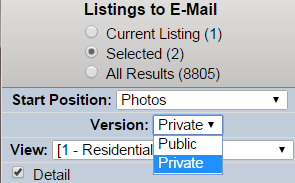
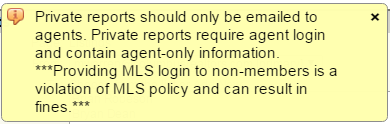
Private reports can now be emailed; requires MLS login; cannot be emailed to clients Agents now have the option to send the private reports when emailing listings. Private reports should be sent only to agents. Private reports contain sensitive, agent only information. These agent-only fields include Agent to Agent remarks, compensation and listing agent contact information. Private reports are not intended for the public. CAUTION: Private reports should be sent only to agents. MLS login is required to view the private reports. How it works: There is a new “Version” selection on the email screen. Agents can select “Private” in the drop down box. A pop-up message will appear warning the agent that MLS login is required and that private reports are for agents only.
Agents may elect to send the private report link to a peer in their office or to another agent or appraiser who has MLS login credentials. REMINDER: Private report links sent in email will always require the agent to login to the MLS in order to view the report. Only MLS members have these login credentials. Private reports should never be emailed to the public. REMINDER: Private report links sent in email will always require the agent to login to the MLS in order to view the report. Public versions of the reports are always available to be emailed to the public. Public reports have been sanitized of agent-only information. The private agent-only fields mentioned above will not be visible on the public reports. The public reports do not require and MLS login. WARNING: Providing your MLS login to anyone, including a client, is a violation of MLS policy and can result in fines. The ability to email private reports was previously deactivated by the MLS committee. The volatile nature of the “agent-only” fields on the private reports was deemed too sensitive to be viewed without requiring an MLS login. FBS, our MLS vendor, has added the ability to require MLS login to view the reports. This prompted the reactivation of the private email option.
| ||
|
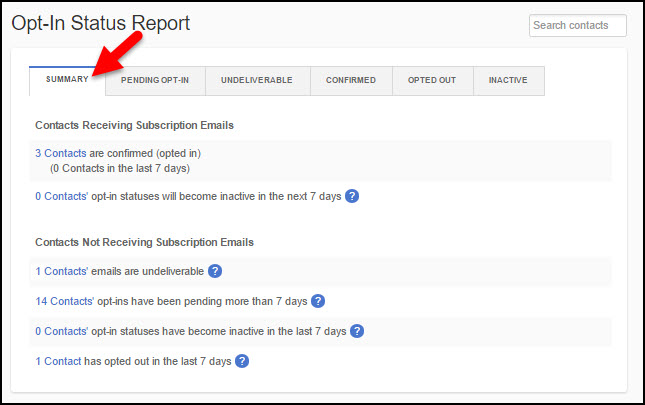
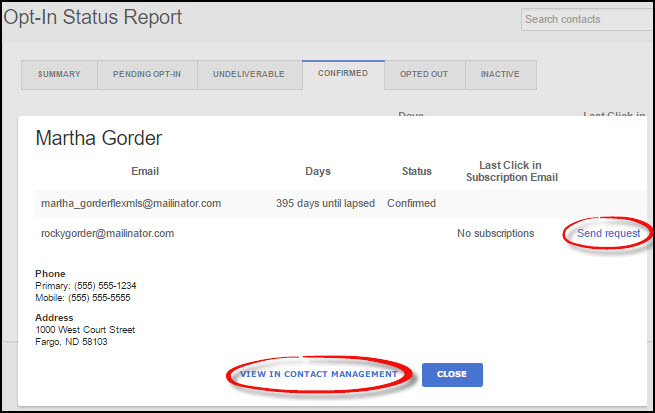
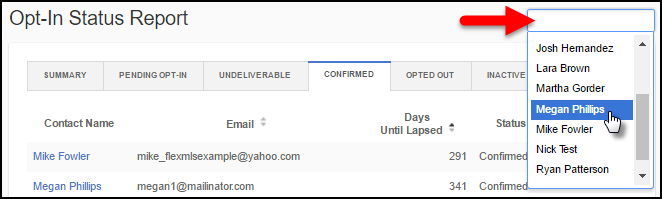
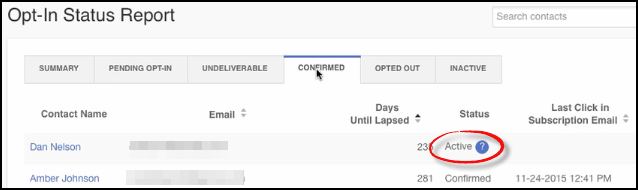
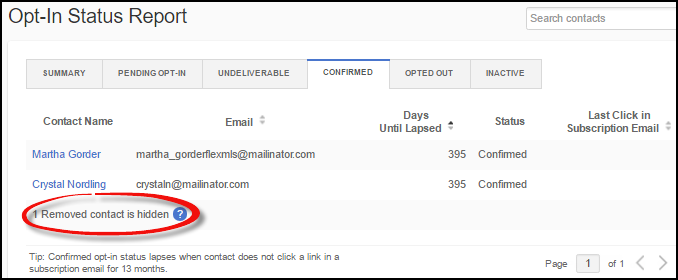
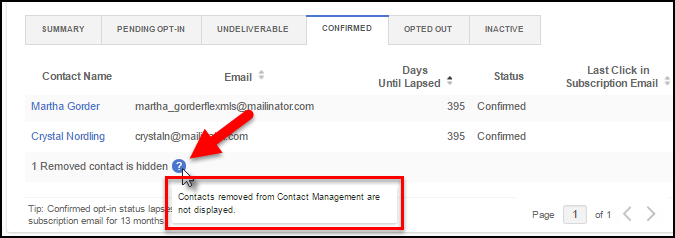
Flex Enhancement: Improvements to the Opt-In Status Report On April 6, the Opt-In Status Report, which shows subscription statuses for all of your contacts in a real-time, easy-to-read report, will be improved to include the following:
Summary Tab The Contacts Receiving Subscription Emails section contains the number of contacts who have opted in and are receiving emails, the number of contacts who have opted in during the last seven days, and the number of contacts whose Confirmed opt-in status will become Inactive in the next seven days. Clicking on a link will take you to the corresponding tab on the report. The Contacts Not Receiving Subscription Emails section shows the number of contacts whose emails can’t be delivered (bounced or returned to sender), the number of contacts who haven’t opted in (Pending) for more than seven days, the number of contacts that have become Inactive within the past seven days, and the number of contacts who have opted out of receiving subscription emails in the past seven days. Clicking on a link will take you to the corresponding tab on the report. Contact Information Search Contacts Bar Active Status Removed Contacts Tool Tips
| ||
|
Realist Downtime: Scheduled Maintenance – Sunday, March 27 – 2am CoreLogic will be performing Realist system maintenance on the early morning of Sunday, March 27, 2016 from 2:00 am to 5:00 am. Realist may be intermittently unavailable during this maintenance period.
|