| ||||||||||||||||||||
|
COCIE – Expanded Eligibility for Governing Board COCIE Rules and Regulations have been modified to expand the number of eligible firms for COCIE Governing Board appointment. Section 3.1.1b of the Rules now allows candidates to be selected from the ten largest firms. Firm size is determined by number of active COCIE members. Previously, eligibility was limited to the top five firms. The appointments for the large firms’ open seats are expected to be made at the July COCIE Governing Board meeting.
| ||||||||||||||||||||
|
MLS Tip: Clear Cooperation vs. Coming Soon – Simplified Clear Cooperation and Coming Soon have been with us for quite a while now. They are related, but definitely not the same. Below is a very brief, easier-to-remember SUMMARY of the differences. The intent is to create a simple way to “remind yourself” of the main differences. Clear Cooperation:
Coming Soon:
These are extremely simplified definitions of Clear Cooperation and Coming Soon. Please refer to the full details published in the Policy Violation Manual and MLS Rules and Regulations.
| ||||||||||||||||||||
|
Section 8 Yes/No Field removed from Res Rental The Section 8 field has been removed from the Res Rental property type. The communities of Reynoldsburg, Bexley, and Columbus recently implemented legislation that potential tenants cannot be disqualified based on their legal source of income. More communities are expected to implement a similar type of law.
| ||||||||||||||||||||
|
Policy Violation Manual Updated – Effective September 1, 2021 You can now download the latest review of the MLS Policy Violation Manual. The manual has been updated for changes effective September 1, 2020.
| ||||||||||||||||||||
|
Policy Update: 1.02.16 now includes Showing Requirements For Active Listings Policy 1.02.16 has been updated to include requirements for properties in Active status. See full policy below. 1.02.16 – Active on MLS Date for Coming Soon or Active Status – Inaccurate Remarks/Description
If the time limitations cannot be met, the listing must be taken off the market until ready for showings.
| ||||||||||||||||||||
|
Contingent Finance and Inspection status label changed: “Contingent” The label for the “Contingent Finance and Inspection” status label will change to simply “Contingent” on August 11. This is only a label change for this status. The functionality has not changed. This change was made since many contingencies may not include both Financing AND Inspection. The Contingency Reason field still exists and should be used to clarify the specifics of the contingency (Finance OR Inspection). Contingent Escape (eg. Sale of Home) and Contingent Lien Release (eg. Short Sale) statuses also still
| ||||||||||||||||||||
|
MLS Tip: 96 Hours to Enter Sold Listing in MLS Closed listings must be entered into the MLS within 96 hours from the actual closing and funding date. HUD listings are to be updated within 96 hours of either: 1) Asset Manager’s notice of closing Please ensure that your closed listings are entered before this deadline to avoid any warnings or fines.
| ||||||||||||||||||||
|
Brokerage Exclusive Form: Old Form, New Name The Office Exclusive form allowed agents to keep a listing exclusive to their brokerage. The Brokerage Exclusive Waiver Form is the same form with a new name. The form is still required when a listing will not be placed on the MLS on the Commencing Date on the Listing Agreement. A number of members thought that the old Office Exclusive form limited the listing to just the listing office, denying them the support of their sister offices. The name change of the Brokerage Exclusive Waiver Form clarifies that the listing can be shared with the entire brokerage, not just a satellite office. Most details of the form remain the same. The Brokerage Exclusive Waiver Form is still required to have an exclusive listing. It must be submitted to the Columbus MLS within 48 hours after the Commencing Date on the Listing Agreement. Exclusive listings cannot be advertised outside the brokerage, as doing so can result in a Clear Cooperation violation. Any exclusive listing marketed outside the brokerage must be entered as Active or Coming Soon in the MLS within 1 business day, or a significant fine for Clear Cooperation violations will be assessed.
| ||||||||||||||||||||
|
Defunct – Delayed Showing Authorization Form The Delayed Showing Authorization form has been discontinued following the replacement of Showing Start Date (SSD) with Coming Soon and the Active on MLS date. Delayed Showing forms are no longer available or required for listings. The rules and regulations for Delayed Showings/Showing Start Date have been consolidated and rolled into Coming Soon, so reference these rules when considering a delayed showing.
| ||||||||||||||||||||
|
Coming Soon? At Time of Entry or Never Coming Soon MUST be selected at the time the listing is created. An Active listing cannot be returned to Coming Soon status. When a new listing is being entered into the MLS, user must choose a status under the Main Fields section. The new listing status can be either Active or Coming Soon. Coming Soon must be selected before the listing is made active. When Coming soon is selected, the user will then be prompted for a List Date and an Active on MLS date. 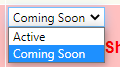 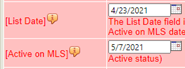 The List Date is the day when your listing goes up on the MLS showing as Coming Soon. This corresponds with the MLS Entry Date field on the listing agreement. While in Coming Soon status, your listing does not accrue Days on Market (DOM). The Active on MLS date is when the MLS switches your listing to the Active status for you, making it fully available for showings. No showings are allowed while your listing is in the Coming Soon status. When it becomes Active, it must be available for showings immediately. Be aware of this when you set your List and Active on MLS dates, as this is the only method to delay showings for properties. Coming Soon and Active on MLS Date have completely replaced the Showing Start Date.  While you can extend Coming Soon up to a maximum of 30 days from List Date, you cannot move the Active on MLS date to an earlier date. You can, however, use the End Coming Soon button, which makes converts the listing to Active status immediately. So, be sure to double-check your dates!
|
