| ||||||||||||||||||||
|
MLS Policy Violation Hotline Created Do you need to report a Clear Cooperation Policy Violation?Call: (614) 528-1135Email: mlspolicy@columbusrealtors.comThe MLS Policy Violation Hotline can be used to report a Clear Cooperation Policy violation or any other MLS violation. Contact information is requested but is not required. You may submit the violation report anonymously. The voicemail recording will explain what is needed to report a violation. Violations may also be reported by email. Additional details in the form of PDFs, photos, and screenshots are extremely helpful and can be sent to mlspolicy@columbusrealtors.com. The name of the person reporting the violation will not be disclosed whether it is reported to the hotline, email, or both.
| ||||||||||||||||||||
|
MLS Entry Date – List Date Now Identified on Listing Agreement A new version of the Residential MLS Exclusive Right to Sell Listing Agreement is available now. Very important changes have been made to the date fields on the new Listing Agreement. The Delayed Showing Authorization Form has also been updated. Download New Documents Now: Delayed Showing Authorization Form Definition of Date Fields on Listing Agreement:
Additional Details and Usage of Date Fields on Listing Agreement:
Delayed Showing Authorization form has also been updated to include the wording: All dates must match listing agreement This updated language is to remind listing agents that use of the Delayed Showing Authorization to delay the showings of a listed property will require that the Showing Start Date listed on the form must match the Showing Start Date that is entered on the newly updated Listing Agreement. Why the change? There has long been confusion about the “List Date” on the MLS and the “Commencing Date” on the Listing Agreement. This was exacerbated by the Office Exclusive listings in regard to Clear Cooperation.
| ||||||||||||||||||||
|
MLS Rules and Regulations Updated – New Section 4.5: Inappropriate Content SECTION 4.5 INAPPROPRIATE CONTENT: Content that is inappropriate for public display may be removed by MLS staff immediately. This includes but is not limited to depictions of death, violence, or sexual content. (Adopted Feb 2020) Original Post 20200304
| ||||||||||||||||||||
|
Updates to Residential Listing Agreement The Residential Listing Agreement has been updated. Items added to Section 8:
New Section 12 has been added: 12. ELECTRONIC SURVEILLANCE DEVICES. Seller does ___ does not ___ (check one) have surveillance equipment located on the property. Seller understands that under Ohio law the seller cannot use electronic, mechanical or any other device to listen, record or otherwise acquire the content of the oral communications of other persons without the consent of at least one party to the communication. Seller agrees that if such surveillance device is present on the property that the seller will turn off any audio feature of the equipment when other persons are present on the property. This applies to all showings, open houses, and any other appointments at which prospective purchasers, real estate licensees, inspectors, appraisers, contractors or others are on the property. Seller is advised to consult with an attorney regarding the use of such surveillance devices under Ohio law. Seller also agrees to indemnify, defend and hold the listing brokerage and its affiliated licensees harmless from and against any and all claims, demands, actions, losses, damages or judgments arising out of the seller’s use of surveillance devices. Original Post: 20200304
| ||||||||||||||||||||
|
Land Trust Added to the Additional Acceptance Conditions Field Agents searching for Land Trust properties will now be able to easily identify Land Trust homes for sale. The new selection was added to help identify properties for sale that are part of the Central Ohio Community Land Trust (COCLT). The listing agent can now select “Land Trust” in the Additional Acceptance Conditions field to identify these properties. Land Trust homes are a shared equity model of homeownership. The COCLT owns the land and the homebuyer owns the dwelling. These homes will require pre-purchase homebuyer education and proof of income eligibility. Original Post 20200304
| ||||||||||||||||||||
|
Green Features Checklist – Revised – December 3 The Green Features Checklist has been revised and updated. The new version is based completely upon standardized fields from the RESO Green Marketing Group. Additional Green certifications have been included on the new version of the form. A glossary of definitions explaining the certifications is also included. Green Features Checklist revision summary:
| ||||||||||||||||||||
|
Business Opportunity Listing: New Field – Dec. 3 A new field will be added to added to Business Opportunity property type on December 3, 2019. The new field will be “Location of business is:”. This field will be required for all new Business Opportunity listings. Existing listings will be required to make a selection in the field upon next edit. Details about the new Business Opportunity field:
| ||||||||||||||||||||
|
MLS Committee: Deadline for Candidates Approaching Ever wonder why things happen in the MLS or think about serving on the MLS Committee and wonder how that’s done? The process to serve on this committee is different than any other. First, it’s an elected committee with a limited number of seats determined by a weighted formula based on the MLS’s number of agents, listings, solds and offices. The number of seats available can change each year based on this formula or elected members whose term ends. This number can sometimes also change as a result of members simply changing offices and then perhaps no longer representing the group from which they were elected. You can find more detailed information on this process here. Interested yet? If so please follow these steps to throw your hat in the ring:
Your bio and resume will be presented to the MLS Nominating Committee who are selected at the Annual Business Meeting. The five selected Brokers that serve on the Nominating Committee, as well as the current MLS Committee Chair and the President Elect, meet in November to select candidates. A ballot is created for the annual election where only brokers vote. Members who wish to volunteer their time to serve are very much in demand by the Nominating Committee and always appreciated. If you still have questions, please review the information linked to the main Columbus REALTORS® site. You could also call or E-mail Colin Finan in the MLS Department at 614.475.4000 and cfinan@columbusrealtors.com.
| ||||||||||||||||||||
|
Do You Want to Be on the MLS Committee? Ever wonder why things happen in the MLS or think about serving on the MLS Committee and wonder how that’s done? The process to serve on this committee is different than any other. First, it’s an elected committee with a limited number of seats determined by a weighted formula based on the MLS’s number of agents, listings, solds and offices. The number of seats available can change each year based on this formula or elected members whose term ends. This number can sometimes also change as a result of members simply changing offices and then perhaps no longer representing the group from which they were elected. You can find more detailed information on this process here. Interested yet? If so please follow these steps to throw your hat in the ring:
Your bio and resume will be presented to the MLS Nominating Committee who are selected at the Annual Business Meeting. The five selected Brokers that serve on the Nominating Committee, as well as the current MLS Committee Chair and the President Elect, meet in November to select candidates. A ballot is created for the annual election where only brokers vote. Members who wish to volunteer their time to serve are very much in demand by the Nominating Committee and always appreciated. If you still have questions, please review the information linked to the main Columbus REALTORS® site. You could also call or E-mail Colin Finan in the MLS Department at 614.475.4000 and cfinan@columbusrealtors.com.
| ||||||||||||||||||||
|
MLS Listing Status Guide The MLS Listing Status Guide has been created and approved by the MLS Committee and MLS Board of Directors. These definitions are intended to help all MLS members understand and correctly use MLS statuses when editing or searching listings in MLS. Download the MLS Listing Status Guide here. The status definitions have also been added to the MLS edit screens. For example, when you change a listing to Contingent status, the definitions will appear on the screen to help you determine the correct status for your listing. 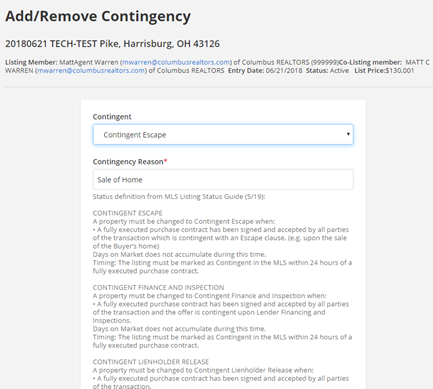 Published 20190627
|
