| ||||||||||||||||||||
|
Document Upload: Critical Information About Your Listing It is very important to upload supporting documents to your listings. These documents provide critical information and disclosures about specific property features. Some attached documents are required by MLS policy while others are optional uploads. This does not indicate that the required documents are the only ones that should be uploaded. All documents help to inform potential buyers or their agents of property-specific features. They may even increase the perceived value of the property for sale. The Lead Based Paint and Residential Property Disclosure forms are required at the federal and state level. These critical attachments are not specifically required by MLS Policy as mandatory uploads. However, it is highly recommended that they be uploaded in a timely manner. How do I attach documents to my listing?
Several fields in the MLS, when marked “yes”, require the appropriate document be uploaded and attached to the listing. According to MLS Policy, failure to upload these required documents could result in an MLS fine. Review the official MLS Policy below. 1.02.15 – Required Document Not Attached to Listing These documents include:
The required documents can be found at www.columbusrealtors.com on the MLS Worksheets, Forms, & Contracts page.
| ||||||||||||||||||||
|
Do not give your MLS password to a vendor, virtual assistant…or anyone else. Providing your MLS password to anyone is a violation of MLS policy. MLS Policy specifically forbids providing your password to any other user. There is NOT an exception for vendors or virtual assistant. Do not provide your password to vendor or virtual assistant provider who will then log in as you to run searches or reports in the MLS. This is subject to a minimum $500 fine. No one is permitted to access the MLS with your login information except you. In addition to vendors, no one else is permitted to login as you either. Other agents, members of your team, assistants and all other users must have their own login. They must login as themselves, then “superuse” (do business) as you. Family members, friends, and clients should never be given your MLS login credentials. Password sharing for any purpose is not permitted. ACTUAL MLS POLICY: 1.05.01 – Data Security/Password Sharing Escalation Policy MLS users who are identified multiple times as “suspected of login sharing” will be subject to an escalation process. Your login name and password shall not be shared, disclosed or knowingly allowed to come into the possession of any other person. This escalation will follow this schedule: 1st Violation: $500 fine, password reset, and user is contacted by telephone
| ||||||||||||||||||||
|
CDOM Calculation: “Look Back” Days Changed to 31 PLEASE NOTE: This change affects only the single field, CDOM. The regular display of Days on Market (DOM) and full MLS listing history will not be affected by this change. The Cumulative Days on Market (CDOM) field was recently removed from the default reports in MLS. The MLS Board of Directors has reviewed CDOM and determined that it should be restored to the private, agent-only reports. However, the calculation of CDOM will be significantly modified. This change will affect the total CDOM reported for many MLS listings. The most notable change to CDOM is the number of “look back” days that will determine whether the previous DOM will be accumulated into the CDOM field. CDOM previously “looked back” 365 days prior to list date. This “look back” will be reduced to 31 days prior to list date instead of 365. Every listing will “look back” 31 days prior to list date and accumulate the CDOM from any prior listing found that did not result in Sold status. The total CDOM for all accumulated listings will be displayed in the newest listing’s CDOM field. The CDOM calculations will begin updating immediately. This will require several weeks to complete. The CDOM field will be restored to the reports after the calculation is updated. All CDOM changes should be complete by November 2019. New CDOM calculation rules for 2019: 1) A newly listed property will “look back” 31 days (previously 365 days) prior to list date. 2) If no previous listing for that property is found when looking back 31 days prior to list date, then both DOM and CDOM will start at 1. 3) If a Sold status listing is found when looking back 31 days prior to list date, then both DOM and CDOM will start at 1. 4) If a listing of any other status is found when looking back 31 days prior to list date, then DOM will start at 1 while CDOM will be 1+(previous listing’s CDOM) CDOM Example 1: CDOM Example 2 – Off Market more than 31 days: CDOM Example 3 – Sold listing encountered: Days on Market (DOM) will continue to be displayed on MLS reports. The current calculation of DOM will not be modified. No listing history will be removed from any listing. All changes currently tracked by MLS listing history will continue to be displayed on the history screen in MLS.
| ||||||||||||||||||||
|
MLS Tip: Business Opportunity Listings Must be Tied to Land The MLS Board of Directors clarified the definition of Business Opportunity listings in the MLS. The listed must be tied to real property in order to be placed in the MLS. The land tied to the Business Opportunity may be leased or for-sale. This affects business opportunities such as food trucks. All businesses, mobile or otherwise, must be tied to land. For example, a truck and equipment without any ties to land cannot be entered into the MLS as a Business Opportunity listing.
| ||||||||||||||||||||
|
MLS Tip: Tenant Occupied Field – Is a Renter Living Here? The Tenant Occupied field is used to indicate that a tenant (renter) is living in the property. The Tenant Occupied field is a required-entry field and must be marked “yes” if there is a tenant living in a property. This is often used in conjunction with the phrase “tenants rights” in the property description and Agent to Agent Remarks. This field should be marked “yes” before you include verbiage such as “tenants rights” in a remarks field. Correct identification of tenant occupied property alerts agents that they cannot access the property without warning because any tenants must be notified in advance of an upcoming showing. Selecting “yes” in this field also makes the property easily searchable for investors who may wish to purchase a property that already has a tenant or want to exclude properties that currently have tenants. The searchable field can be added to a Quick Search: 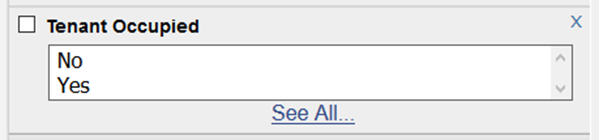 Tenant Occupied field is required on listing entry screen: 
| ||||||||||||||||||||
|
MLS Policy Tip: For Sale Signs Cannot Be Visible in Photos Pictures on the MLS cannot be branded in any way. This applies explicitly to your “For Sale” sign. MLS photos are available to the public through MLS email and broker-operated websites. For this reason, For Sale signs are considered very volatile and are subject to an immediate $100 fine. It doesn’t matter if the signage or other branding is on the primary or secondary photos. It is an MLS policy violation and you will receive a fine. Please check your listings photos for possible violations for yard signs or any other branding on your photos. Please review the actual MLS policy below. 1.03.05 – Unallowable Data on Photos and Public Documents No marketing devices of any type (e.g., logos, readable for sale signs, company names, phone numbers, Web sites, Open House Overlay, email addresses including embedded, overlaid or digitally stamped information etc.) shall appear on or with any photos or public documents except for the following:
| ||||||||||||||||||||
|
Status in MLS: Confused? Read this. The MLS Listing Status Guide has been created and approved by the MLS Committee and MLS Board of Directors. These definitions are intended to help all MLS members understand and correctly use MLS statuses when editing or searching listings in MLS. Download the MLS Listing Status Guide here. The status definitions have also been added to the MLS edit screens. For example, when you change a listing to Contingent status, the definitions will appear on the screen to help you determine the correct status for your listing. 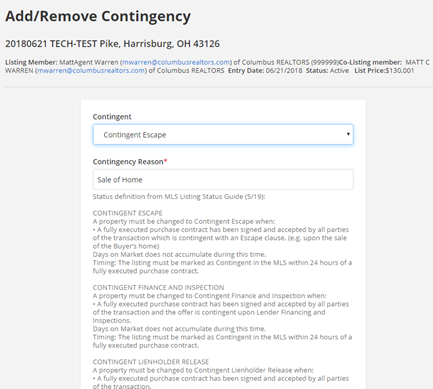 Published 20190627
| ||||||||||||||||||||
|
CDOM to be Removed from MLS reports PLEASE NOTE: This change affects only the single field, CDOM. The regular display of Days on Market (DOM) and full MLS listing history will not be affected by this change. The MLS Board of Directors has voted to remove the Cumulative Days on Market (CDOM) display field from the default reports in MLS. This change will occur in phases over the coming days and weeks. The process should be complete in early June. Days on Market (DOM) will continue to be displayed on MLS reports. The current calculation of DOM will not be modified. No listing history will be removed from any listing. All changes currently tracked by MLS listing history will continue to be displayed on the history screen in MLS. The feasibility of completely removing CDOM from the MLS (as opposed to simply not displaying it) is to be discussed by the MLS Board of Directors in the future.
| ||||||||||||||||||||
|
Policy Reminder: Don’t Forget to Upload Required Documents for Your Listing Several fields in the MLS, when marked “yes”, require the appropriate document be uploaded and attached to the listing. It is very important to include these documents to accurately describe the additional features of the property for sale. These documents help to inform all potential buyers of these property-specific features. This will increase the perceived value of the property for sale. Failure to upload these required documents can also result in an MLS fine. Review the official MLS Policy below. 1.02.15 – Required Document Not Attached to Listing Fine with Warning Documents that are required to be attached to listings must be uploaded within 5 business days of the listing entry date. These documents include:
The required documents can be found at www.columbusrealtors.com on the MLS Worksheets, Forms, & Contracts page.
| ||||||||||||||||||||
|
Listing Data Checker – New MLS Correction Email and Tracking System Listing Data Checker (LDC) will be added to the Columbus and Central Ohio Regional MLS on April 2nd. You may receive notices to make corrections to your listings that look different from previous MLS notifications. LDC will expedite and automate the identification of listing errors. This will dramatically reduce the amount of time required to catch and notify members of incomplete or inaccurate information within the MLS. LDC will also standardize the process of tracking and reporting of MLS Policy infractions. Listing Data Checker compares MLS listing data to the public records data in Realist. Some fields will automatically generate an email notifying the listing agent of the incorrect data found on the listing. LDC also allows MLS staff to manually find, notify, and correct listing errors based upon the comparison of Realist and MLS listing data. Integration of the Listing Data Checker system will be a work in progress. There may be some incorrect notifications of listing errors and other unforeseen issues. Please contact the MLS department if you have any questions or feel that you have received an erroneous notification of incorrect data on your listing.
|
