Welcome Screen News Archive
Note: Most posts prior to 11/2012 are not available in the archive.

Back to MLS Welcome Screen


You searched for: Year of 2016

Search Results:
· New Residential Fields – April 20: HOA/COA – Y/N and Manufactured Housing – Y/N   04/08/2016
· Trainers: Flexmls Train-the-Trainer (TTT) Webinar Series   04/06/2016
· Private reports can now be emailed; requires MLS login; cannot be emailed to clients   04/04/2016
· Flex Enhancement: Improvements to the Opt-In Status Report   04/04/2016
· Caution Alert: Closing Scam involving wire fraud   03/29/2016
· Realist Downtime: Scheduled Maintenance – Sunday, March 27 – 2am   03/24/2016
1 9 10 11 12 13 14


Archives by Year:

Note: Most posts prior to 11/2012 are not available in the archive.

Archives by Subject:

New Residential Fields – April 20: HOA/COA – Y/N and Manufactured Housing – Y/N

On April 20, 2016, 2 new fields will be added to the Residential property type in the MLS.

The 2 new fields are:

  1. HOA/COA Y/N – field will allow the listing agent to identify whether the property for sale is part of a Homeowners or Condo Association.  The field will be a simple Yes/No selection.  It will appear only in Residential property type.  It will be a required field for all Residential listings.  It will appear directly before the Assoc/Condo Fee field on the worksheet and Add/Edit.  When HOA/COA “Yes” is selected, the Assoc/Condo Fee field will then be required.
  2. Manufactured Housing Y/N – field will allow the listing agent to identify properties that are manufactured as opposed to wood-framed. Manufactured homes are identified by the steel undercarriage/chassis construction as opposed to wooden joist.  One typical manufactured type is a “single-wide mobile home”.  Agents should carefully distinguish between a Modular and a Manufactured home. Read this article for a brief overview of Modular vs. Manufactured.  This new field will appear in Residential and Res Rental.  It will be a simple Yes/No selection.  It will appear directly above the existing Manufactured Housing field on the worksheet and Add/Edit. If Manufactured Housing “Yes” is selected, then the appropriate selection should be made in the already-existing Manufactured Housing field such as Single Wide, Double Wide, etc.


Back To Top
 

04/08/2016

Trainers: Flexmls Train-the-Trainer (TTT) Webinar Series

Are you a trainer?  Do you need to brush up your knowledge of Flexmls?  Do your new office trainers need to get up-to-speed fast?  These FBS trainer webinars are just what you need!

Because these are open to all who use Flexmls, the majority of the training will be held using FBS’ local MLS (FMAAR) but some other databases may be shown for certain features. There are 4 sessions (each Thursday in April) along with a bonus session on IDX on Friday, April 29th. Make sure to register for all 5 sessions as registering just for the first one won’t allow you to access the others. Each invite highlights what will be covered but I have also attached more detailed outlines.

Reminder: upcoming Flexmls training webinars open to all end users can be found at https://www.flexmls.com/training/

Flexmls Train the Trainer Session #1
Join us for a 2 hour webinar on Thursday, Apr 07, 2016 – 12pm
Register now! After registering, you will receive a confirmation email containing information about joining the webinar.
https://attendee.gotowebinar.com/register/5684495280051262723

This 2 hour webinar will cover:
General Navigation
Adding/Editing Listings
Creating a search and viewing search results
Setting up a subscription
—-
If time allows we will cover the following. If not, we will start the 2nd session of TTT with this.
Portals
Mobile/Flexmls Pro

Flexmls Train the Trainer Session #2
Join us for a 2 hour webinar on Thursday, Apr 14, 2016 – 12pm
Register now! After registering, you will receive a confirmation email containing information about joining the webinar.
https://attendee.gotowebinar.com/register/2823708961090163971

This two hour webinar will pick up where we left off in session #1. It will also include:

Additional Search Results tools
CMAs
Fannie Mae 1004 MC
Exporting Listings

Flexmls Train the Trainer Session #3
Join us for a 2 hour webinar on Thursday, Apr 21, 2016 – 12pm
Register now! After registering, you will receive a confirmation email containing information about joining the webinar.
https://attendee.gotowebinar.com/register/522456412922523651

This 2 hour webinar will cover:

Map Searching
My Map Overlays
Statistics

Customizing:
Dashboards
Tessera Reports
Views
Quick Searches

Flexmls Train the Trainer Session – Building Reports
Join us for a 1 hour webinar on Thursday, Apr 28, 2016. 12pm
Register now! After registering, you will receive a confirmation email containing information about joining the webinar.
https://attendee.gotowebinar.com/register/8825350300352425218

Use the Flexmls custom report writer to create custom report layouts for showcasing listings or one-line reports for aggregating data. This 1 hour session will introduce the Report Writer tool and walk through some example code for customization.

Bonus Flexmls Train the Trainer Session – Flexmls IDX
Join us for a 1 hour webinar on Friday, Apr 29, 2016 – 12pm
Register now! After registering, you will receive a confirmation email containing information about joining the webinar.
https://attendee.gotowebinar.com/register/4940696554584927491

Flexmls IDX is an optional subscriptions available to your members through FBS’s dedicated Broker Agent Services department.
This 1-hour overview covers how Flexmls IDX differs from third-party IDX solutions, why Flexmls IDX’s mobile-compatible solution is so valuable, and where to send Brokers and Agents for more information.

Back To Top
 

04/06/2016

Private reports can now be emailed; requires MLS login; cannot be emailed to clients

Agents now have the option to send the private reports when emailing listings.  Private reports should be sent only to agents.  Private reports contain sensitive, agent only information. These agent-only fields include Agent to Agent remarks, compensation and listing agent contact information.  Private reports are not intended for the public.

CAUTION:  Private reports should be sent only to agents. MLS login is required to view the private reports.

How it works:

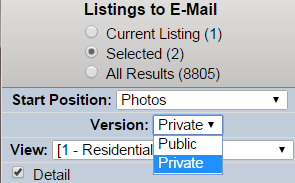
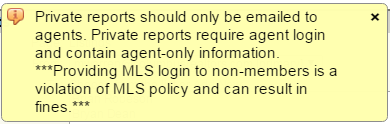
There is a new “Version” selection on the email screen.  Agents can select “Private” in the drop down box.  A pop-up message will appear warning the agent that MLS login is required and that private reports are for agents only.

privateVersionBox             privateWarning

Agents may elect to send the private report link to a peer in their office or to another agent or appraiser who has MLS login credentials.  REMINDER:  Private report links sent in email will always require the agent to login to the MLS in order to view the report.  Only MLS members have these login credentials.  Private reports should never be emailed to the public.

REMINDER:  Private report links sent in email will always require the agent to login to the MLS in order to view the report. 

Public versions of the reports are always available to be emailed to the public.  Public reports have been sanitized of agent-only information.  The private agent-only fields mentioned above will not be visible on the public reports.  The public reports do not require and MLS login.

WARNING:  Providing your MLS login to anyone, including a client, is a violation of MLS policy and can result in fines. 

The ability to email private reports was previously deactivated by the MLS committee.  The volatile nature of the “agent-only” fields on the private reports was deemed too sensitive to be viewed without requiring an MLS login.  FBS, our MLS vendor, has added the ability to require MLS login to view the reports.  This prompted the reactivation of the private email option.


Back To Top
 

04/04/2016

Flex Enhancement: Improvements to the Opt-In Status Report

On April 6, the Opt-In Status Report, which shows subscription statuses for all of your contacts in a real-time, easy-to-read report, will be improved to include the following:

  • A Summary tab that contains a quick overview of contacts who are and are not receiving subscription emails.
  • A Contact Information screen will appear as a pop-up when you click a contact.
  • A Search Contacts bar allows you to search for specific contacts.
  • Tool Tips to explain features within the report.

Summary Tab
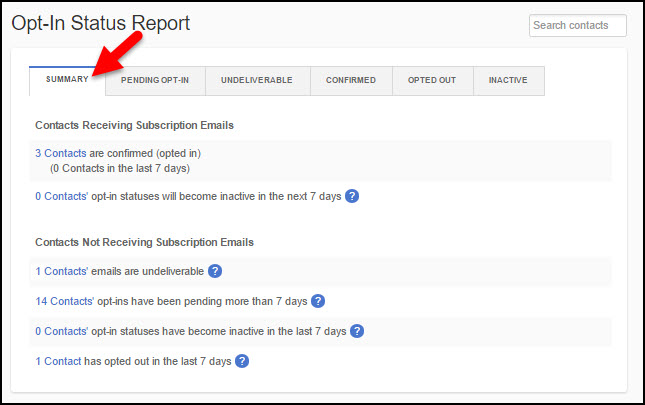
When you access the Opt-In Status Report, it will open on the Summary tab.
optin01SummaryTab

The Contacts Receiving Subscription Emails section contains the number of contacts who have opted in and are receiving emails, the number of contacts who have opted in during the last seven days, and the number of contacts whose Confirmed opt-in status will become Inactive in the next seven days. Clicking on a link will take you to the corresponding tab on the report.

The Contacts Not Receiving Subscription Emails section shows the number of contacts whose emails can’t be delivered (bounced or returned to sender), the number of contacts who haven’t opted in (Pending) for more than seven days, the number of contacts that have become Inactive within the past seven days, and the number of contacts who have opted out of receiving subscription emails in the past seven days. Clicking on a link will take you to the corresponding tab on the report.

Contact Information
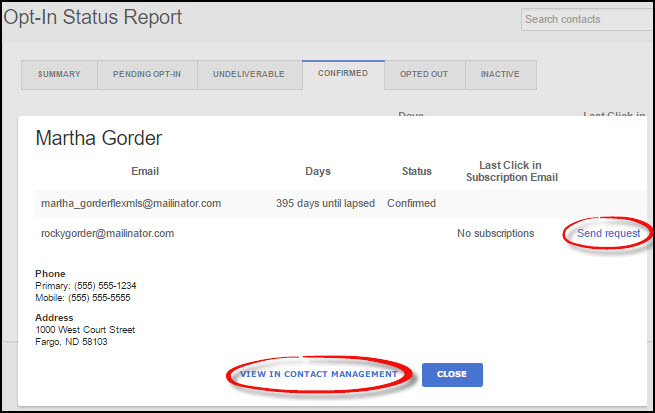
Clicking on a Contact’s name will bring up an overlay with basic contact information, along with all of their email addresses. For each email address, you can see the opt-in status, last click in a subscription email, and you can send or resend an opt-in request (if applicable). There’s no need to leave the page to get more information. You can close the overlay or, if you like, you can go to the contact’s record by clicking View in Contact Management. To open Contact Management in a new window, right-click the link.
optin02ContactInfo

Search Contacts Bar
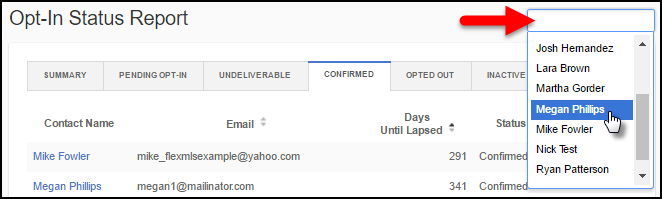
Click in the Search Contacts bar to bring up a list of your contacts or type in the name of a specific contact to search for them. This searches all of your contacts, not just the contacts on the current screen. Selecting a contact opens the contact information overlay (as shown in the screenshot above).
optin03SearchContactsBar

Active Status
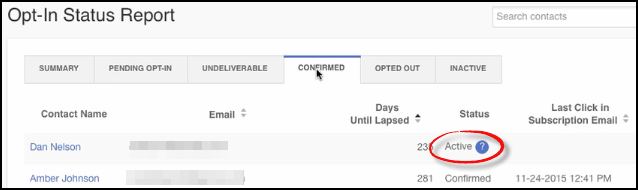
On the Confirmed tab, you may see a new status called Active; this indicates that they were receiving subscription emails before Flexmls required contacts to complete the confirmation email process (before 9-29-2015). Subscription emails are sent even though the contact has not confirmed yet that they want to receive the emails. Since they are not yet Confirmed, they are considered Active. All Active contacts will eventually change to a different status by the end of October, 2016. They’ll automatically become Confirmed if they click any link in any subscription email; Inactive if they never click a link in a subscription email; and Opted Out if they click an opt-out link in a subscription email.
optin04ActiveStatus

Removed Contacts
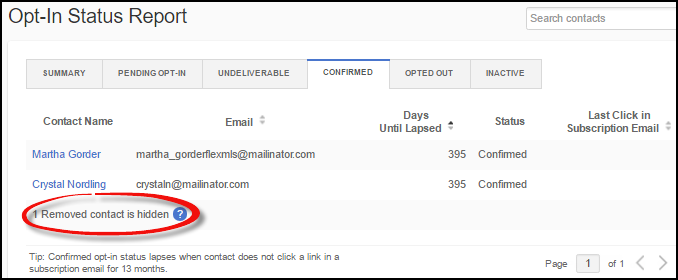
If you remove a contact from Flexmls, their name will not appear anywhere in the Opt-In Status report. However, even though you have removed the contact from Flexmls, the status associated with the contact’s email address is still stored in Flexmls. Since you have already removed the contact, they are no longer relevant and are not displayed in the report other than the note that there were contacts that have been removed.
optin05RemovedContacts

Tool Tips
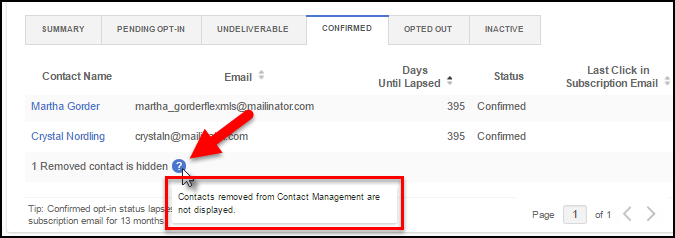
Hover over tool tip icons to learn more information about the selected feature.
optin06ToolTips

Back To Top
 

In Memoriam: Jessica Hogg

Read full obituary here:

http://www.legacy.com/obituaries/dispatch/obituary.aspx?n=jessica-marie-hogg&pid=179496102&fhid=8647

Back To Top
 

In Memoriam – Nancy D Sharp

Past president Columbus REALTORS® (1990), an Honorary Member of the association and a member of the NAR RPAC Hall of fame (2007)

Click below to view more details:

http://www.legacy.com/obituaries/dispatch/obituary.aspx?n=nancy-douglas-sharp&pid=179488479&fhid=8708

Friends may visit on Monday, April 4 at the New Albany Presbyterian Church, 5220 Johnstown Road, New Albany from 4-7 p.m., where a funeral service will be held on Tuesday, April 5 at 11 a.m. In lieu of flowers, donations may be made in honor of Nancy to The Lettuce Work Foundation at www.lettucework.org. Funeral arrangements have been entrusted to SCHOEDINGER NORTHEAST. Please visit www.schoedinger.com to leave online condolences.

Published in The Columbus Dispatch on Apr. 2, 2016

Back To Top
 

04/01/2016

Caution Alert: Closing Scam involving wire fraud

View the entire article by clicking here:

http://www.columbusrealtors.com/NewsDetail/Closing-Scam-involving-wire-fraud

Back To Top
 

03/29/2016

Realist Downtime: Scheduled Maintenance – Sunday, March 27 – 2am

CoreLogic will be performing Realist system maintenance on the early morning of Sunday, March 27, 2016 from 2:00 am to 5:00 am. Realist may be intermittently unavailable during this maintenance period.

Back To Top
 

03/24/2016

In Memoriam: Darla Luebbe

View full obituary here:

http://www.legacy.com/obituaries/dispatch/obituary.aspx?n=darla-lynn-luebbe-debra&pid=178111858&fhid=6016


Back To Top
 

03/18/2016

In Memoriam: Jackie Florence Groom

View full obituary here:

http://www.legacy.com/obituaries/dispatch/obituary.aspx?n=jacqueline-florence-groom&pid=178030559&fhid=8542

Back To Top