| ||||||||||||||
|
MLS Password Sharing Fines to be Increased – September 2018 Providing your MLS password to anyone is a violation of MLS policy. Password sharing for any reason to anyone is not permitted. Beginning in September 2018, the fine for sharing your password will be increased. MLS Policy specifically forbids providing your password to any other user. There is NOT an exception for vendors, family members, assistants or ANYONE ELSE. Do not provide your password to a vendor who will then log in as you to run searches or reports in the MLS. There is now an immediate fine for sharing your password. PLEASE NOTE: Warnings will no longer be issued if password sharing is suspected on a user’s account. No one is permitted to login as you except you. In addition to vendors, no one else is permitted to login as you either. Other agents, members of your team, unlicensed assistants, and all other users must have their own login. They must login as themselves, then “superuse” (do business) as you. Password sharing for any reason to anyone is not permitted. MLS POLICY as updated August 2018: 1.05.01 – Data Security/Password Sharing Escalation Policy$100, $500, $1000, $2000, Suspension
| ||||||||||||||
|
Sub-Type Field is Changing: New Sub-Type Style Field to be Added – September 2018 There are changes coming to the existing Sub-Type field in September 2018. The current Sub-Type field will be split into 2 fields. Due to RESO requirements, the current Sub-Type field must be modified in order to comply with these standards. No selections in the Sub-Type field will be removed from the MLS system. Some will be moved out of Sub-Type and into a new field that will be called Sub-Type Style. Other than these selections now appearing in 2 separate fields instead of one field, the functionality and available selections will not change. PLEASE NOTE: All listings will be data-mapped from their current selections to the corresponding selections in the new field format. It will still be a good idea to verify your listings were correctly data-mapped after the conversion to the new fields. The old Sub-Type field contained these options: The modified Sub-Type field will contain: The new Sub-Type Style field will contain:
| ||||||||||||||
|
Upcoming Flexmls Training Webinars Offered by FBS Flexmls training webinars offer live, online training on a variety of topics. Below are the latest offerings through October. Click the link beside the date and time for the webinar you wish to attend. You will be taken to a registration page for that webinar. Note: All basic functions of the Flexmls system will be identical to those used in the Columbus MLS but the exact field names may be different. Attendees will be from across the country and the specific MLS used for the demonstrations will likely be from other cities, not Columbus. Click a link below to register:8/29 – 3pm – 60 min. 9/5 – 12pm – 30 min. 9/26 – 12pm – 30 min. 10/11 – 11am – 60 min. 10/30 – 2pm – 30 min.
| ||||||||||||||
|
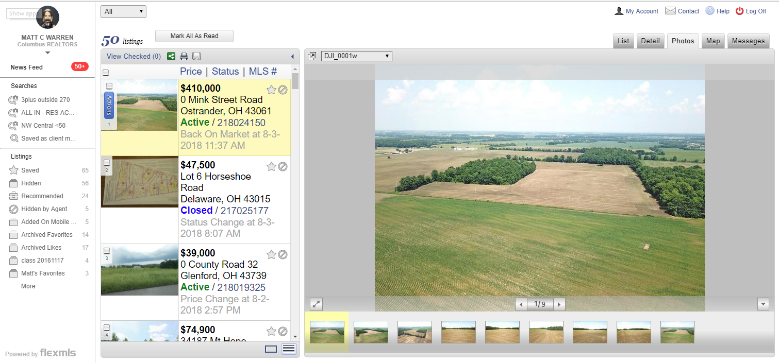
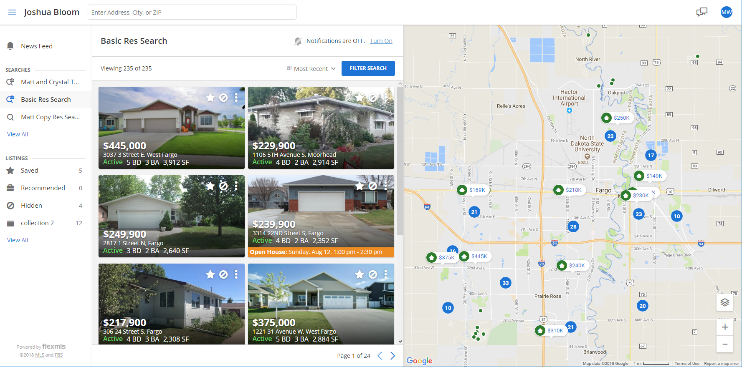
Update – Video Available – New Optional Client Portal Design – September 2018 VIDEO OF NEW PORTAL: Click here to see a video preview of the new portal. VIDEO OF ENABLING NEW PORTAL AND SETTINGS: Click here to see a video of the New Portal Settings screen and how to enable the new portal. Would you like to download or print a copy of this New Portal announcement? Click here to view the PDF. A new, updated Portal interface for clients will be made available in flexmls in September. The new Portal (aka P2, if you want to be “trendy”) is more visual and easier for clients to navigate. It will have larger, more prominent photos. Old Portal: New Portal: Update – Agent Settings for the new Portal:The Portal Preferences page looks very different when the new Portal is enabled. There are some changes as well. Some settings are removed. The basic layout of the settings is a new, collapsed view. Each section of the settings can be expanded by clicking the section you want to modify. Three New Preferences:
Renamed Preferences:
Removed Preferences: Some preferences have been removed. These include Start Position, Detail, Business Card and several others. Since these are incorporated into the default design of the new Portal, there is no customization. These items will always be displayed in their new, “P2”/New Portal layout. Changes in Contact Management: The View News Feed option allows the agent to work on behalf of the client. The agent can see the portal, mark favorites, hide, and recommend listings. NOTE: Even if the new portal is enabled, the agent will see the Classic Portal layout when they work on behalf of the client. Simplified settings when mailing Public Listings: The manual email screen is simplified when emailing public versions of a listing. Some of the Classic Portal settings don’t apply to the new layout. When a manual email of the public version of the listing is sent, the recipient views the listing in the new portal format (even if they are not using the Portal itself). This ensures that all listings from Flexmls follow the same format/design–keeping the client’s user-experience the same for all listing updates (subscription emails, manually emailed listings, and portal). NOTE: Private versions of the email will still have the options that agents are used to seeing. How do I enable the new portal? After the New Portal is enabled to all users in September, you will see a button on Portal Preferences. The large, blue button will read, “Try the New Flexmls Portal”. As soon as you enable the New Portal, ALL of your clients will have the new interface. Reminder: Switching back and forth repeatedly would be very confusing to the clients.
Things to note about the new Portal:
Would you like to download or print a copy of this New Portal announcement? Click here to view the PDF.
VIDEO OF NEW PORTAL: Click here to see a video preview of the new portal.
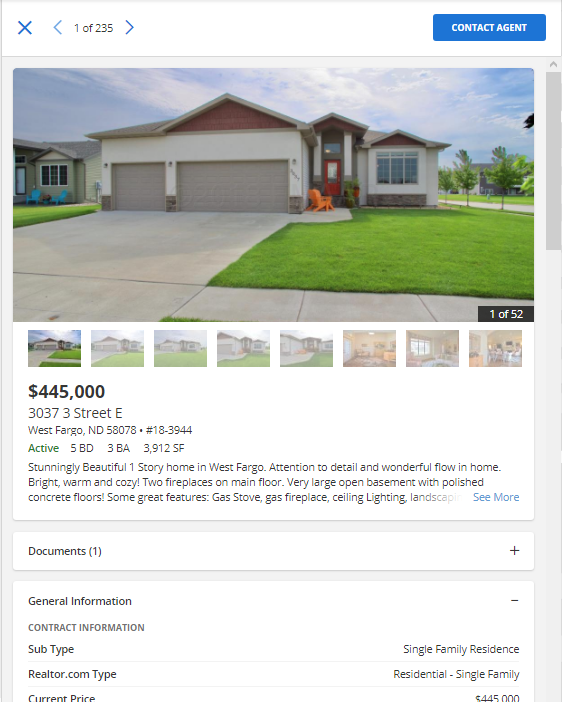
If you prefer to see screenshots of the new functionality, here you go: New “Contact Agent” button appears at the top of each listing report.
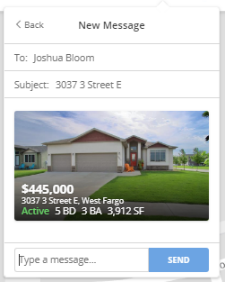
Simplified “send” box appears to allow client to contact their agent quickly.
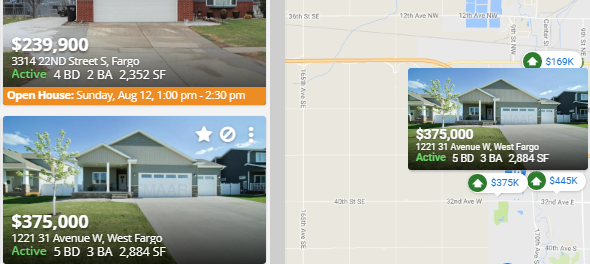
Hovering over a photo on the new Portal will cause the photo to “pop-up” over the property on the map.
Clicking on the photo will take the client to the photo viewer and listing information for that property.
Some considerations before switching to the new Portal:
| ||||||||||||||
|
In Memoriam: Richard Alt See full obituary here: https://www.legacy.com/obituaries/name/Richard-Alt-obituary?pid=189861178
| ||||||||||||||
|
In Memoriam: James L. Bates See full obituary here: http://www.legacy.com/obituaries/dispatch/obituary.aspx?n=james-l bates&pid=189843808&fhid=8658
| ||||||||||||||
|
In Memoriam: Myron “Ed” Turner See full obituary here: https://www.snyderfuneralhomes.com/obituary/myron-ed-turner/
| ||||||||||||||
|
Alert: Possible identity thief looking to buy a home in our area View full story here: https://columbusrealtors.com/alerts/default.aspx
| ||||||||||||||
|
Now available! August 2018 RPR Webinars RPR has recently provided a list of upcoming webinars for August 2018. The links below will take you to RPR for the specific event for registration. Note that it appears that many of these events have multiple potential dates to register. Residential: Get the Most out of the RPR/zipForm® Partnership Pre-listing Checklist: Use RPR to Nail Your Next Listing Presentation Open House Tips & Tricks from RPR RPR for Residential Investment Analyses Design and Deliver a Successful Buyer Tour With RPR Commercial Webinar Recordings: Introduction to RPR Commercial RPR Mobile™ for Commercial Practitioners Adding Value to Multifamily Investments Through Renovations and Refinancing Broker/Owner Workshops: Introduction to RPR’s Broker Tool Set RPR Overview for Broker/Owners and Managers RPR Data Tool and Market Reports
| ||||||||||||||
|
Reminder – Policy for Buyer-Related Comments A change was made in 2016 that affects what can be said about listings that are “Back on the Market” because of buyer related matters. The policy is listed below: 1.02.13 – Comments Specific to Buyers in the Property Description Field Comments specific to buyers or buyer-related information, including financing concerns, are not permitted in the Property Description field. The comment “Back On Market – See Agent to Agent Remarks” is permitted. MLS staff is authorized to delete wording as needed to make the Property Description compliant with this policy. The policy will be effective Immediately with enforcement beginning November 1, 2016 Some examples of phrases that are not permitted are listed below: Back On Market – Buyer’s Financing Fell Through Back On Market – Buyer’s Unable to Perform Back On Market – Buyers Back Out of Contract Note: the examples above are not all inclusive. In general, any comments relating to the potential buyer and/or their part of the transaction can not be used. For your review you can always download the latest version of the MLS Policy Violation Manual. The manual can be downloaded in PDF format here. If you have any questions if a phrase is acceptable or not please contact the MLS staff to verify policy compliance. email mlspolicy@columbusrealtors.com or call 614-475-4000
|