| ||||||||||||||||||||
|
New MLS Data Entry and Photo Services Fee Schedule – Effective October 1, 2014 The following information applies only to agents who have their listings and photos entered by MLS staff. There is no change for agents who add their own listings or photos. Dear MLS Member, You are being contacted because you recently requested MLS data entry or photo services. These services may have included data entry of a listing from an MLS worksheet or scanning/upload of listing photos to your listing. This letter is to inform you that there is a new fee schedule for data entry of listings, photo scanning, and photo upload to MLS. These price changes have been authorized by the Columbus REALTORS® Board of Directors and will take effect October 1, 2014. Why the change? Historically, there has been no fee for MLS staff to scan photos and upload them to an MLS listing. Nor has there been a fee for photos that are received in a digital format to be uploaded to a listing. These services were implemented well over a decade ago. At that time, many listing photos were taken with a 35mm film camera. Film had to be developed, printed and delivered to MLS staff by the agent or photographer. MLS staff then scanned the printed photos and uploaded them to the appropriate listing. Photographic Technology and MLS software have advanced dramatically since that time. Almost all MLS photos are now taken with a digital camera. Photos can be uploaded by the listing agent, assistant, or office administrator directly to the MLS listing from any computer and many mobile devices. There is no MLS staff intervention necessary for the digital photo to be added to the listing on the MLS. The MLS will continue to offer photo scanning and upload services, but there will now be a $15 fee for these services. This service fee will be closer to the actual cost of time and effort required by MLS staff to scan and/or upload up to 25 images. Additional photos can be uploaded at the rate of $15 per 25 images or any portion thereof. (See full schedule of MLS service fees below.) MLS Data Entry and Photo Services Fee Schedule (as of October 2014):Data Entry of MLS listing: Photo Services – scanning and/or upload: New Listing Bundle Discount available (combined services): * – Original Article posted on 08/31/2014
| ||||||||||||||||||||
|
Realist Downtime for Scheduled Maintenance – Saturday: 11pm – 4am CoreLogic will be performing system maintenance on the evening of Saturday, September 20, 2014, from 11:00 pm ET to 4:00 am ET. Realist may be unavailable several hours during this maintenance window.
| ||||||||||||||||||||
|
Recent MLS Field Changes and Additions Several new options have been added recently to the MLS.
| ||||||||||||||||||||
|
Office Exclusive – Waiver Form is Now a Fillable PDF The Office Exclusive – Waiver Form is now interactive. This form should be used when the seller wants to keep their listing off the MLS, when a listing cannot be entered within the 72 hour requirement, or when using a Coming Soon sign. Click the link below to download the newly fillable PDF: Office Exclusive – Waiver Form (You may have to open the form in Acrobat Reader in order to fill out the form. Web browser versions of the PDF reader may not allow for fillable forms.)
| ||||||||||||||||||||
|
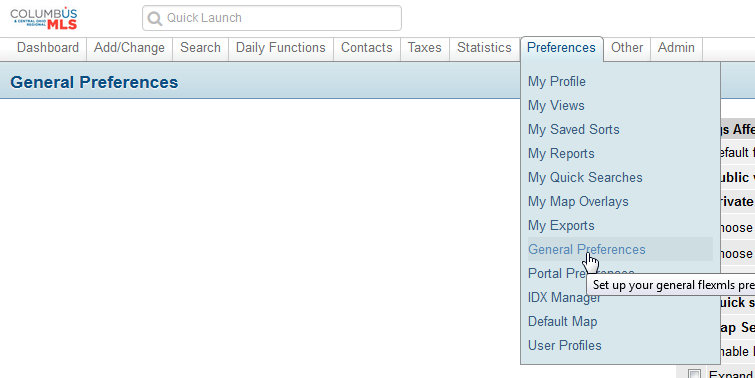
Listing Report Issue UPDATE: As of 2:28PM it appears our vendor may have made progress on this issue. Currently there is an issue with the default listing report within Flexmls. The MLS software company (FBS) is currently aware of the situation and are working towards a resolution. You can use the “Report” button above the listing report when on the Detail screen to temporarily bring up the “CR Full Report”. You can also permanently select the default listing report that is displayed within your Flexmls preferences. The instructions below are how to do that: 1. Hover your mouse over “Preferences”, and click “General Preferences” from the drop down menu.
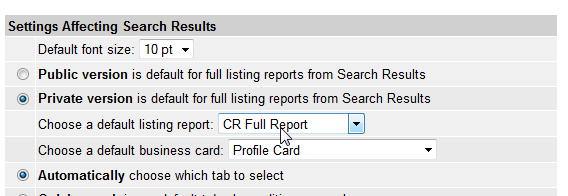
2. Locate the “Choose a default listing report” setting. Click the drop down menu next to it, and select the option of: “CR Full Report” from the drop down menu.
|
 Back To Top
 |
09/04/2014 |
Title: Flexmls – Mapping, Statistics & Customizations
Date: Thursday, September 4, 2014
This 60 minute webinar will cover:
-Using the Map to Search
-Saving Custom Map Overlays
-Driving Directions
-Stat Reports
-Customizing Flexmls
-And More!
Eastern – 11:00 AM
Central – 10:00 AM
Mountain – 9:00 AM
Arizona – 8:00 AM
Pacific – 8:00 AM
Space is limited.
Reserve your Webinar seat now at:
https://www1.gotomeeting.com/register/909417209
|
Back To Top |
08/28/2014 |
Join us for an overview of the newly redesigned Flexmls Mobile site, and ask questions to help you learn more.
Title: Flexmls Mobile – Informational Session
Date: Friday, August 22, 2014
Time: 3:00-4:00 PM CENTRAL
After registering you will receive a confirmation email containing information about joining the Webinar.
System Requirements
PC-based attendees
Required: Windows® 8, 7, Vista, XP or 2003 Server
Mac®-based attendees
Required: Mac OS® X 10.6 or newer
Mobile attendees
Required: iPhone®, iPad®, Android™ phone or Android tablet
Space is limited.
Reserve your Webinar seat now at:
https://www1.gotomeeting.com/register/593722456
|
Back To Top |
08/20/2014 |
Example 1: Contains Searching
To do a “contains” search in Flexmls Web, add the asterisk character * before and after your keyword. To search the subdivision field for “contains mcnaughten”, you would type in: *mcnaughten*
This will return listings with subdivision entries of: “Ravines At McNaughten”, “Ravines Of McNaughten”, “McNaughten Commons”, “McNaughten Glen”, etc.
Example 2: Starts With Searching
If instead you only wanted a starts with search of only “McNaughten Glen” and NOT everything else like “McNaughten Commons”, etc, you would type in: mcnaughten glen
This would return listings with subdivision entries of: “McNaughten Glen”.
*Originally Posted on 03-03-2014, Revised 08-25-2014*
|
Back To Top |
|
No one can deliver new listing and price change email to a client in central Ohio faster than an MLS member at Columbus REALTORS!
Automatic email to clients can now be sent as often as every minute. ASAP is the new email frequency that has been added when creating an auto-email event for a client. ASAP email is sent “as soon as” the listing is changed on the MLS. If a new listing is added at 8:30am, it will arrive in your client’s email at approximately 8:31am.
This is the fastest email delivery for real estate listings on the planet. FBS created this “immediate” delivery of email specifically for Columbus REALTORS. We are the first market to receive this new, super-speed client email delivery.
Read the full story here:
ASAP: Auto Email As Fast As It Gets on ColumbusRealtors.com
Remember (Delay and Junk Mail): Long-time email “hazards” can still delay or even prevent delivery of listings to the client’s inbox. Some email providers artificially delay delivery of email for virus/malware scanning. Also, Junk mail filters may catch listing emails.
|
Back To Top |
08/14/2014 |
CoreLogic will be performing system maintenance on the evenings of Saturday, August 16 and Sunday, August 17, 2014 beginning at 8:00 PM PDT through 12:00 AM PDT each night. Realist will be intermittently unavailable during this maintenance periods.
|
Back To Top |
|