| ||||||||||||||||||||
|
Realist Downtime: System Maintenance – Saturday, February 21 – 11pm-11am CoreLogic will be performing system maintenance on the evening of Saturday, February 21 beginning at 11:00 PM through 11:00 AM Sunday morning. Realist will be unavailable during this maintenance period. This maintenance is related to the data center move which will be completed in early second quarter of 2015.
| ||||||||||||||||||||
|
New “Notify” Checkbox for Multiple Email Addresses is ASAP Only. Not for Weekly/Monthly A new “Notify” checkbox has been added to the contact manager for any contact that has more than one email address. You may have read about this new notification option in the red headline at the top of the Flexmls window. VERY IMPORTANT: This new “Notify” checkbox on the contact record currently only applies to ASAP auto-email. Weekly and Monthly auto-email will only send to the primary email on the contact record. This new feature allows ASAP email to be sent to multiple email addresses as long as the “Notify” checkbox is selected for any additional email address to which the auto-email should be sent. The Weekly and Monthly auto-email events will continue to sent only to the primary email (the first, at the top, email) until they are converted to the new FBS email system. This new “Notify” checkbox option is part of a major email system upgrade being installed in stages to Flexmls. The email upgrade for Weekly/Monthly auto-email is expected in March 2015. That update will make the “Notify” checkbox work for all Flexmls email, not just ASAP and manual email as it does today. Currently, all ASAP auto-email and manual email are sent using the new email system, while Weekly and Monthly auto-email are still being sent using the old email system. This is the reason for the discrepancy between ASAP and Weekly/Monthly email functions. Since Weekly/Monthly email are on the old system, they do not interface with the new “notify” checkbox that is part of the new MLS system. Workarounds: If you need to have 2 email addresses associated with one client currently using Weekly/Monthly auto-email, there are 2 ways to accomplish this: 1) Create a separate contact for each email address. For example, if a husband and wife prospect both have an email address, simply create a contact for each individual rather than one contact with 2 email addresses. You can add both contacts (one email each) to the Auto-email event and the email will be delivered as expected. 2) If your client is willing to receive ASAP auto-email instead of Weekly (3 times daily) or Monthly (once per month), you could change their Auto-email Event settings from Weekly or Monthly to ASAP. Since ASAP is on the new email system, the “Notify” checkbox will correctly deliver email to both addresses. Make sure your client is willing to have ASAP email delivery, as this can generate a lot of email (potentially every minute) for “wide-open” searches with large amounts of matching listings.
| ||||||||||||||||||||
|
Auto-population of School District, Corp Limit, and Township
The MLS fields School District, Corp Limit Per Auditor, and Township will now be auto-populated from information collected by the MLS department for our primary counties. This auto-population requires that Realist first auto-populate Tax District. Only the 13 counties that are included in Realist tax data will be able to auto-populate these additional fields. Video Tutorial available at the bottom of this page. Please review the information in these fields for your current listings. Although it is auto-populated from information that was tested and presumed accurate, there is still a possibility that incorrect information may exist. Please verify these 3 fields and if inaccuracy is found, please email techsupport@columbusrealtors.com to report any disparities from the auditor record. REMINDER: You must auto-populate tax data from Realist to initiate auto-population of School District, Corp Limit and Township. These field selections are based on Realist-populated tax district. If the tax district is not auto-populated by Realist at time of listing entry, the School District, Corp Limit, and Township will NOT auto-populate. Therefore, just like Realist, only the 13 counties supported by Realist can be auto-populated.
| ||||||||||||||||||||
|
Seller Opt Out – New Default on Export Tab for AVM and Allow Comments The following items has been set as default “Yes” on Add/Edit. These items appear on the Export tab in the Seller Opt Out section. This change is to return Flexmls to the same default used by the previous MLS add/edit default. These 2 selections will now automatically be checked when entering a new listings. The previous MLS system mirrored these default settings. These settings were apparently missed when converting to the new Flexmls system. This change merely returns to the previous system default. The MLS committee has chosen to re-institute the default settings from the previous MLS. This means that new listings will, by default, NOT be available for AVMs or Internet Comments. This setting can easily be unchecked by any listing agent when adding a new listing or editing an existing listing. This is only the default setting and does not affect existing listings. The setting chosen at time of listing entry will be retained. This only affects newly entered listings from January 21, 2015 forward.
| ||||||||||||||||||||
|
Android App for Flexmls Available Now The Android version of Flexmls has been released in the Google Play store. The new app is in it’s early stages. There are some known issues already. Updates and bug fixes may be rolled out in the weeks to come. Please keep an eye on your Play Store for any updates and apply when available. You can download the app by searching “flexmls” in the Google Play website or on the App Store app on your phone. Please note: Flexmls for Android requires Android OS version 4.1 or newer. Flexmls app exists for the iPhone (in the App Store) as well.
| ||||||||||||||||||||
|
Realist Downtime: System Maintenance – Friday, January 9 – 11pm-2am CoreLogic will be performing system maintenance on the evening of Friday January 9, 2015, beginning at 11:00 PM EST through 2:00 AM EST. Realist will be unavailable during this maintenance period.
| ||||||||||||||||||||
|
Realist Reports and Auto-pop Unavailable for Franklin, Delaware, and Morrow Counties Realist Property Details reports are generating a “No Properties Found” or “No Report Generated” error for Delaware, Franklin and Morrow Counties. Auto Population of tax data when entering a new listing is also affected. Realist technical support has been notified and is currently working to resolve the issue as soon as possible. We will provide updates as they become available.
| ||||||||||||||||||||
|
“Online Bidding” – new selection in Addl Acceptance Conditions A new selection in the “Addl Accetance Conditions” field has been added. “Online Bidding” is to be used for listings that are available for online bidding through websites such as “Hubzu”. These are not “in-person” or “auctioneer-led” auctions that are regulated by the Department of Agriculture. Properties marked “Online Bidding” cannot have a simultaneous, in-person auction or they cannot be considered “online bidding” properties in the MLS. This new selection will appear in “Addl Acceptance Conditions” when entering a new listing as well as on the search screen.
| ||||||||||||||||||||
|
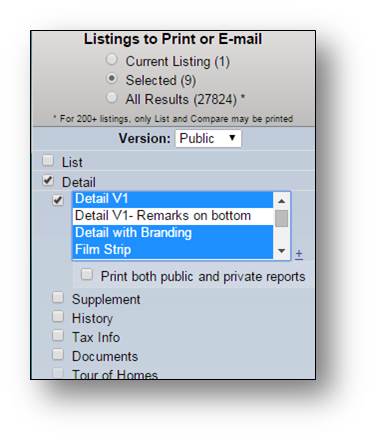
Feature Enhancement – Print or Email Multiple Report Formats Today on December 4th, Flexmls included a new feature that allows users to select multiple report formats from the Print and Email screens. From the Listings to Print or Email screen, select the Detail checkbox and up to 4 different report formats. To choose multiple reports, hold down the Ctrl Key (Command on a Mac) as you click on the individual reports you’d like to include. To deselect one item from the list with multiple items highlighted, hold down the Ctrl (Command) key and click the report you wish to remove. *Note – To see the new options, it is possible you may need to check and then recheck the DETAIL option on the left of the screen. Once you recheck the option, please select the report you wish to print (Default standard view report is “CR Full Report”). Once you have a report, or reports, selected you can click on the SAVE wording near the bottom left of the screen to remember these options.*
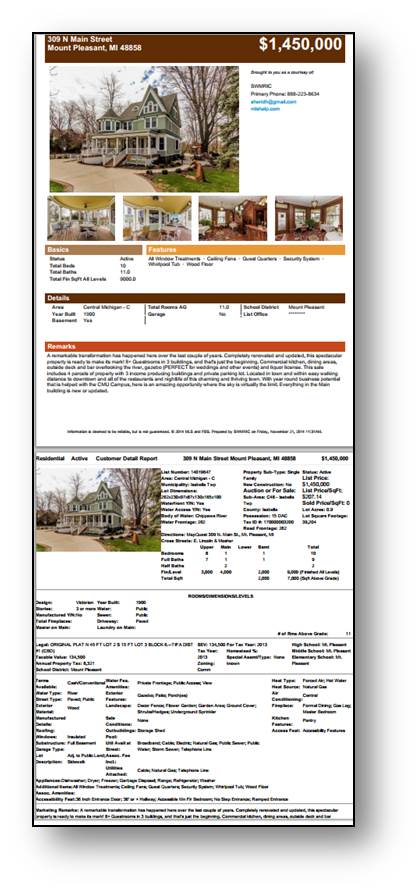
Reports for each listing will be grouped together, followed by the same reports for the next listing.
| ||||||||||||||||||||
|
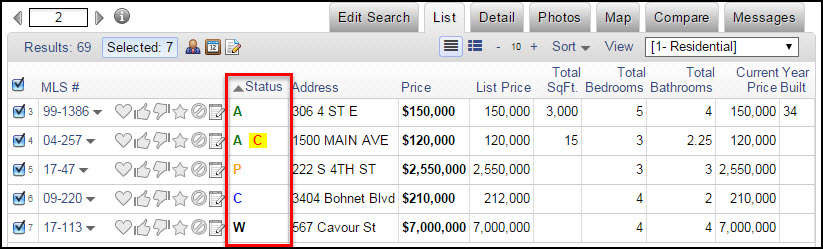
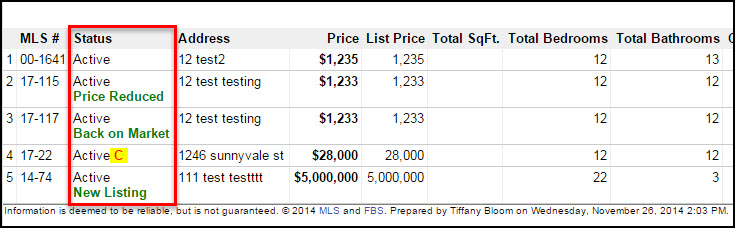
Changes to the One Line List View – December 10, 2014 On December 10, FBS will change the way listing statuses appear when viewing listings in the one-line view on the List tab. Since the current, full-text description can make the column unnecessarily wide, it will be replaced by a lettered code for the status.
You can use your mouse to hover over the letter in the Status column to see the full status description.
Below is list of common status abbreviations: Additional information for status changes and contingencies will follow the status code.
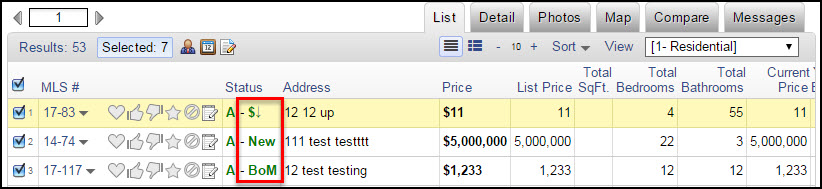
Use your mouse to hover over the letters or symbols following the status to see the full description.
Common status change abbreviations/symbols are as follows: Contingency codes are determined by whether your MLS handles them as separate statuses or sub-statuses and they will reflect the codes that your MLS currently uses to define them. Just hover over the contingency to see more information.
Please note that these changes do not apply when printing the one-line view for the list tab. When printing, the full-text description will still print as shown in the example below.
|