| ||||||||||||||||||||
|
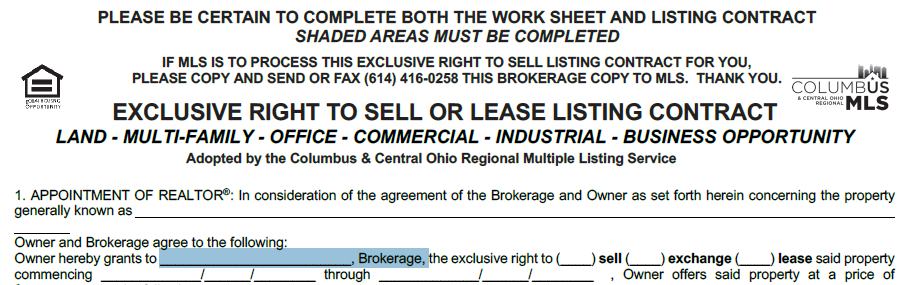
Changes to Commercial MLS Listing Agreement
| ||||||||||||||||||||
|
Do You Want to Be on the MLS Committee? Ever wonder why things happen in the MLS or think about serving on the MLS Committee and wonder how that’s done? The process to serve on this committee is different than any other. First, it’s an elected committee with a limited number of seats determined by a weighted formula based on the MLS’s number of agents, listings, solds and offices. The number of seats available can change each year based on this formula or elected members whose term ends. This number can sometimes also change as a result of members simply changing offices and then perhaps no longer representing the group from which they were elected. You can find more details on the election process here. Interested in Running? Follow these steps to throw your hat in the ring:
Your bio and resume will be presented to the MLS Nominating Committee who are selected at the Annual Business Meeting. The five selected Brokers that serve on the Nominating Committee, as well as the current MLS Committee Chair and the President Elect, meet in November to select candidates. A ballot is created for the annual election where only brokers vote. Members who wish to volunteer their time to serve are very much in demand by the Nominating Committee and always appreciated. Questions? Review the information linked to the main Columbus REALTORS® site or you can contact Matt Warren at (614) 475-4000 or email mlselections@columbusrealtors.com
| ||||||||||||||||||||
|
Other Residential with Deeded Land to Be Changed to Single Family- The MLS sub-type of Other Residential WITH Deeded Land will be removed on Wednesday, September 27. All of these listings in all statuses will be changed to Single Family. This does not affect mobile homes without deeded land. Mobile homes in a park or without land must still be entered as Other Residential without Deeded Land. All new mobile homes WITH deeded land should be entered as Single Family in the future.  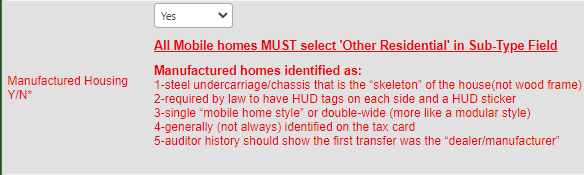 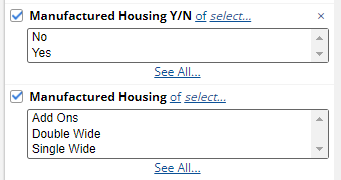
| ||||||||||||||||||||
|
Changes to MLS ERS Listing Contract Wording from the ‘Brokerage Exclusive Waiver’ form has been added to the MLS ‘Exclusive Right to Sell (ERS) Listing Contract.’ This includes changes to brokerage exclusive workflow (for purposes of Clear Cooperation). Notable changes to the Contract and Policy Requirements:

| ||||||||||||||||||||
|
MLS Cyber Security Below is a message from FBS, Makers of Flexmls regarding cybersecurity measures they have in place to protect Columbus and Central Ohio Regional MLS’ data. With the recent, unfortunate ransomware attacks on real estate software, you’re likely wondering what FBS does to protect and prevent malware/ransomware attacks on our software and systems. While cyber attacks and attackers are constantly evolving and becoming more sophisticated, we want to assure you that system security and proactive attack-prevention are utmost priorities. This email is intended to review with you both the general security practices FBS follows and to provide details regarding the software and services we use to provide protection of our server and cloud network against attacks.
Most malware/ransomware attacks are the result of unpatched or outdated software or from employees clicking on untrusted links or attachments. In general, to mitigate these elements:
FBS Uses CrowdStrike to Protect, Prevent, and Remediate Attacks:
The FBS Team
| ||||||||||||||||||||
|
Realist Outage 5/11/2023 At 3:14pm May 11th CoreLogic alerted us that Realist is currently experiencing an outage. This will impact your ability to access Realist and use the “Load Tax Record” option in the MLS. CoreLogic Provided the following:
| ||||||||||||||||||||
|
Realist Outage 5/3/2023 At 2:41pm May 3rd CoreLogic alerted us that Realist is currently experiencing an outage. This will impact your ability to access Realist and use the “Load Tax Record” option in the MLS. CoreLogic Provided the following:
| ||||||||||||||||||||
|
One Line CMA: New Fields Added Two new columns will be added to the One Line CMA on April 14, 2023.
The Full Bath (FB) and Half Bath (HB) fields have been abbreviated to make room for the additional fields. The Parking field width was also narrowed slightly.   This change will be made first to Residential CMA, then to all other property types.
| ||||||||||||||||||||
|
MLS Profile Updates Must Be Made in the Member Portal Changes to your MLS contact information, such as email or phone number, will now be handled within the Member Portal. Previously, you would make those changes in Flexmls by going to the “My Profile” page. This page still exists. However, you must click the button at the bottom labeled Click Here to be redirected to the Member Portal profile page.   Click the Columbus MLS button under Subscriptions.   On the Subscription Details page for Columbus MLS, click the Edit button at the bottom right. Be sure to click Save when done.  You Association Membership profile (association specifically, not MLS) is a separate page. To update your membership profile , click Profile on the left hand side below My Association (closer to the top).
| ||||||||||||||||||||
|
Additional Options for CMA Statistical Average Display The default field for CMA Statistical Average calculations in Flexmls is SqFt Documented. This has not changed. Additional options have been added on the “Create CMA” screen. SqFt ATFLS and Acreage have been added to the drop-down list for the Statistical Average field. 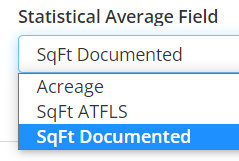 Changing this selection will determine the field used for the Statistical Average displayed on the CMA reports. 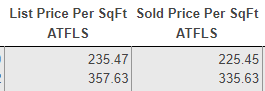 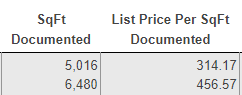
|
