| ||||||||||||||||||||
|
Realist Downtime: System Maintenance – Sunday, December 10, 1am to 6am – Sunday, December 17, 1am to 4am CoreLogic has scheduled system maintenance this weekend and next, Sunday, December 10, from 1:00am to 6:00am and Sunday, December 17, from 1:00am to 4:00am. During this time, Realist and autopop may be intermittently unavailable.
| ||||||||||||||||||||
|
Policy Violation Manual Updated – Effective December 1, 2022 You can now download the latest revision of the MLS Policy Violation Manual. The manual has been updated for changes effective December 1, 2022. Changes include the following:
| ||||||||||||||||||||
|
MLS Policy Change : 1.02.08 Multiple Entry of Same Property MLS policy 1.02.08 has been modified. The previous policy allowed only Res Rental and Business Opportunity listings to be entered simultaneously in other Property types for single parcel. The policy has been modified to expand the multiple entry ability to better serve the seller and buyer. Members should use caution when entering listings in multiple property types. If listings are entered incorrectly, fines apply to each listing. More listings equals more potential for errors and fines. Also, members must be knowledgeable about each type of property in order to properly and professionally represent their client. Updated Policy as of December 1, 2022: 1.02.08 – Multiple Entry of the Same Property Fine with Warning
| ||||||||||||||||||||
|
Attention MLS Brokers – MLS Committee Election – Voting Ends December 1st On Monday, November 21, 2022, eligible MLS Participant (Principal Brokers) were sent an email from announcement@associationvoting.com with a link to their ballot for the Columbus REALTORS®’ annual online MLS Committee Election. Only the MLS Participant (Principal Broker) can vote.
| ||||||||||||||||||||
|
Deadline for Candidates: MLS Committee The deadline for resume submission for candidates for the MLS Committee is Monday, October 31st. Ever wonder why things happen in the MLS or think about serving on the MLS Committee and wonder how that’s done? The process to serve on this committee is different than any other. First, it’s an elected committee with a limited number of seats determined by a weighted formula based on the MLS’s number of agents, listings, solds and offices. The number of seats available can change each year based on this formula or elected members whose term ends. This number can sometimes also change as a result of members simply changing offices and then perhaps no longer representing the group from which they were elected. You can find more details on the election process here. Interested in Running? Follow these steps to throw your hat in the ring:
Your bio and resume will be presented to the MLS Nominating Committee who are selected at the Annual Business Meeting. The five selected Brokers that serve on the Nominating Committee, as well as the current MLS Committee Chair and the President Elect, meet in November to select candidates. A ballot is created for the annual election where only brokers vote. Members who wish to volunteer their time to serve are very much in demand by the Nominating Committee and always appreciated. Questions? Review the information linked to the main Columbus REALTORS® site or you can contact Matt Warren at (614) 475-4000 or email mlselections@columbusrealtors.com
| ||||||||||||||||||||
|
Authentication Codes? Update your Flex MLS Pro App ASAP A bug fix remedying frequent multifactor authentication logins on the Flex MLS App for Real Estate Pros has been released as of October 10, 2022.We encourage all users of the Flex MLS app to verify that the most updated version of the app has been installed on your device.
We appreciate your understanding as the Association transitions to these new platforms. The Columbus REALTORS® staff worked with both vendors to find a fix for the issue that was causing problems across the country. Additionally, If you have problems with multifactor authentication on your desktop or laptop computer, that is likely a setting with that device. Please contact techsupport@columbusrealtors.com for assistance.
| ||||||||||||||||||||
|
Policy Violation Manual Updated – Effective October 1, 2022 You can now download the latest revision of the MLS Policy Violation Manual. The manual has been updated for changes effective October 1, 2022. Changes include the following: SECTION 5 DATA MAINTENANCE FEE OR FINE WAIVER PROCESS WITH EDUCATION CLASS SECTION 5.01 – Real Estate Data Accuracy Class Requirements: Data Maintenance Fee or Fine is due and payable within five (5) days of receipt of the policy violation notice. (Added September 2022) Under the following guidelines, REALTORS® may choose to attend the Real Estate Data Accuracy Class up to two (2) times in a calendar year (Jan. – Dec.) for violation of two different policies and receive up to $100 in waivers each time. (Amended September 2022)
| ||||||||||||||||||||
|
MLS Policy Change regarding fines and reimbursement – Oct. 1 The following change has been made to the MLS Policy Violation Manual. This change will be effective October 1, 2022. Changes are in bold red below. SECTION 5
Under the following guidelines REALTORS® may choose to attend the Real Estate Data Accuracy Class up
| ||||||||||||||||||||
|
Client Search on Portal; Classic Portal going away – October 10 Summary:
The newer version of the Client Portal was first made available to Columbus users in 2018. There have been many improvements since then. Many users never upgrade to the new version. One of the features of the new version of the Client Portal is the ability for the client to search for listing and mark listings as favorites. The Search button (magnifying glass on mobile) will appear at the top of the screen on desktop and Android. It will be at the bottom on iOS The MLS committee and MLS Board of Directors believe that allowing the client to search on the MLS Client Portal is very important to stay competitive. They have decided to activate search functionality on the new portal and push the newer version of the portal to everyone. This means that all existing old-style classic portals will be automatically converted to the new version for users who have not already converted to the new version.  
| ||||||||||||||||||||
|
Improved “Auto-Suggest” lookup and map zoom for location fields – September 26 The following fields will be updated on September 26, 2022 with improved “Auto-Suggest” functionality on Quick Search and Add/Edit screens.
You will now be able to type the first few letters of a name, and the field will “auto-suggest” only the matches that contain those letters. Click Enter to select.  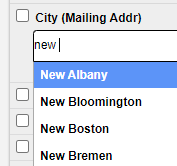 You will still be able to click “See All…” at the bottom of the search box if you would like to view the entire list of available options. 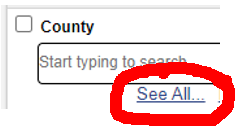 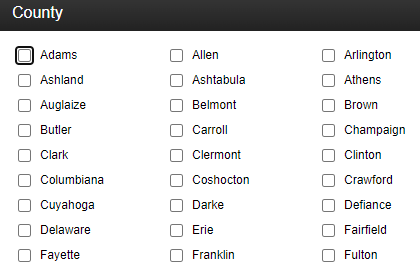 The map will also “jump to” the location of the matched properties. 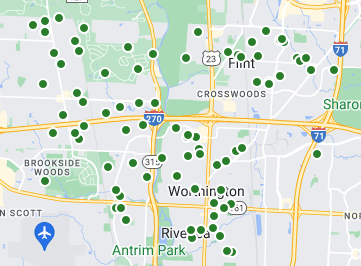
|
