| ||||||||||||||||||||
|
Realist Service Issues – Connection Issues 10/16/2020 – Resolved As per our Realist vendor, Corelogic, there is a known connectivity issue with Realist as of today, 10/16/2020. They are working to resolve the issue as soon as possible. Below is the message from our vender. To: Valued CoreLogic Real Estate Solutions Clients
| ||||||||||||||||||||
|
Do You Want to Be on the MLS Committee? Ever wonder why things happen in the MLS or think about serving on the MLS Committee and wonder how that’s done? The process to serve on this committee is different than any other. First, it’s an elected committee with a limited number of seats determined by a weighted formula based on the MLS’s number of agents, listings, solds and offices. The number of seats available can change each year based on this formula or elected members whose term ends. This number can sometimes also change as a result of members simply changing offices and then perhaps no longer representing the group from which they were elected. You can find more details on the election process here. Interested in Running? Follow these steps to throw your hat in the ring:
Your bio and resume will be presented to the MLS Nominating Committee who are selected at the Annual Business Meeting. The five selected Brokers that serve on the Nominating Committee, as well as the current MLS Committee Chair and the President Elect, meet in November to select candidates. A ballot is created for the annual election where only brokers vote. Members who wish to volunteer their time to serve are very much in demand by the Nominating Committee and always appreciated. Questions? Review the information linked to the main Columbus REALTORS® site or you can contact Matt Warren at (614) 475-4000 or email mlselections@columbusrealtors.com
| ||||||||||||||||||||
|
Realist Service Issues – Maintenance 10/14/2020 As per our Realist vendor, Corelogic, there may be a service interruption with Realist tomorrow, 10/14/2020 at 9:00PM PT (12:00AM ET). Below is the message from our vendor: CoreLogic will be conducting maintenance tomorrow, Wednesday, October 14, 2020 beginning at 9:00 PM PT and lasting about an hour. Realist may potentially be unavailable during this maintenance.
| ||||||||||||||||||||
|
Tech Tips: Listing Contingency Removal Every Realtor® hates it, but sometimes it happens. A deal in the final stages falls through and now your listing needs to be put back on the market, but for some reason the MLS will not let you. Here, we will go over how to fix that. Where to StartTo begin, we will need go to the Edit Listing section of the listing in question. To get there, we’ll go to the Menu button in the upper left corner, right below the Columbus MLS logo, as seen here. 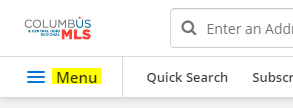 Click Menu and then click Edit Listing. Alternatively, you can click the MLS number if you’ve got the listing open and click Edit Listing, as seen below. 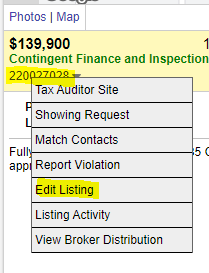 Removing the ContingencyThe first instinct for most is to click Edit Current Status and change their listing back to Active. This is where the MLS will stop you. The MLS counts contingencies as a separate status, and they need to be removed manually before you can go back to Active. It’s often overlooked but Add/Remove Contingency can be seen below. 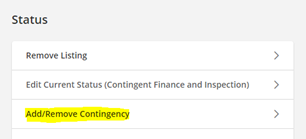 Click Add/Remove Contingency and change it to No Contingency. Once this is complete, your listing will kick back over to Pending. From there, you can click Edit Current Status and move it to Active. This works for all contingencies. Viola!Your listing is now back on the market for new buyers. Did you enjoy this MLS tip? Keep an eye out for new ones!
| ||||||||||||||||||||
|
Franklin County Auditor’s office conducting server maintenance this weekend The Auditor’s office is due to perform essential server maintenance in coordination with the County Data Center starting today, Friday, Oct. 2, at 7:30p and ending tomorrow, Saturday, Oct. 3 by 3:30a. This will impact the Auditor website functions.
| ||||||||||||||||||||
|
Recent Changes to MLS Rules & Regulations Sections 1.18 and 1.19 (below) were added to the MLS Rules & Regulations in July by action of the MLS Board of Directors. SECTION 1.18 TEMPORARY OFF MARKET PROPERTIES: a. No showings while in the status of “Temporary Off Market” SECTION 1.19 MARKETING OF A PROPERTY WITHOUT A LISTING AGREEMENT: Original Post 20200814
| ||||||||||||||||||||
|
Livestream Open House: Virtual Open House Label Change Revision: Our MLS Vendor, FBS, has changed the label, not the functionality on the Open House screen. In April of 2020, the “Virtual Open Houses” was added to our MLS. This caused some confusion as “Virtual Open House” shared a similar name to “Virtual Tour,” which implied a prerecorded video. This change is intended to clarify that “Livestream” open houses are not prerecorded. When “Livestream” is selected, instructions appear directly below the “Link URL” field reminding members that Livestream Open Houses are live and not pre-recorded. 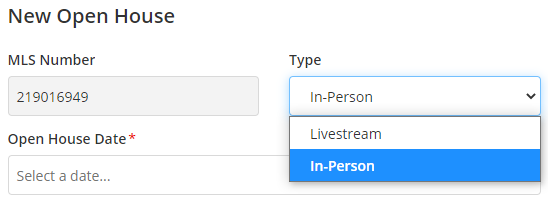 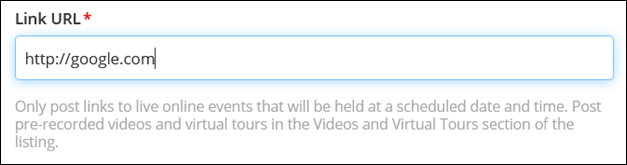 Original post: Virtual Open Houses: Video Overview Now AvailableVideo now available: Add Virtual Open House links in MLS. Your Columbus REALTORS® MLS staff has been working hard to bring you innovative options to keep our central Ohio housing market strong. We are happy to announce that our MLS vendor has responded to industry needs with a new option: Virtual Open House links. How is a Virtual OPEN HOUSE different than a Virtual TOUR? CAUTION: Get written permission from the seller BEFORE you start streaming! Show that home virtually instead of in-person! 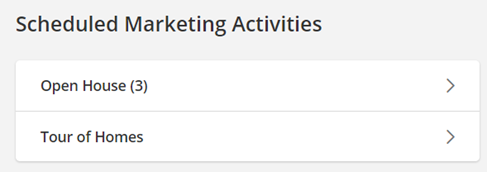 As an alternative to in-person open houses, you can now enter a link to a STREAMING, Virtual Open House using a variety of online communication services such as Facebook Live, GoToMeeting, or Microsoft Teams. Homebuyers or agents can join your Virtual Open Houses/Tour of Homes. The live attendees can view video streamed from your phone and ask questions during the “virtual walkthrough”. 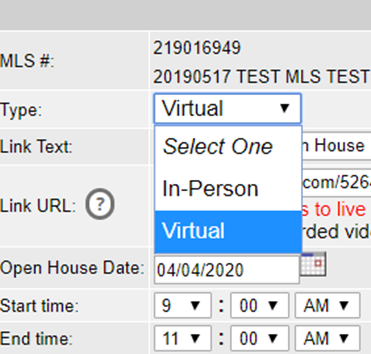 There is help text right on the Add/Edit screen to remind agents that only online streaming sources can be entered in the URL address field.  If you enter a URL that is not recognized as a live streaming/conferencing service, Flexmls will pop-up a warning. There is a link to the list of recognized URL addresses for known web conferencing services (ie GoToMeeting, Facebook Live, etc.) right on the warning bubble. 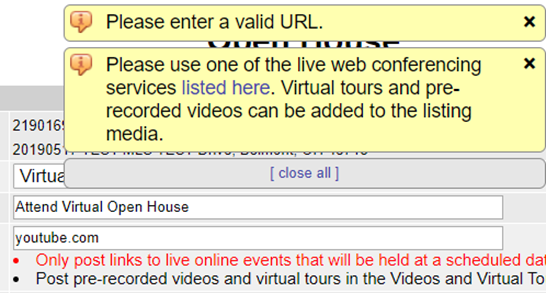 There will certainly be a few “bumps in the road” and definitely some “growing pains”, but the new Virtual Open House is here now, and here to stay. For additional information and the full details of this new feature in Flexmls, click here. Full URL – https://flexmls.com/flexmls-academy/product-news/introducing-virtual-open-houses-tours-of-homes/ Original post: 20200406
| ||||||||||||||||||||
|
Tech Tips: Removing or Adding Yourself to a Client Subscription. What does this mean?Sometimes you may want to receive the same email that your clients get with their email subscription. Doing this lets you see exactly what they see so you can better communicate and coordinate with them, like with especially high-profile clients. Other times you may decide that you do not need these emails, like with a client who is casually searching for a home with a very wide set of criteria, potentially meaning many emails. In this guide, we will teach you how to edit this setting inside the Columbus Realtors MLS. First, locate the Subscription that you want to edit email settings for.To do this, we’ll go to Subscriptions in the MLS, as seen below. 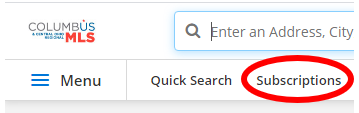 Your view may be different depending on your settings, but Subscriptions can always be found by searching in the Menu button. Simply open the Menu, click the search bar, and type “Subscriptions” to bring the option up Next, open the Subscription.Now, you simply need to click the Subscription name to open the editing page. From there, you will notice a few options at the top of the page like the Subscription name and where new notifications go to. Notice the checkbox labeled You (sender). If this is checked, you get the same listing emails your client does. If unchecked, you do not get the listing emails. By default, this is usually turned on. Once this is edited to your liking, click Save at the bottom of the page. Viola!Your email setting is now edited in just a few steps, giving you more control over your email box. Did you enjoy this MLS tip? Keep an eye out for a new one next week!
| ||||||||||||||||||||
|
MLS Policy Violation Hotline Created Do you need to report a Clear Cooperation Policy Violation?Call: (614) 528-1135Email: mlspolicy@columbusrealtors.comThe MLS Policy Violation Hotline can be used to report a Clear Cooperation Policy violation or any other MLS violation. Contact information is requested but is not required. You may submit the violation report anonymously. The voicemail recording will explain what is needed to report a violation. Violations may also be reported by email. Additional details in the form of PDFs, photos, and screenshots are extremely helpful and can be sent to mlspolicy@columbusrealtors.com. The name of the person reporting the violation will not be disclosed whether it is reported to the hotline, email, or both.
| ||||||||||||||||||||
|
MLS Entry Date – List Date Now Identified on Listing Agreement A new version of the Residential MLS Exclusive Right to Sell Listing Agreement is available now. Very important changes have been made to the date fields on the new Listing Agreement. The Delayed Showing Authorization Form has also been updated. Download New Documents Now: Delayed Showing Authorization Form Definition of Date Fields on Listing Agreement:
Additional Details and Usage of Date Fields on Listing Agreement:
Delayed Showing Authorization form has also been updated to include the wording: All dates must match listing agreement This updated language is to remind listing agents that use of the Delayed Showing Authorization to delay the showings of a listed property will require that the Showing Start Date listed on the form must match the Showing Start Date that is entered on the newly updated Listing Agreement. Why the change? There has long been confusion about the “List Date” on the MLS and the “Commencing Date” on the Listing Agreement. This was exacerbated by the Office Exclusive listings in regard to Clear Cooperation.
|
