| ||||||||||||||||||||
|
Association Contact Email Addresses – Reminder Due to the COVID-19 virus and Columbus REALTORS® staff members working from home, we are reminding our members of the best email addresses to utilize for assistance: Columbus and Central Ohio Regional MLS For MLS Technical Support/Questions on the Flexmls/Flexmls App or other MLS related software: Please contact techsupport@columbusrealtors.com For MLS Listing Questions or Corrections: Please contact mlscorrections@columbusrealtors.com For MLS Policy Related Questions/Violations: Please contact mlspolicy@columbusrealtors.com Columbus REALTORS® For Keybox/Supra: Please contact keybox@columbusrealtors.com For Membership/Billing: Please contact membership@columbusrealtors.com For Member Service Center/Store: Please contact memberservice@columbusrealtors.com
| ||||||||||||||||||||
|
Homesnap Training Update: On-Site Classes Replaced by Webinars Due to Coronavirus The recent developments with COVID-19 have necessitated changes to the upcoming Homesnap Training on March 16-17. The on-site classes have been cancelled. However, online webinars at the exact same times and dates will be offered in lieu of the in-person training. The same information that was to be covered in the classes will be covered in the webinars. Sign up now for a Homesnap webinar If you previously registered, you should have already received an email asking you to re-register for the online webinar. Updated 20200311 Homesnap’s biggest-ever update was just released! The newest version now includes new property heatmaps based on key factors like mortgage age, ownership time, and likelihood to list! It also includes home buyer contact information.
| ||||||||||||||||||||
|
MLS Rules and Regulations Updated – New Section 4.5: Inappropriate Content SECTION 4.5 INAPPROPRIATE CONTENT: Content that is inappropriate for public display may be removed by MLS staff immediately. This includes but is not limited to depictions of death, violence, or sexual content. (Adopted Feb 2020) Original Post 20200304
| ||||||||||||||||||||
|
Updates to Residential Listing Agreement The Residential Listing Agreement has been updated. Items added to Section 8:
New Section 12 has been added: 12. ELECTRONIC SURVEILLANCE DEVICES. Seller does ___ does not ___ (check one) have surveillance equipment located on the property. Seller understands that under Ohio law the seller cannot use electronic, mechanical or any other device to listen, record or otherwise acquire the content of the oral communications of other persons without the consent of at least one party to the communication. Seller agrees that if such surveillance device is present on the property that the seller will turn off any audio feature of the equipment when other persons are present on the property. This applies to all showings, open houses, and any other appointments at which prospective purchasers, real estate licensees, inspectors, appraisers, contractors or others are on the property. Seller is advised to consult with an attorney regarding the use of such surveillance devices under Ohio law. Seller also agrees to indemnify, defend and hold the listing brokerage and its affiliated licensees harmless from and against any and all claims, demands, actions, losses, damages or judgments arising out of the seller’s use of surveillance devices. Original Post: 20200304
| ||||||||||||||||||||
|
Land Trust Added to the Additional Acceptance Conditions Field Agents searching for Land Trust properties will now be able to easily identify Land Trust homes for sale. The new selection was added to help identify properties for sale that are part of the Central Ohio Community Land Trust (COCLT). The listing agent can now select “Land Trust” in the Additional Acceptance Conditions field to identify these properties. Land Trust homes are a shared equity model of homeownership. The COCLT owns the land and the homebuyer owns the dwelling. These homes will require pre-purchase homebuyer education and proof of income eligibility. Original Post 20200304
| ||||||||||||||||||||
|
Homesnap: On-Site Training March 16-17 Homesnap’s biggest-ever update was just released!The newest version now includes new property heatmaps based on key factors like mortgage age, ownership time, and likelihood to list! It also includes home buyer contact information.
| ||||||||||||||||||||
|
Realist Service Issues – RESOLVED/MONITORING 2/24/20 There was an unplanned service interruption for the Realist system from approximately 11:15am to approximately 1:15pm 2/24/2020. Below is the most recent update from our vendor:
The CoreLogic technical teams have fully restored Realist and all related services. A complete root cause analysis will be conducted to determine the cause and prevent future occurrences. Thank you for your patience and understanding as we worked to resolve the issue. We sincerely apologize for any inconvenience this has caused to you and your members.
| ||||||||||||||||||||
|
Homesnap: Contingent Properties Display Change – January 17 The public will be able to view contingent properties in Homesnap beginning January 17, 2020. Public and “claimed clients” Clients must “opt-in” to viewing the contingent properties. By default, only For Sale (active) were displayed for public searches prior to this change. The change was made to allow the public to see contingent listings because there was confusion being created when listings in Contingent status did not appear on the map in Homesnap. The public did not have access. This led them to wonder why a property had a “For Sale” sign in the yard, but did not appear in Homesnap. This change will allow them to view the contingent properties. To enable display of Contingent properties(as public/client):
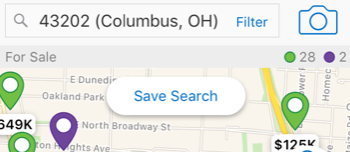 2. Click Status on the filter screen. 3. Click the checkbox to manually enable the “Contingent” status below For Sale. 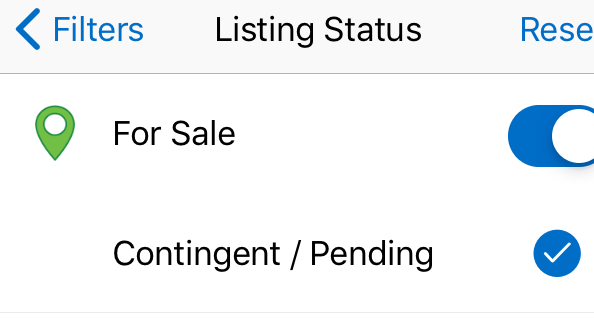 4. Click See Results at the bottom to apply. Once enabled, Contingent status listing will appear on the map as green icons. This is the same green icon that appears for Active listings. Contingent listings will also display a yellow Contingent flag on the corner of the photo at the top of the full listing display screen.
| ||||||||||||||||||||
|
Green Features Checklist – Revised – December 3 The Green Features Checklist has been revised and updated. The new version is based completely upon standardized fields from the RESO Green Marketing Group. Additional Green certifications have been included on the new version of the form. A glossary of definitions explaining the certifications is also included. Green Features Checklist revision summary:
| ||||||||||||||||||||
|
Attention MLS Brokers – MLS Committee Election On November 25, 2019, eligible MLS Participants (Broker of Record/Designated REALTOR®) were sent a unique link to their online ballot for 2020 MLS Committee members. If you are the official MLS Participant (Broker of Record/Designated REALTOR®) for your company and did not receive this email, please check your Junk (or spam) folders. An alternative would be to visit www.CRelections.com, click ‘Help’ and enter your name and email address. Provided that your email address matches the one we have on file, your voting credentials will be emailed to you within a few minutes. Voting begins: November 25 – 12:00pm Voting ends: December 5 – 11:59am Original Post: November 25, 2019
|
