| ||||||||||||||||||||
|
New MLS Selections: Leasehold, Income Restricted, and Land Trust Some properties in MLS are not traditional Single Family homes where the buyer owns the land and the structure. Some properties may also have income requirements that must be verified to determine eligibility. There are now 3 new options in the MLS to help identify and search for these properties.
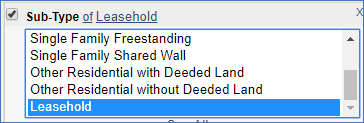 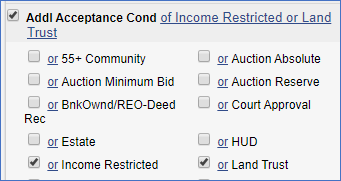 Please contact the MLS department if you have any questions. MLS Policy questions – mlspolicy@columbusrealtors.com MLS Listing Entry questions – mlscorrections@columbusrealtors.com
| ||||||||||||||||||||
|
Less Password Changes in MLS! The password reset requirement has been extended to 180 Days These are trying times. There is plenty of stress without having to change your MLS password 4 times every year. What if password changes only happened every 180 days instead of the current 90 days? Would that really hurt anything? No, probably not. Let’s do it. Recent studies in the technology and data security sector have pointed to a couple of recommendations regarding passwords. The first recommendation is that passwords be more difficult to hack. A short password consisting of a few letters and numbers is not enough. A longer password of nonsensical words is harder to guess or hack. The second is that frequent password changes don’t really help that much. In fact, they lead to simple passwords that are easier to remember and easier to steal. Your MLS login will no longer force-change your password every 90 days. You will still have to change your password, but only twice a year. Please make your new password longer and more secure as described below. This will make your password safer as you take advantage of the “less password changes per year”. What does an insecure, weak password look like?
What about stronger, more “secure” passwords?
Takeaways:
| ||||||||||||||||||||
|
Realist Video Available Did you miss the Realist 2020 webinar on April 13th? The webinar was recorded live on April 13, 2020 with an audience of central Ohio real estate professionals. Watch the recording to learn about the new features available now in the new version of Realist for 2020. Please note: You will be taken to a “registration” page that will require you to enter a name and email to watch the video. 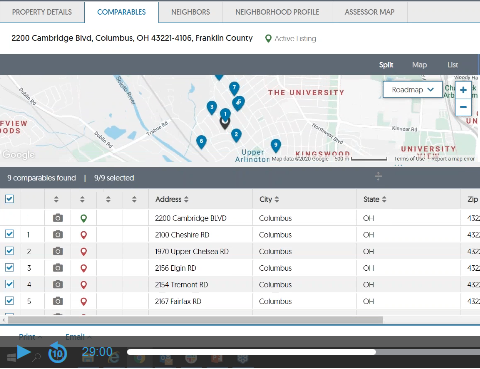
| ||||||||||||||||||||
|
Android Users: Flexmls Pro Login Issues *This only applies to Flexmls Pro used on Android Devices* We have had many reports recently of Android users having issues with Flexmls Pro. These issues have been reported to FBS and it is not just in our market the issue appears. If you are seeing an issue, please continue to some steps for a resolve. When FBS provides a fix, it will likely come as an update to the app you’ll simply download via your Play Store updates. The Issue If you are a user of FBS’s app, Flexmls Pro and are seeing white or blank screens when attempting to log into your app to view the MLS, here are some instructions that can help. Please note, with Android based devices, these instructions may not *exactly” match your particular device. Please use these instructions below as a basic guild line.
Here’s an example from a real device: The below is based off a Google Pixel 3A XL. Please note, your device may be similar but not exactly the same:
This link will take you to a generic page that goes over the generic steps for the process above. This link is NOT about Flexmls Pro specifically, but the general steps you can use on Android. This link provided for visuals. Link is also listed below:
| ||||||||||||||||||||
|
New Realist for 2020 – What’s New About It? Register now for New Realist Training webinar to be held live this coming Monday. Date: Monday, April 13, 2020 Learn about the new features, new interface, and updates that are available now in Realist. Adobe Flash is no longer a required install in order to use Realist! IMPORTANT: Please visit the link and make sure your computer is ready to view the webinar PRIOR to the start time.
| ||||||||||||||||||||
|
Virtual Open Houses: Video Overview Now Available Video now available: Add Virtual Open House links in MLS. Original post: Your Columbus REALTORS® MLS staff has been working hard to bring you innovative options to keep our central Ohio housing market strong. We are happy to announce that our MLS vendor has responded to industry needs with a new option: Virtual Open House links. How is a Virtual OPEN HOUSE different than a Virtual TOUR? CAUTION: Get written permission from the seller BEFORE you start streaming! Show that home virtually instead of in-person! 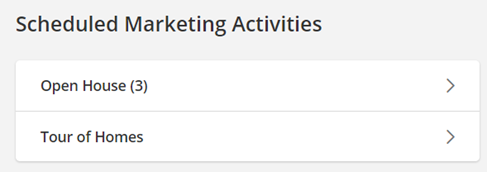 As an alternative to in-person open houses, you can now enter a link to a STREAMING, Virtual Open House using a variety of online communication services such as Facebook Live, GoToMeeting, or Microsoft Teams. Homebuyers or agents can join your Virtual Open Houses/Tour of Homes. The live attendees can view video streamed from your phone and ask questions during the “virtual walkthrough”. 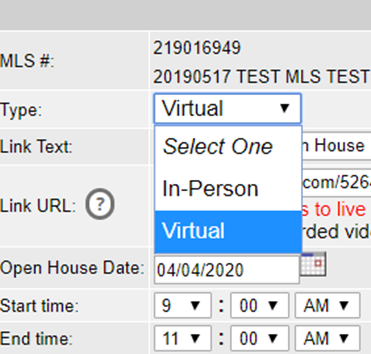 There is help text right on the Add/Edit screen to remind agents that only online streaming sources can be entered in the URL address field.  If you enter a URL that is not recognized as a live streaming/conferencing service, Flexmls will pop-up a warning. There is a link to the list of recognized URL addresses for known web conferencing services (ie GoToMeeting, Facebook Live, etc.) right on the warning bubble. 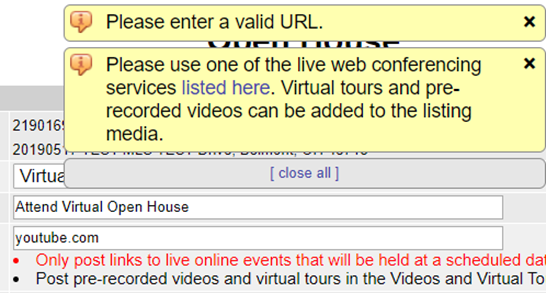 There will certainly be a few “bumps in the road” and definitely some “growing pains”, but the new Virtual Open House is here now, and here to stay. For additional information and the full details of this new feature in Flexmls, click here. Full URL – https://flexmls.com/flexmls-academy/product-news/introducing-virtual-open-houses-tours-of-homes/ Original post: 20200406
| ||||||||||||||||||||
|
Survey – Video, Virtual Tours and Virtual Open Houses Attention Commercial & Residential REALTORS®
| ||||||||||||||||||||
|
Realist 2020 Update is here! Realist 2020 – Improvements, New Features, and HTML Realist has released their 2020 edition of their system and it is live now here for Columbus and Central Ohio Regional MLS! The most notable update is the removal of Adobe® Flash®. The updated, Flash@-free Realist environment is expected to be more responsive and with a much more modern user interface. The basic navigation and functionality are very similar to the old versions. This will help maintain a familiarity which will make it easy to learn and use the new version. Realist has added several NEW features in additional to improvements and removing the Flash® install requirement. To Help with the transition, Realist has made available several video resources. As Realist releases additional help and resources, we will make these available on an updated version of this post. See the links below: An Introduction To The New Realist – Great place to start giving an overview over the new system. How To Use The Realist Search Tools Working with Realist Search Results Exports and Mailing Labels in Realist Understanding The Realist Property Detail Report Understanding The Realist Map Tools As with anything new, there will of course be bugs. If you see something, please let us know so we can provide feedback to Realist. You can reach out to us via email at techsupport@columbusrealtors.com
| ||||||||||||||||||||
|
Realist Update Coming: No More Flash Realist 2020 – Improvements, New Features, and HTML The Realist public records software is scheduled for a major update this year. Updates include a new user interface, improvements and new functionality. The current estimate for release is April of 2020. The most notable update is the removal of Adobe® Flash®. The updated, Flash@-free Realist environment is expected to be more responsive and with a much more modern user interface. The basic navigation and functionality are very similar to the old versions. This will help maintain a familiarity which will make it easy to learn and use the new version. Realist has added several NEW features in additional to improvements and removing the Flash® install requirement.
| ||||||||||||||||||||
|
Updated Member/Office Search User Interface. Our MLS Software vendor, FBS, has rolled out to our market their updated user interface for the Member/Office Search. The rollout began back in February and they slowly were updating each MLS they serve. See the link below for details direct from FBS on the new functionality of the search: https://flexmls.com/flexmls-academy/product-news/updated-ui-for-office-member-search/
|
