| ||||||||||||||||||||
|
CDOM to be Removed from MLS reports PLEASE NOTE: This change affects only the single field, CDOM. The regular display of Days on Market (DOM) and full MLS listing history will not be affected by this change. The MLS Board of Directors has voted to remove the Cumulative Days on Market (CDOM) display field from the default reports in MLS. This change will occur in phases over the coming days and weeks. The process should be complete in early June. Days on Market (DOM) will continue to be displayed on MLS reports. The current calculation of DOM will not be modified. No listing history will be removed from any listing. All changes currently tracked by MLS listing history will continue to be displayed on the history screen in MLS. The feasibility of completely removing CDOM from the MLS (as opposed to simply not displaying it) is to be discussed by the MLS Board of Directors in the future.
| ||||||||||||||||||||
|
Land Users: CIE Export field is now required Do you have commercial land listed on MLS? Do you want it to be displayed in CIE/Catylist? The CIE Export Y/N field was recently added to Land property type. Please make sure to select “Yes” if you want to deliver your listing to Catylist from MLS for all Commercial, Office, Industrial and Business Op listings and now commercial LAND listings. If the listing should not be made available to CIE/Catylist, simply select “No”. NOTE: CIE Export is not intended for Residential lots. COCIE (CIE) is the Central Ohio Commerical Information Exchange. “CIE Export Y/N” is a required field in MLS for all Commercial, Office, Industrial, Business Op added to MLS in June 2018. It is now available for Land as well. The field determines whether the listing will be made available to Catylist. The field appears on the Edit Listing screen below the Printing Services field on the “Details” tab. The CIE Export field does not display on listing reports. PLEASE NOTE: Summary:
| ||||||||||||||||||||
|
Flexmls Web: Quick Search Screen Improvements – April 18 FBS will make a couple of changes to the search screen in Flexmls on April 18, 2019. These changes are based upon user feedback after the recent update. New Search Detail Pop-up The ability to quickly see the currently selected criteria using the “i bubble” at the top left was removed with the recent Flexmls update. This Search Detail functionality will return in a new location. You will now access the Search Detail pop-up by clicking the 3-dot icon at top right then Search Detail in the drop-down menu. 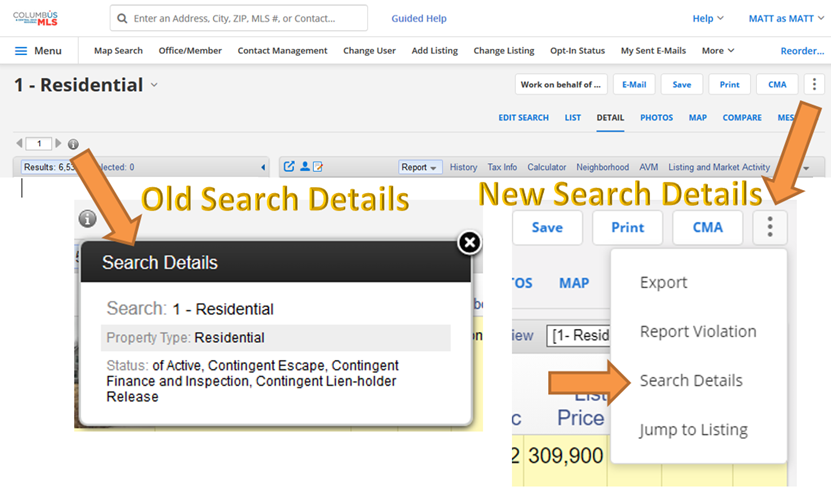 Empty Space at the Top of Search Screen Removed The redesigned layout of the search screen created a blank, unused gray bar at the top of the search screen. This blank gray area will be removed to allow additional space for map search and criteria fields. 
| ||||||||||||||||||||
|
Policy Reminder: Don’t Forget to Upload Required Documents for Your Listing Several fields in the MLS, when marked “yes”, require the appropriate document be uploaded and attached to the listing. It is very important to include these documents to accurately describe the additional features of the property for sale. These documents help to inform all potential buyers of these property-specific features. This will increase the perceived value of the property for sale. Failure to upload these required documents can also result in an MLS fine. Review the official MLS Policy below. 1.02.15 – Required Document Not Attached to Listing Fine with Warning Documents that are required to be attached to listings must be uploaded within 5 business days of the listing entry date. These documents include:
The required documents can be found at www.columbusrealtors.com on the MLS Worksheets, Forms, & Contracts page.
| ||||||||||||||||||||
|
Homesnap Training at the Real Estate Exchange – April 17 Did you miss the live Homesnap training last month? Here is your chance to get up-to-speed on Homesnap. There will be three live, 30-minute Homesnap training break-out sessions at the Real Estate Exchange (Formally Sales Associates Day) on April 17th. Register Now to attend the Real Estate Exchange 2019 on April 17th. 
| ||||||||||||||||||||
|
Flexmls Pro for Android and Flexmls Mobile Web: Saved Search Changes – April 11 The Saved option on the home page will be renamed Saved Searches to match the labeling in Flexmls Web. 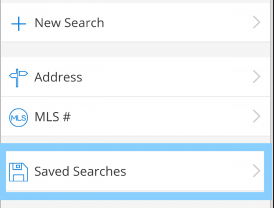 Links have been added at the top of the Saved Searches page to easily access favorite and draft searches. You can sort the list of saved searches by most recent, least recent, or search name. A saved search can easily be marked as a favorite by clicking on the star grey star. 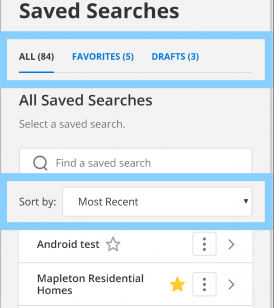 The More menu (three dots) to the right of each search gives you one-click access to view details, rename, or delete that saved search. 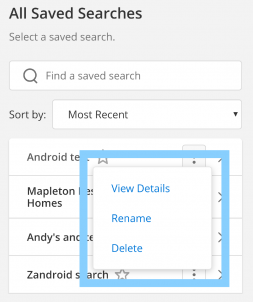
| ||||||||||||||||||||
|
Flexmls Web: Saved Search Name Will Now Be Displayed – April 4 Current Behavior: 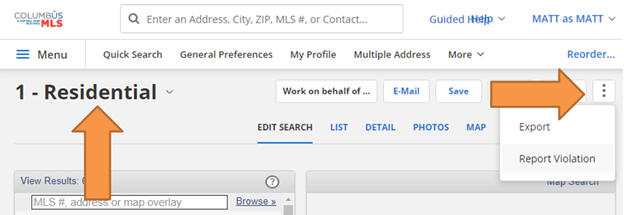 Updated Behavior April 4th: 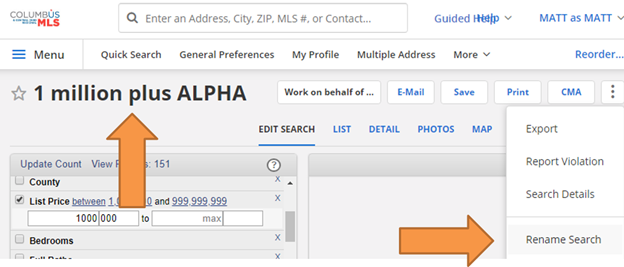
| ||||||||||||||||||||
|
Listing Data Checker – New MLS Correction Email and Tracking System Listing Data Checker (LDC) will be added to the Columbus and Central Ohio Regional MLS on April 2nd. You may receive notices to make corrections to your listings that look different from previous MLS notifications. LDC will expedite and automate the identification of listing errors. This will dramatically reduce the amount of time required to catch and notify members of incomplete or inaccurate information within the MLS. LDC will also standardize the process of tracking and reporting of MLS Policy infractions. Listing Data Checker compares MLS listing data to the public records data in Realist. Some fields will automatically generate an email notifying the listing agent of the incorrect data found on the listing. LDC also allows MLS staff to manually find, notify, and correct listing errors based upon the comparison of Realist and MLS listing data. Integration of the Listing Data Checker system will be a work in progress. There may be some incorrect notifications of listing errors and other unforeseen issues. Please contact the MLS department if you have any questions or feel that you have received an erroneous notification of incorrect data on your listing.
| ||||||||||||||||||||
|
Homesnap University – Online Training If you missed the in-person training and live webinar, you can still get all of the information you need to get up-and-running with Homesnap. Check out Homesnap University to watch short topical videos, recorded training webinars, and printable PDFs. Best of all, you can pause, rewind, and play the part you missed during the classes! Homesnap University: Click here to watch the recorded version of the Columbus webinar that was offered March 5, 2019. You will have to “register” to view the video online. Homesnap customer support: Columbus Homesnap Challenge What is the Broker Public Portal and its relationship to Homesnap? Buyer’s agents are also protected because they can “claim” their clients within Homesnap. When a “claimed” client views a listing, they will see their agent’s contact information and be able to contact their agent directly from Homesnap. The BPP partnered with Homesnap to provide the software interface for the public and agents to the BPP database. The Homesnap app and website. What is Homesnap Pro: Video Testimonials:
| ||||||||||||||||||||
|
Homesnap Webinar Tuesday 10am Did you miss the in-person Homesnap training around Columbus? No problem. There is still plenty of training available. Sign up for the March 5 webinar or visit Homesnap University any time to learn how to connect with your client through Homesnap. Homesnap Webinar Training: Homesnap University: Homesnap customer support: Columbus Homesnap Challenge Video Testimonials: Homesnap Pro is the professional version of the Homesnap consumer platform built specifically for real estate agents. Through integrations with MLSs and brokers through the Broker Public Portal, Homesnap Pro provides you with real-time mobile access to your most valuable asset: MLS data, enhanced through data intelligence. Millions of consumers use Homesnap to search for homes every month, and each time they explore your listing, you get the lead instantly from Homesnap for free. What is the Broker Public Portal and its relationship to Homesnap? Buyer’s agents are also protected because they can “claim” their clients within Homesnap. When a “claimed” client views a listing, they will see their agent’s contact information and be able to contact their agent directly from Homesnap. The BPP partnered with Homesnap to provide the software interface for the public and agents to the BPP database. The Homesnap app and website.
|
