| ||||||||||||||||||||
|
Realist Downtime: System Maintenance – Saturday, January 26 – 11pm CoreLogic has scheduled system maintenance this weekend, Saturday, January 26, 2019 from 11:00pm to 1:00am. During this time, Realist may be intermittently unavailable.
| ||||||||||||||||||||
|
ePropertyWatch: Free for Columbus REALTORS members Looking for an easy way to stay in touch with past clients? ePropertyWatch™ is a now a FREE member benefit for all Columbus REALTORS MLS members! Don’t let your clients forget who you are. ePropertyWatch is a an automated email system that keeps you “front and center” in the minds of your past clients. It will send a monthly report full of information on their home and neighborhood, including information on their home’s value, nearby listings and transactions, local trends, and more.
Watch a training video (You must enter your name and email to view): Email technical issues or for help activating ePropertyWatch: Activate your ePropertyWatch account now: Watch a short video introduction to ePropertyWatch.
| ||||||||||||||||||||
|
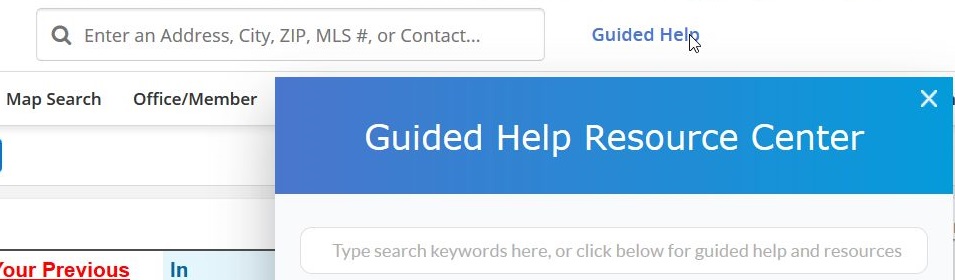
Coming January 23: Guided Help for Flexmls – Your 24/7 Virtual Trainer Right on the MLS Screen On January 23rd, Flexmls will release the new Guided Help Resource Center. This new in-line training resource will allow all users to increase their knowledge, at their own pace, and on their own schedule. It is like a 24/7 virtual trainer built right into the Flexmls system. Anytime you need help or tips you can access the Guided Help without even leaving the MLS in your web browser. Guided Help Search Bar Access the new Guided Help by clicking on the Guided Help link at the top of the Flexmls window next to Quick Launch. Type a phrase or topic you’d like to search: specific Flexmls features, guided help tutorials, feature specific help pages, and more. Multiple resources appear on the screen as soon as you start typing.
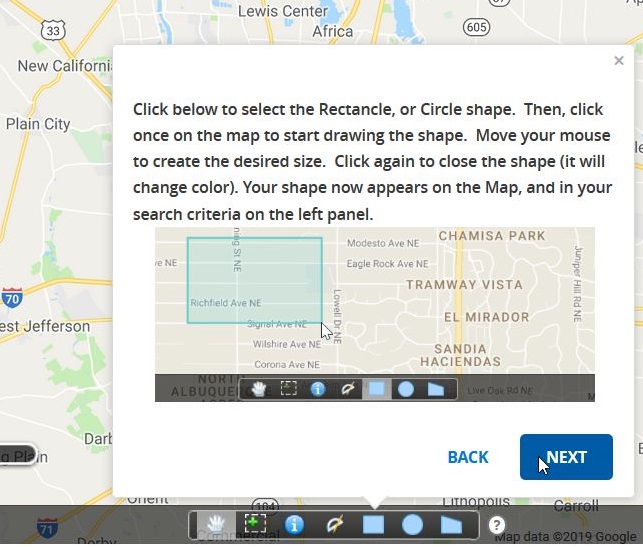
Guided Help Tours With Guided Help, you don’t have to wait around for answers or ask someone else how to do something in Flexmls. The new Guided Help tours put instruction just a click away, right on the MLS! Just select a topic to learn more about Flexmls. You will instantly be guided through the process, step-by-step.
Guided Help Smart Tips You’ll notice small question marks with a circle around them sprinkled throughout Flexmls. Click or hover on a smart tip to learn more about a particular feature. Want to preview Guided Help? Watch this short video presentation.
| ||||||||||||||||||||
|
ePropertyWatch: Free Webinar This Friday – 11am – Get Up to Speed Fast Free, live online training Friday, January 18th: Looking for an easy way to stay in touch with past clients? ePropertyWatch™ is a now a FREE member benefit for all Columbus REALTORS MLS members! Don’t let your clients forget who you are. ePropertyWatch is a an automated email system that keeps you “front and center” in the minds of your past clients. It will send a monthly report full of information on their home and neighborhood, including information on their home’s value, nearby listings and transactions, local trends, and more.
Watch a pre-recorded training video: Email technical issues or for help activating ePropertyWatch: Activate your ePropertyWatch account now: Watch a short video introduction to ePropertyWatch.
| ||||||||||||||||||||
|
Don’t Let Your Previous Clients Forget You! ePropertyWatch – New FREE MLS Member Benefit Looking for an easy way to stay in touch with past clients? ePropertyWatch™ is a now a FREE member benefit for all Columbus REALTORS MLS members! Don’t let your clients forget who you are. ePropertyWatch is a an automated email system that keeps you “front and center” in the minds of your past clients. It will send a monthly report full of information on their home and neighborhood, including information on their home’s value, nearby listings and transactions, local trends, and more.
Two ways to learn about ePropertyWatch NOW: Free, live online training Friday, January 18th: Watch a pre-recorded training video NOW: For Technical Issues or help activating ePropertyWatch: Activate Your ePropertyWatch Account Now: Watch a short video introduction to ePropertyWatch.
| ||||||||||||||||||||
|
Re-listing a property to get a 2019 MLS number – Listing must be off the market for 30 days. We’ve started a new year. Some listing agents are taking their listings off the market and re-listing them immediately to get a shiny new 2019 MLS number. Other listings expired on December 31st. Regardless, please be careful to follow MLS policy or that new MLS number may cost you. MLS policy requires that a listing be off the market for at least 30 days before it can be re-listed with a new MLS number. You can review MLS policy 1.02.07 below to ensure you are in compliance.
1.02.07 – Re-Entry of Same Property Prior to 30-Day Off-Market Warning, $100, $200, $500 Property with the same parcel number may not be re-entered by the same agent with the same company within 30 days or less. The thirty-day relist policy also applies to co-listed properties. This policy applies unless (1) it has been in the status of Cancelled, Temporary Withdrawn or Expired for 30 consecutive days or longer, (2) it has been in the status of Under Contract, Contingent Finance/Inspection, Contingent Escape, Contingent Lien-Holder Release or Leased for 90 consecutive days or longer (3) it has acceptable verification documents that can be provided to the MLS that serve to identify a new owner. Acceptable verification documents are (a) recorded deed, (b) proof from auditor (c) legal title change or (4) sending MLS a completed Thirty-Day Relist Waiver Form for Waiver of MLS 30-day Relist Policy and New MLS Listing Number
| ||||||||||||||||||||
|
MLS Policy Update: Closed listings must be marked Sold in MLS within 96 hours The MLS policy regarding Closed listings in MLS has changed. The listing must be marked Sold on MLS within 96 hours of the closing and funding date. The time was extended from 72 hours but the exclusions for weekends and federal holidays were removed. The full text of the MLS Policy 1.02.04 as modified appears below. 1.02.04 – Non-Reported Closing (Solds) All sales closed must be entered within 72 96 hours from the actual closing/funding closing and funding date except if the 72-hour deadline falls on weekends and federal holidays whereby the closing information is to be entered the following business day except HUD listings that are to be updated within 72 96 hours of either (1) Asset Manager’s notice of closing or (2) the county auditor or Realist published sale information for the property.
| ||||||||||||||||||||
|
Flexmls user survey You may have also received an email inviting you to participate in this survey. FBS, the creators of Flexmls, always wants to learn as much as they can from people that use Flexmls. Currently, they’re seeking opinions from a large group of users to learn more about their opinions on how Flexmls looks. This 10-minute survey is designed to encourage you to think about how Flexmls looks. Your responses will provide guidance and insight on which areas of the product to refresh. FBS is also donating $1 for each survey completed (up to a max of $500) to the Ventura County Community Foundation for the fire recovery efforts in California.
| ||||||||||||||||||||
|
Resolved 12:01PM – System Slowness – High system load Update: 12:01 – From FBS Service has recovered and we’re monitoring everything closely. As of 11:51am, our vendor, FBS, has notified that they are experiencing high system load for the Flexmls Web system. You will likely see slowness in browsing the website or preforming any standard action. At this time, no ETA has been given for the resolve.
| ||||||||||||||||||||
|
Realist Maintenance Downtime: Saturday, December 1 – 11pm CoreLogic has scheduled system maintenance and patching on several servers this weekend. During this time, Realist may be intermittently unavailable. Downtime Schedule:
|