| ||||||||||||||||||||
|
Upcoming Flexmls Training Webinars Offered by FBS Flexmls training webinars offer live, online training on a variety of topics. Below are the latest offerings through October. Click the link beside the date and time for the webinar you wish to attend. You will be taken to a registration page for that webinar. Note: All basic functions of the Flexmls system will be identical to those used in the Columbus MLS but the exact field names may be different. Attendees will be from across the country and the specific MLS used for the demonstrations will likely be from other cities, not Columbus. Click a link below to register:8/29 – 3pm – 60 min. 9/5 – 12pm – 30 min. 9/26 – 12pm – 30 min. 10/11 – 11am – 60 min. 10/30 – 2pm – 30 min.
| ||||||||||||||||||||
|
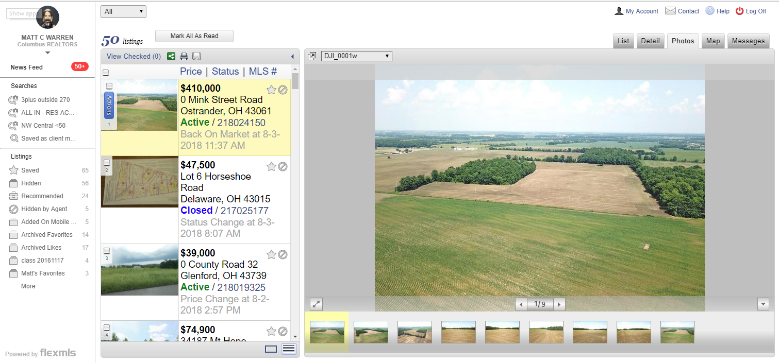
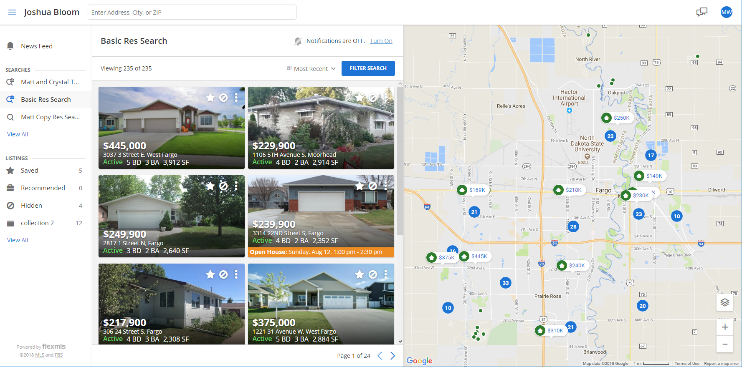
Update – Video Available – New Optional Client Portal Design – September 2018 VIDEO OF NEW PORTAL: Click here to see a video preview of the new portal. VIDEO OF ENABLING NEW PORTAL AND SETTINGS: Click here to see a video of the New Portal Settings screen and how to enable the new portal. Would you like to download or print a copy of this New Portal announcement? Click here to view the PDF. A new, updated Portal interface for clients will be made available in flexmls in September. The new Portal (aka P2, if you want to be “trendy”) is more visual and easier for clients to navigate. It will have larger, more prominent photos. Old Portal: New Portal: Update – Agent Settings for the new Portal:The Portal Preferences page looks very different when the new Portal is enabled. There are some changes as well. Some settings are removed. The basic layout of the settings is a new, collapsed view. Each section of the settings can be expanded by clicking the section you want to modify. Three New Preferences:
Renamed Preferences:
Removed Preferences: Some preferences have been removed. These include Start Position, Detail, Business Card and several others. Since these are incorporated into the default design of the new Portal, there is no customization. These items will always be displayed in their new, “P2”/New Portal layout. Changes in Contact Management: The View News Feed option allows the agent to work on behalf of the client. The agent can see the portal, mark favorites, hide, and recommend listings. NOTE: Even if the new portal is enabled, the agent will see the Classic Portal layout when they work on behalf of the client. Simplified settings when mailing Public Listings: The manual email screen is simplified when emailing public versions of a listing. Some of the Classic Portal settings don’t apply to the new layout. When a manual email of the public version of the listing is sent, the recipient views the listing in the new portal format (even if they are not using the Portal itself). This ensures that all listings from Flexmls follow the same format/design–keeping the client’s user-experience the same for all listing updates (subscription emails, manually emailed listings, and portal). NOTE: Private versions of the email will still have the options that agents are used to seeing. How do I enable the new portal? After the New Portal is enabled to all users in September, you will see a button on Portal Preferences. The large, blue button will read, “Try the New Flexmls Portal”. As soon as you enable the New Portal, ALL of your clients will have the new interface. Reminder: Switching back and forth repeatedly would be very confusing to the clients.
Things to note about the new Portal:
Would you like to download or print a copy of this New Portal announcement? Click here to view the PDF.
VIDEO OF NEW PORTAL: Click here to see a video preview of the new portal.
If you prefer to see screenshots of the new functionality, here you go: New “Contact Agent” button appears at the top of each listing report.
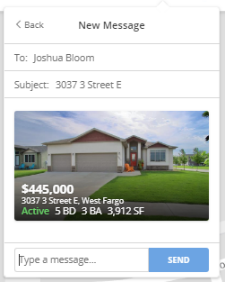
Simplified “send” box appears to allow client to contact their agent quickly.
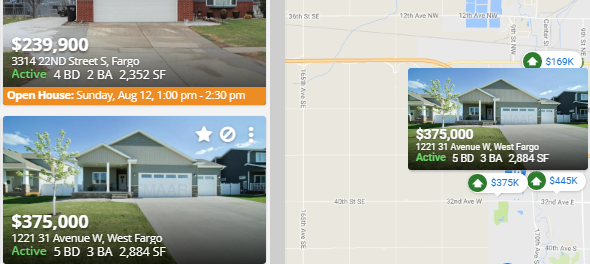
Hovering over a photo on the new Portal will cause the photo to “pop-up” over the property on the map.
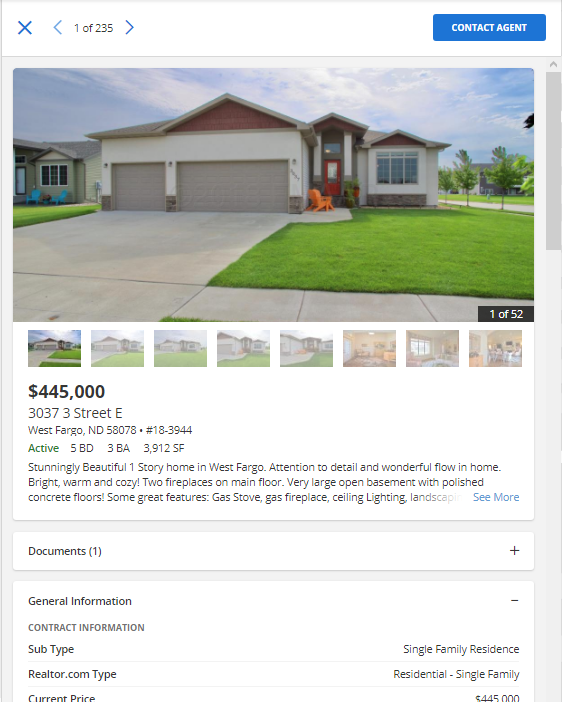
Clicking on the photo will take the client to the photo viewer and listing information for that property.
Some considerations before switching to the new Portal:
| ||||||||||||||||||||
|
Now available! August 2018 RPR Webinars RPR has recently provided a list of upcoming webinars for August 2018. The links below will take you to RPR for the specific event for registration. Note that it appears that many of these events have multiple potential dates to register. Residential: Get the Most out of the RPR/zipForm® Partnership Pre-listing Checklist: Use RPR to Nail Your Next Listing Presentation Open House Tips & Tricks from RPR RPR for Residential Investment Analyses Design and Deliver a Successful Buyer Tour With RPR Commercial Webinar Recordings: Introduction to RPR Commercial RPR Mobile™ for Commercial Practitioners Adding Value to Multifamily Investments Through Renovations and Refinancing Broker/Owner Workshops: Introduction to RPR’s Broker Tool Set RPR Overview for Broker/Owners and Managers RPR Data Tool and Market Reports
| ||||||||||||||||||||
|
Reminder – Policy for Buyer-Related Comments A change was made in 2016 that affects what can be said about listings that are “Back on the Market” because of buyer related matters. The policy is listed below: 1.02.13 – Comments Specific to Buyers in the Property Description Field Comments specific to buyers or buyer-related information, including financing concerns, are not permitted in the Property Description field. The comment “Back On Market – See Agent to Agent Remarks” is permitted. MLS staff is authorized to delete wording as needed to make the Property Description compliant with this policy. The policy will be effective Immediately with enforcement beginning November 1, 2016 Some examples of phrases that are not permitted are listed below: Back On Market – Buyer’s Financing Fell Through Back On Market – Buyer’s Unable to Perform Back On Market – Buyers Back Out of Contract Note: the examples above are not all inclusive. In general, any comments relating to the potential buyer and/or their part of the transaction can not be used. For your review you can always download the latest version of the MLS Policy Violation Manual. The manual can be downloaded in PDF format here. If you have any questions if a phrase is acceptable or not please contact the MLS staff to verify policy compliance. email mlspolicy@columbusrealtors.com or call 614-475-4000
| ||||||||||||||||||||
|
Commercial Users: Have you set CIE Export field to Yes? Please make sure to select “Yes” if you want to deliver your listing to Catylist from MLS for all Commercial, Office, Industrial and Business Op listings. “CIE Export Y/N” is a required field in MLS for all Commercial, Office, Industrial and Business Op listings entered into the MLS. It was added to MLS in June 2018. The field determines whether the listing will be made available to Catylist. The field appears on the Edit Listing screen below the Printing Services field on the “Details” tab. The CIE Export field does not display on listing reports. PLEASE NOTE: Summary:
| ||||||||||||||||||||
|
Do You Use Online Bidding? Changes to the Auction/Online Bidding and Additional Acceptance Conditions fields The Auction field has been relabeled “Auction/Online Bidding” to accommodate the selection of “YES” in this field for online bidding-type auctions. This change was made because the State of Ohio does not recognize online auction services as traditional auctions. Help text has been added for the newly relabeled “Auction/Online Bidding” field as well as the “Additional Acceptance Conditions” field. This help text will appear on the add/edit screen beside the fields these fields. The text is intended to promote proper usage of these fields. It will also clarify the label change of the Auction field. The exact help text appears below.
| ||||||||||||||||||||
|
Realist Downtime: Scheduled Maintenance – Thursday, July 12, 1:00am A Realist update is scheduled for the early morning of Thursday July 12th, 2018. Realist may be intermittently unavailable between 1:00 AM and 5:00 AM during the installation process.
| ||||||||||||||||||||
|
Holiday: Closing Early Tuesday 7/3 at 4:00pm; Closed Wednesday 7/4 for Independence Day The Columbus REALTORS® association headquarters will close early at 4:00pm on Tuesday, July 3rd and all day on Wednesday, July 4th in observance of Independence Day. The association will open for normal business hours on Thursday, July 5th at 8:30am. Schedule:
| ||||||||||||||||||||
|
Video and Audio Recording: what is allowed? Video and audio surveillance is everywhere. It’s on the streets and highways, in stores, in cars, and ever more frequently inside private homes. When taking a client into a home, it is important to understand that nanny-cams and pinhole cameras may be recording everything you say and do. While you can’t blame a homeowner for wanting to keep an eye on their property, you must be aware of the privacy concerns of the buyers as well. View the full, state-by-state “Video and Audio Surveillance State Law Survey” on the NAR website here. An excerpt from the NAR website regarding the laws governing surveillance in the state of Ohio appears below. Summary for Ohio: Statute – Communications: Statute – Videos:
| ||||||||||||||||||||
|
CIE Export Y/N: New Catylist field for Commercial, Office, Industrial and Business Op Listings “CIE Export Y/N” is a new, required field in MLS for all Commercial, Office, Industrial and Business Op listings entered into the MLS. The field determines whether the listing will be made available to Catylist. The field will appear on the Edit Listing screen below the Printing Services field on the “Details” tab. The CIE Export field will not display on listing reports. The release of the new field is scheduled for June 4, 2018. It may take a few weeks for CIE/Catylist to begin adding the listings in Catylist after the new field is created. PLEASE NOTE: The new field will be back-populated “NO” for all existing listings. All newly added listing will require the agent to manually select Yes or No before saving the listing as Active in MLS. It may require some existing listings to enter Yes/No when edited, until all existing listings are back-populated with “no”. Summary:
|