| ||||||||||||||||||||
|
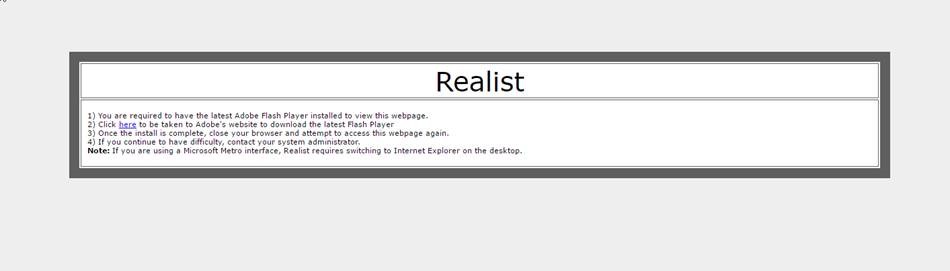
New Google Chrome version 57 – Changes to Adobe Flash affecting Realist 03/14/2017 This change affects both Mac & PC. With the release of Google’s new version of Chrome, 57, Google has changed the way that Adobe Flash processes within the browser. For those that use the Realist system within Chrome, you’ll need to make some adjustments to your browser to continue to let Realist run. If you do not make this change, you’ll receive the following error when trying to utilize Realist:
Below, you’ll find some instructions on adding this exception to Chrome’s settings. If you need assistance, please contact technical support at 614-475-4000 Mon-Fri 8:30a-5:00p or by email at techsupport@columbusrealtors.com To add Realist as an Adobe Flash Exception.
| ||||||||||||||||||||
|
Flex Mobile Web – New Design – March 8 On March 8, Flexmls Mobile Web will have an updated design for its search screens. The new design does not change any functionality and it will appear for searches in Flexmls mobile web as well as the search function for client portals on Flexmls mobile web. The new design is based on the current interface for the new Flexmls portals, reducing the differences between platforms. Flexmls Mobile Web for Agents
| ||||||||||||||||||||
|
Changes to Exclusive Right to Sell Listing Contract – Section 6 The Exclusive Right to Sell Listing Contract has been modified. The following text has been added at the end of the Section 6: Seller acknowledges that photos and/or videos may be taken of the property. It is the intent of the MLS committee that this change serve as notification to sellers that photos and videos may be taken for multiple purposes including marketing and comparison. They may be taken by various parties such as agents, inspectors, appraiser, and even prospective buyers. These changes are included in the latest version of the Exclusive Right to Sell Listing Contract. The version of the form can be identified by the revision date printed at the bottom of the form. The latest revision that includes this change will be labeled “2/17”. Full text of section 6:
| ||||||||||||||||||||
|
Realist Downtime: Scheduled Maintenance – Saturday, Feb. 18 – 11pm CoreLogic will be performing system maintenance the evening of Saturday, February 18, 2017 beginning at 11:00 PM through 4:00 AM Sunday morning. Realist may be intermittently unavailable during this maintenance period.
| ||||||||||||||||||||
|
New Function: Delete Multiple Photos – February 21 On February 21, you will be able to delete multiple photos (up to 50 at once) from the Photo Upload screen. Here’s how it will work: Please note: you will not be able to delete the primary photo. The option to delete multiple photos will only be available from the current Photo Upload screen. If you use the Original Photo Upload screen, you can only delete one photo at a time.
| ||||||||||||||||||||
|
New Hot Sheet Design Layout – February 21 On February 21, the layout of the Hot Sheet page will be updated to make it more modern. This is part of an ongoing effort by FBS to freshen the user interface in Flexmls and make it more usable. To run the hot sheet, go to Daily Functions menu and select Hot Sheet. The new hot sheet page has two sections: the 24-Hour Hot Sheet at the top of the page and the Custom Hot Sheet at the bottom of the page. 24-Hour Hot Sheet Please note, if you run the 24-Hour Hot Sheet on a Monday, it also displays listing events from the past 72 hours (over the weekend). Custom Hot Sheet
| ||||||||||||||||||||
|
Other Residential – New Sub-Types in Residential and Res Rental Residential and Res Rental property types: two new “Sub-Types” have been added. The new sub-types are:
****Units that do not meet these criteria (or criteria for another property type) cannot be listed
| ||||||||||||||||||||
|
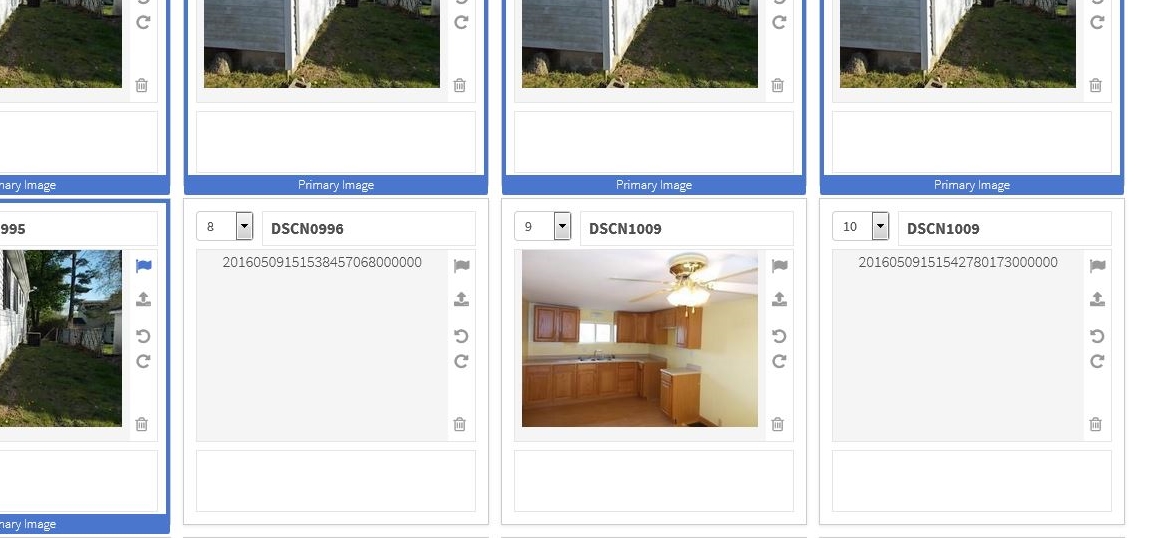
RESOLVED: Photo Uploader Issue 2/2/17 – We are seeing that the Photo Upload functionality looks to be restored. Original Post: Starting at around 11:45am today, we were made aware of some issues with the photo upload ability within the Flexmls system. When attempting to use the photo uploader, it’s very likely that you’ll either receive an error message on the photo uploading process, or, if you are able to load a photo, you’ll get items that display like below:
At this time, if you are seeing the errors messages or blank photos as seen above, there is nothing you are doing incorrectly. This issue is affecting all users of the MLS system. At this time, one option would be to try to use the Original Photo Upload tool available in the upper right. This post was added recently as our MLS vendor, FBS, has confirmed the issue and is currently working towards a fix. At this time, they did not provide us with an ETA as to when the issues would be resolved. When we find out more, we will update this post.
| ||||||||||||||||||||
|
RESOLVED: MLS Email Delivery Delays – Tuesday, January 31 Vendor update 6:00PM: At about 3:15p Central Time, we were notified that the upstream issue had been resolved, and that the email queues were draining to a normal level. We’ve been monitoring the situation since then, and it appears that emails for all of the top domains are back in line with their typical delivery speeds. At this point, we’re confident this issue resolved, and will update back here if anything changes. Vendor update: 3:07PM: Our mail delivery provider is currently working to resolve this issue. From our perspective, it appears as if the majority of emails are flowing again, without delay, however some recipient domains (notably gmail.com) still appear to have a fairly high delivery delay. Please be aware that delivery of some email from the MLS is being delayed. The headline for this story will be updated when this issue is resolved. Original: Tech support received the following message from FBS, our MLS vendor: ———————————————- ———————————————-
| ||||||||||||||||||||
|
Realist Downtime: Scheduled Maintenance – Saturday, January 21 – 11pm CoreLogic will be performing system maintenance on the evening of Saturday, January 21, 2017 beginning at 11:00 PM through 4:00 AM Sunday morning. Realist may be intermittently unavailable during this maintenance period.
|