| ||||||||||||||||||||
|
New Flex Feature: Search Contact List When Saving a Search – June 1 On June 1, 2017, you will be able to search for existing contacts when saving a search. This will make selecting a contact easier by eliminating the need to scroll through a long list in order to find specific contacts. The lookup bar will appear when you save a search and select the option for Existing Contacts. Use the lookup to find contacts. If you click in the contact search bar without typing, a list of all of your contacts will appear and you can scroll through to find and select specific contacts. Start typing a contact’s name into the search bar to search for a specific contact. Click the contact to select them as a recipient. If you would like to remove a recipient, click the X next to the email address you’d like to remove. If a contact has multiple email addresses, only the contact’s primary email address will appear in the search results. This is because the search is being saved to the Contact’s record in Flexmls not to a specific email address. If you choose to Save and Add Subscription, the subscription will be sent to all email addresses that are set to receive notifications for the selected contact.
| ||||||||||||||||||||
|
Realist Downtime: System Maintenance – Sunday, April 23, 2am-8am On Sunday, April 23nd, Realist will be conducting an annual network fail over/redundancy test. The activity will start at 2:00 am and will take approximately 6 hours to complete. Realist may be intermittently unavailable during this maintenance period.
| ||||||||||||||||||||
|
Announcement: MLS won’t support Microsoft Vista as of 4/11/17 As many may have heard over the last few months, Microsoft has ended support for PC systems running Windows Vista on April 11, 2017. As such, Windows Vista will no longer receive software updates including security updates that protect your PC from harmful viruses, spyware, and other malicious software, which can steal your personal information. Not surprising, all major web browsers are no longer supporting Windows Vista either. As our MLS Software vendor, FBS, can only support Flexmls on up-to-date browsers, this means you won’t be able to get technical support from MLS Tech staff or FBS if you’re running on Microsoft Vista. If you are running Windows Vista, your computer (including MLS) will work the same as it did before for a while. But, as the major software providers for your system dropped support for their products, your continued usage of the computer system will be at your own risk. As MLS access is likely an essential part of your daily business practice, it is strongly suggested you begin the process of looking to upgrade your computer system or to look at purchasing another system. If you have any questions about upgrades or new computer systems, the MLS Technical Support can give general advice. We are available Mon-Fri 8:30a-5:00p by phone at 614-475-4000 or by email at techsupport@columbusrealtors.com For Flex Desktop access:
For Flex Mobile:
Resources:
| ||||||||||||||||||||
|
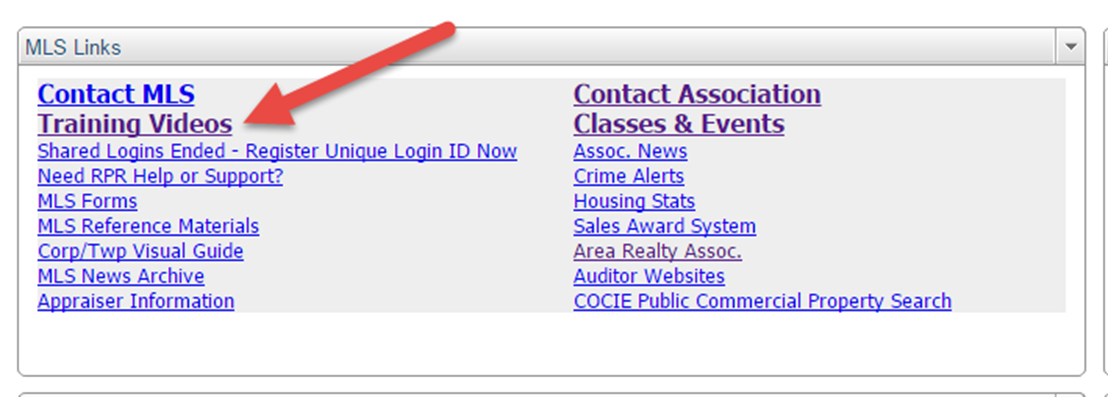
Flexmls Columbus-Specific Training Videos – Learn to Use the MLS from Home Flexmls Full Class Training Videos are Available Online The Flexmls 1 and Flexmls 2 Class videos contain the same material covered in the full 6 hours of hands-on MLS classes. It will closely mirror the class instruction offered in house. All videos labeled “Specific to Columbus” are recorded on the Columbus MLS. They will use the same fields and screens you will see when logged into the MLS, not fields and screens from Tulsa, Fargo, or Florida. You can watch these MLS training videos from the comfort of your home. Single videos on multiple Add/Edit features, Hotsheet Basics, Saved Searches, CMAs, Contact Management are also available. Whether you want to get up to speed on everything Flexmls has to offer, or just want a refresher on one topic, we have you covered. Please note: While the full class videos cover the same material in the Flexmls 1 & 2 classes, the video classes DO NOT QUALIFY for CE credit. They are informational only. Here’s how to find the Training Videos: 1. Log in to MLS 2. Click on ‘Training Videos’ as shown here:
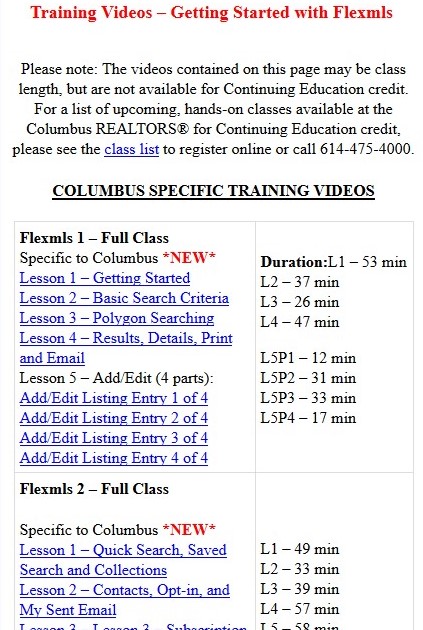
3. Flexmls 1 and Flexmls 2 full class videos as well as many other videos can be viewed from this page as seen in the image below. ___________________________
| ||||||||||||||||||||
|
Realist Downtime: System Update – Tuesday, April 4 – 1am A system update for Realist is scheduled to be installed early morning on Tuesday April 4th. Realist may be unavailable for several hours between 1:00 AM and 5:00 AM during the installation process.
| ||||||||||||||||||||
|
Realist Downtime: System Maintenance – Sunday, April 2 – 1am CoreLogic will be performing system maintenance the early morning of Sunday, April 2, 2017 beginning at 1:00 AM through 4:00 AM the Sunday morning. Realist may be intermittently unavailable during this maintenance period.
| ||||||||||||||||||||
|
RESOLVED: Flexmls Slowness and Errors – Friday, March 24 – 345pm FBS reports that the issue causing slowness and errors on Flexmls has been resolved. If you are experiencing issues, you may need to clear your cache. Original report:
| ||||||||||||||||||||
|
Notice from Franklin County Recorder 3/38/17 Note – Website appears to be up. We did not receive a follow-up message from the Recorder’s office. We’ve just received a notice from the Franklin County Recorder that their online website is unavailable and they wish to pass along to the membership/public this information: “Our main website is down at the moment due to internal Data Center issues, however our search page is still available for your membership to do document searches (via this link)? https://countyfusion5.propertyinfo.com/countyweb/login.do?countyname=Franklin We are not certain when the main webpage will be fully functioning but until then this link should give them the access they need.” The Franklin County Recorder is available by phone at 614-525-3930. Note from MLS Staff: This outage does not affect Flexmls, Realist, RPR or Data Co-Op in any way.
| ||||||||||||||||||||
|
RESTORED – Realist Outage – Began 10:45am 03/14/17 12:22PM: From Realist: Realist service has been restored. The CoreLogic technical teams continue to monitor and will investigate root cause of the event. We thank you for your patience, and we sincerely apologize for the inconvenience this has caused you and your members. 11:21AM: Unfortunately, no change in status. Issue looks to be in place for ALL MLS’s that utilize Realist. This message just received this directly from Realist: Realist is currently unavailable. The technical teams are working to restore Realist service as soon as possible. We will provide updates as they are available. We regret the inconvenience this causes you and your members. Thank you, Realist Support Team 11:10AM: At this time, we are seeing that the Realist system is unavailable. Attempts to load the Realist system will stall and then present a blank, white screen.For those attempting to Load Tax Record data on new listing entry, you will get errors. To proceed with listing entry, please do not try to utilize the Load Tax Record option. Issue has been confirmed on multiple computers/browsers and internet connections. There is no action to take on your system that will allow the site to come up as it looks to be on Realist’s end. We have reached out to Realist but have yet to receive an ETA for resolve. We will update this post with details as they are available. 10:45AM: We at Columbus REALTORS® began to see issues with Realist, we have not had any member reports of the issue as of yet.
| ||||||||||||||||||||
|
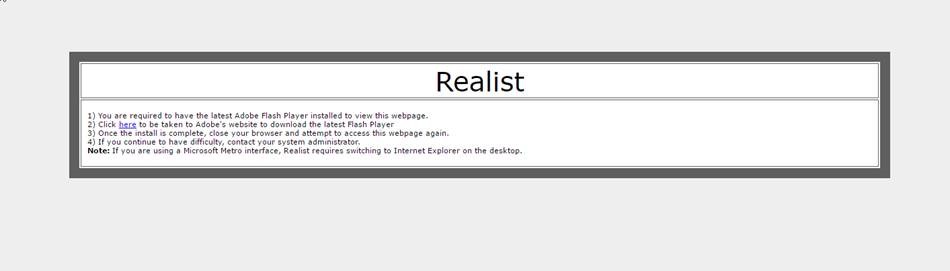
Apple Safari 10 – Changes to Adobe Flash affecting Realist This is for Apple Laptops/Desktops running Mac OS 10.10 (Yosemite) , 10.11 (El Capitan), 10.12 (Sierra) that have updated to Safari 10. At this time, these settings are not needed for iPads. With recent updates to Apple’s Safari 10 browser, Apple has changed the way that Safari runs Adobe Flash Content. The default is actually for all flash content to be disabled. If you are running Safari and want to use the Realist System, you must enable Adobe Flash. If you do not, you’ll see the following message when trying to access Realist:
Below, you’ll find some instructions on adding this exception to Chrome’s settings. If you need assistance, please contact technical support at 614-475-4000 Mon-Fri 8:30a-5:00p or by email at techsupport@columbusrealtors.com To enable Adobe Flash within Safari 10.
|