| ||||||||||||||||||||
|
ASAP Email Notification Issues – Update This information was last updated afternoon of 10/3/14. All major issues with ASAP notification should now be resolved. Some minor issues remain (see below). If you encounter an additional occurrence of one of these issues, please report it to MLS Technical Support. Fixed Issues
Some or all of these issues appear to have begun some time on Friday September 19th, 2014. Any issues still outstanding are currently at a high priority for fixing with FBS (the software vendor that makes Flexmls). As more information is known this article will be updated. We apologize for the inconvenience.
| ||||||||||||||||||||
|
Realist Downtime for Scheduled Maintenance – Saturday: 11pm – 4am CoreLogic will be performing system maintenance on the evening of Saturday, September 20, 2014, from 11:00 pm ET to 4:00 am ET. Realist may be unavailable several hours during this maintenance window.
| ||||||||||||||||||||
|
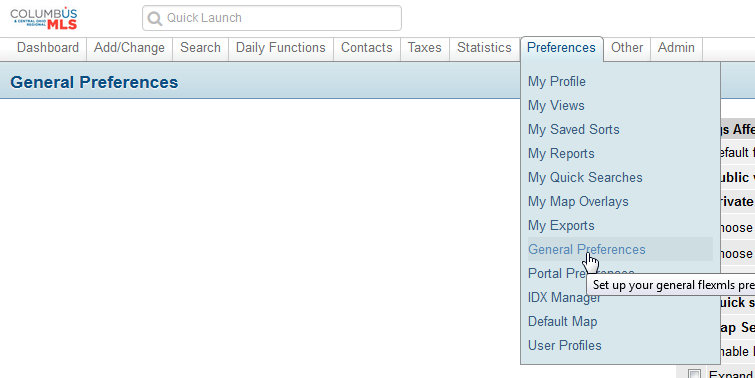
Listing Report Issue UPDATE: As of 2:28PM it appears our vendor may have made progress on this issue. Currently there is an issue with the default listing report within Flexmls. The MLS software company (FBS) is currently aware of the situation and are working towards a resolution. You can use the “Report” button above the listing report when on the Detail screen to temporarily bring up the “CR Full Report”. You can also permanently select the default listing report that is displayed within your Flexmls preferences. The instructions below are how to do that: 1. Hover your mouse over “Preferences”, and click “General Preferences” from the drop down menu.
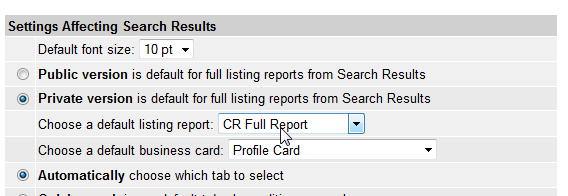
2. Locate the “Choose a default listing report” setting. Click the drop down menu next to it, and select the option of: “CR Full Report” from the drop down menu.
|
 Back To Top
 |
09/04/2014 |
Title: Flexmls – Mapping, Statistics & Customizations
Date: Thursday, September 4, 2014
This 60 minute webinar will cover:
-Using the Map to Search
-Saving Custom Map Overlays
-Driving Directions
-Stat Reports
-Customizing Flexmls
-And More!
Eastern – 11:00 AM
Central – 10:00 AM
Mountain – 9:00 AM
Arizona – 8:00 AM
Pacific – 8:00 AM
Space is limited.
Reserve your Webinar seat now at:
https://www1.gotomeeting.com/register/909417209
|
Back To Top |
08/28/2014 |
Join us for an overview of the newly redesigned Flexmls Mobile site, and ask questions to help you learn more.
Title: Flexmls Mobile – Informational Session
Date: Friday, August 22, 2014
Time: 3:00-4:00 PM CENTRAL
After registering you will receive a confirmation email containing information about joining the Webinar.
System Requirements
PC-based attendees
Required: Windows® 8, 7, Vista, XP or 2003 Server
Mac®-based attendees
Required: Mac OS® X 10.6 or newer
Mobile attendees
Required: iPhone®, iPad®, Android™ phone or Android tablet
Space is limited.
Reserve your Webinar seat now at:
https://www1.gotomeeting.com/register/593722456
|
Back To Top |
08/20/2014 |
Example 1: Contains Searching
To do a “contains” search in Flexmls Web, add the asterisk character * before and after your keyword. To search the subdivision field for “contains mcnaughten”, you would type in: *mcnaughten*
This will return listings with subdivision entries of: “Ravines At McNaughten”, “Ravines Of McNaughten”, “McNaughten Commons”, “McNaughten Glen”, etc.
Example 2: Starts With Searching
If instead you only wanted a starts with search of only “McNaughten Glen” and NOT everything else like “McNaughten Commons”, etc, you would type in: mcnaughten glen
This would return listings with subdivision entries of: “McNaughten Glen”.
*Originally Posted on 03-03-2014, Revised 08-25-2014*
|
Back To Top |
|
No one can deliver new listing and price change email to a client in central Ohio faster than an MLS member at Columbus REALTORS!
Automatic email to clients can now be sent as often as every minute. ASAP is the new email frequency that has been added when creating an auto-email event for a client. ASAP email is sent “as soon as” the listing is changed on the MLS. If a new listing is added at 8:30am, it will arrive in your client’s email at approximately 8:31am.
This is the fastest email delivery for real estate listings on the planet. FBS created this “immediate” delivery of email specifically for Columbus REALTORS. We are the first market to receive this new, super-speed client email delivery.
Read the full story here:
ASAP: Auto Email As Fast As It Gets on ColumbusRealtors.com
Remember (Delay and Junk Mail): Long-time email “hazards” can still delay or even prevent delivery of listings to the client’s inbox. Some email providers artificially delay delivery of email for virus/malware scanning. Also, Junk mail filters may catch listing emails.
|
Back To Top |
08/14/2014 |
CoreLogic will be performing system maintenance on the evenings of Saturday, August 16 and Sunday, August 17, 2014 beginning at 8:00 PM PDT through 12:00 AM PDT each night. Realist will be intermittently unavailable during this maintenance periods.
|
Back To Top |
|
CoreLogic will be performing system maintenance on the evening of Sunday, August 3, 2014 beginning at 11:00 PM through 2:00 AM Monday Morning. Realist will be unavailable during this maintenance period.
|
Back To Top |
07/31/2014 |
FBS’s latest Flexmls webinar is scheduling now. Available August 5th, 2014 starting at 3:30PM. To get scheduled to attend, please use the link below:
https://www1.gotomeeting.com/register/913470601
This webinar will cover:
*Adding Contacts
*Auto E-mail Setup
*Portals
*Importing/Exporting
*Reverse Prospecting
*Reports and more.
|
Back To Top |
07/23/2014 |