| « Previous 1 … 18 19 20 21 22 … 27 Next » | ||
|
Realist Downtime: System Maintenance – Friday, January 9 – 11pm-2am CoreLogic will be performing system maintenance on the evening of Friday January 9, 2015, beginning at 11:00 PM EST through 2:00 AM EST. Realist will be unavailable during this maintenance period.
| ||
|
Realist Reports and Auto-pop Unavailable for Franklin, Delaware, and Morrow Counties Realist Property Details reports are generating a “No Properties Found” or “No Report Generated” error for Delaware, Franklin and Morrow Counties. Auto Population of tax data when entering a new listing is also affected. Realist technical support has been notified and is currently working to resolve the issue as soon as possible. We will provide updates as they become available.
| ||
|
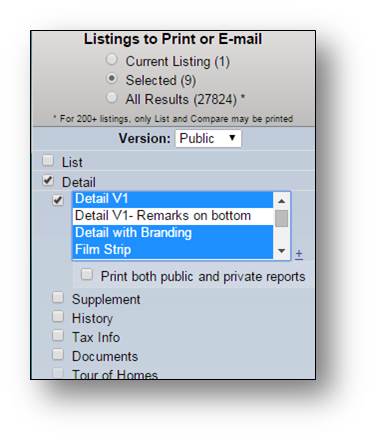
Feature Enhancement – Print or Email Multiple Report Formats Today on December 4th, Flexmls included a new feature that allows users to select multiple report formats from the Print and Email screens. From the Listings to Print or Email screen, select the Detail checkbox and up to 4 different report formats. To choose multiple reports, hold down the Ctrl Key (Command on a Mac) as you click on the individual reports you’d like to include. To deselect one item from the list with multiple items highlighted, hold down the Ctrl (Command) key and click the report you wish to remove. *Note – To see the new options, it is possible you may need to check and then recheck the DETAIL option on the left of the screen. Once you recheck the option, please select the report you wish to print (Default standard view report is “CR Full Report”). Once you have a report, or reports, selected you can click on the SAVE wording near the bottom left of the screen to remember these options.*
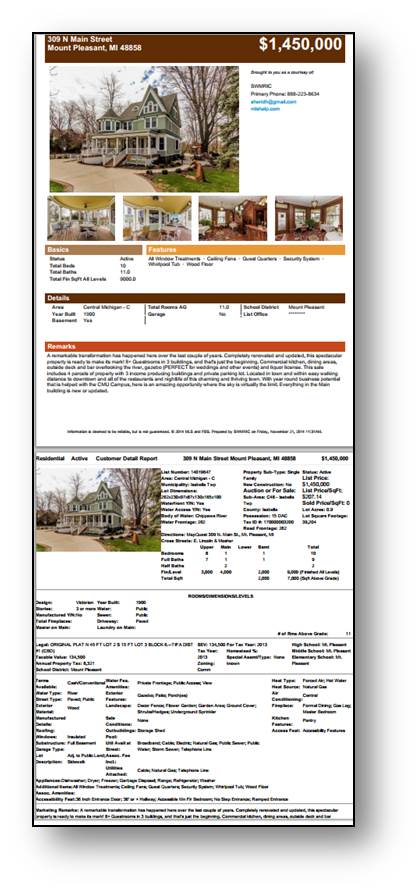
Reports for each listing will be grouped together, followed by the same reports for the next listing.
| ||
|
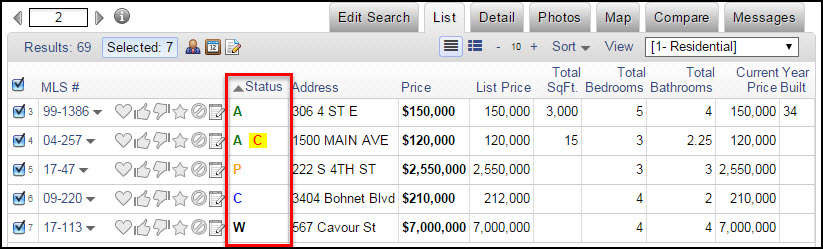
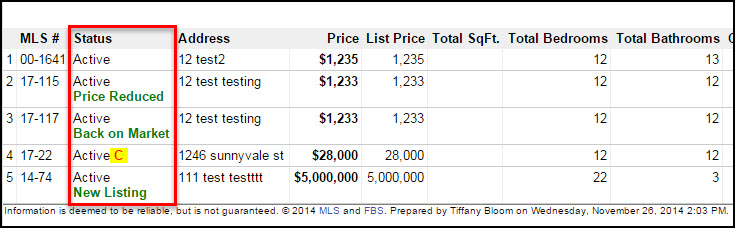
Changes to the One Line List View – December 10, 2014 On December 10, FBS will change the way listing statuses appear when viewing listings in the one-line view on the List tab. Since the current, full-text description can make the column unnecessarily wide, it will be replaced by a lettered code for the status.
You can use your mouse to hover over the letter in the Status column to see the full status description.
Below is list of common status abbreviations: Additional information for status changes and contingencies will follow the status code.
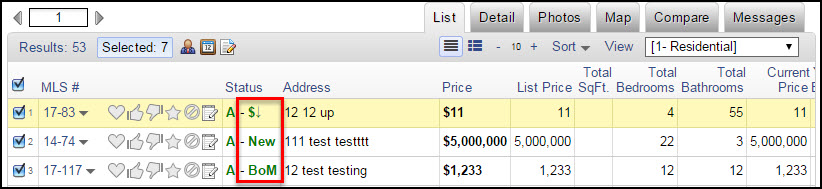
Use your mouse to hover over the letters or symbols following the status to see the full description.
Common status change abbreviations/symbols are as follows: Contingency codes are determined by whether your MLS handles them as separate statuses or sub-statuses and they will reflect the codes that your MLS currently uses to define them. Just hover over the contingency to see more information.
Please note that these changes do not apply when printing the one-line view for the list tab. When printing, the full-text description will still print as shown in the example below.
| ||
|
Realist Downtime for Scheduled Maintenance – November 15 – 11pm Realist will be performing system maintenance on the evening of Saturday, November 15 Schedule of Downtime: Realist offline and inaccessible – 11:00 PM Realist access restored – 3:00 AM. Realist will be unavailable during this maintenance period.
| ||
|
Realist Downtime for Scheduled Maintenance – 1:30am Tuesday, Nov. 11 Realist will be performing system maintenance on the early morning of Tuesday, November 11 Schedule of Downtime: 1:30 AM Realist offline and inaccessible 3:00 AM Realist access restored Realist will be intermittently unavailable during this maintenance period.
| ||
|
Flexmls for iOS App – Informational Session – Wednesday, October 22, 2014 3:30 PM Join our vendor FBS for a Webinar on Wednesday, October 22 on the recently updated iOS Flexmls App Space is limited. Join us for an overview of the Flexmls for iPhone app and see the latest updates! Title: Flexmls for iPhone App – Informational Session
| ||
|
FBS Security Updates and older web browsers – October 15, 2014 On October 14, 2014, at approximately 8pm CDT, the FBS Hosting team reacted to a vulnerability/exploit (CVE-2014-3566) that was disclosed to the public about an hour earlier. The action taken, on our vendor’s part, was to completely disable SSLv3 on the servers responsible for serving all Flexmls traffic. What this may mean for you is that your browser you are using to access Flexmls is out of date or is using non-standard settings, you will likely have an issue even bringing up the Flexmls system. You do have several options to help assist with access to the system: Make sure the browser that’s being used is as up-to-date as possible for the OS that is being used.
It is still recommended that users upgrade to the latest possible version of whichever browser they’re using (if possible). If the user is running one of these browsers and still having an issue, it may be the case that they have disabled TLS support in their browser.
For most home users, the answer is to look to make sure you are up to date with both your browser’s version or the appropriate Windows or Mac OS updates. The following links can help: For assistance with Windows Updates, you can use the following link: http://windows.microsoft.com/en-us/windows/windows-update Once you have updated fully for either Windows or Mac OS updates, if you are still having a problem with your browser of choice, your next course of action would be to try a different browser. Flexmls supports recent versions of Internet Explorer, Google Chrome, Firefox on Windows systems and Google Chrome, Firefox or Safari on Mac OS. If you are on a computer that is in an office or corporate environment, it is possible your computer may have certain settings or software requirements established by your company’s IT team for the protection of their internal network or provided hardware. You would want to consult your IT team for further assistance regarding this situation. If your IT team has questions, please direct them to our technical support at techsupport@columbusrealtors.com or by phone at 614-475-4000 during regular business hours of Mon-Fri 8:30a – 5:00p.
| ||
|
Realist Downtime Tuesday Morning – 1am-5am – System Update There will be a scheduled outage for Realist beginning approximately 1am Tuesday morning. There will be intermittent inaccessibility during the update. Service should be restored to normal for Realist by 5am. PLEASE NOTE: MLS access will not be affected, only Realist.
| ||
|
Subdivision, A2A Remarks, Property Description: Default to “Contains” Auto-Wildcard Searching The Subdivision, A2A Remarks, and Property Description fields now default to searching for text “contained within the field”. That is, if you type “meadow”, these 3 fields will now find the term “meadow” anywhere within the field. (ie Meadowlark Woods, The Meadows, etc) The Property Description field had this functionality already, but Subdivision and A2A Remarks defaulted to “Starts with” previously. If you want to search for a specific subdivision by an “exact matching name”, you can use the “=” (equals sign) for search for “exact matches”. (ie =The Glen will return only that subdivision, not The Glen at Woodside or The Glen at Abbyshire) As always, remember that Subdivision is not a required field at time of listing entry. If the agent chooses not to fill in the field, it will be blank and unsearchable. It is always a good idea to do a “second opinion” search when using the field Subdivision. A second search using a polygon around the subdivision might be a good idea to make sure you didn’t miss any listings that had a “blank” subdivision.
|