| ||||||||||||||||||||
|
Homesnap Training – February 27, 28, March 1 – Sign Up Now! Homesnap will offer live training February 27th, 28th, and March 1st (Sign up now!)Homesnap Launches on February 26th. Columbus REALTORS® has partnered with Homesnap Pro. Homesnap is the market-leading national home search platform that provides real-time MLS data to consumers and free leads that go directly to the listing agent not the highest bidder! Stay in touch with your client with built-in instant messaging. Send a Homesnap Rapid CMA directly from your phone. The integrated Homesnap platform provides over 875,000 agents with access to powerful, intelligent mobile tools that accelerate their success. Sign up for one of the FREE in-person training sessions around central Ohio: East Columbus Dublin Westerville Can’t make in-person dates or just prefer to get your training online?
Video overview of Homesnap Pro here.
| ||||||||||||||||||||
|
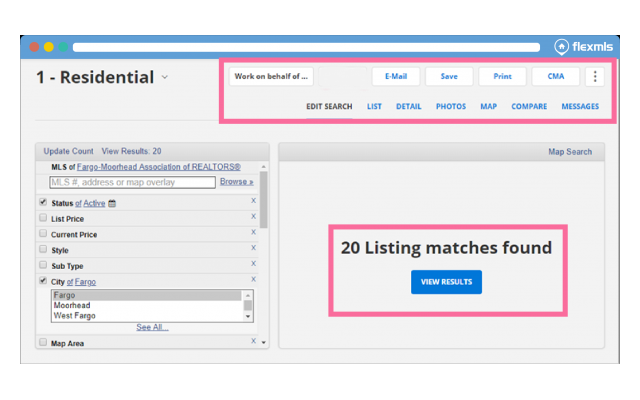
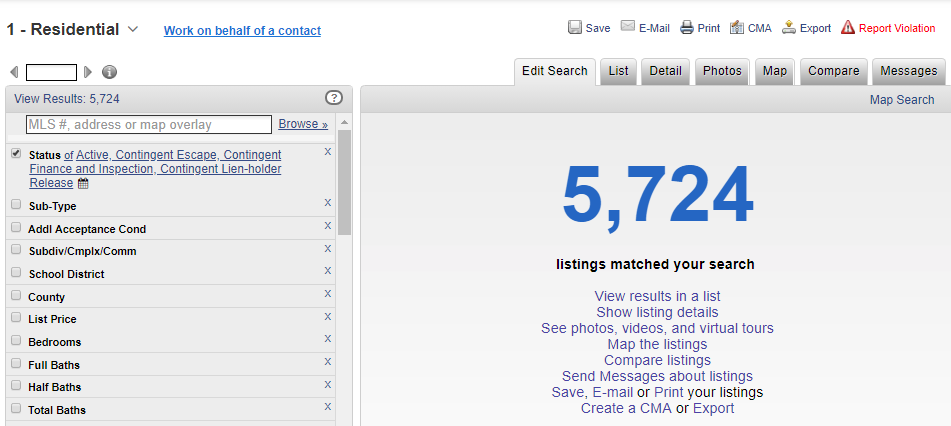
Updated Look for Quick Search – March 5 Starting on March 5, the Quick Search feature of Flexmls Web will be updated with a modernized look that is also easier to use. Only the appearance of the page will change. The functionality of Quick Search and all features and functions remain. The tabs and buttons at the top of the page have been simplified, and the results pane of the Edit Search page has been decluttered. The results pane will display only the number of matching listings and a View Results button instead of repeating the same options that are displayed at the top. New Quick Search Page:
Old Quick Search Page:
| ||||||||||||||||||||
|
Realist Downtime: System Maintenance – Saturday, January 26 – 11pm CoreLogic has scheduled system maintenance this weekend, Saturday, January 26, 2019 from 11:00pm to 1:00am. During this time, Realist may be intermittently unavailable.
| ||||||||||||||||||||
|
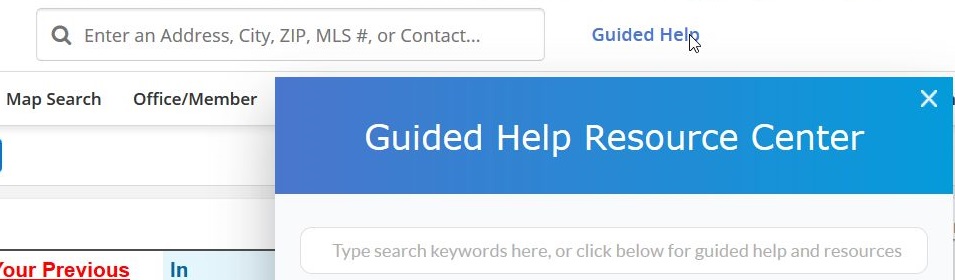
Coming January 23: Guided Help for Flexmls – Your 24/7 Virtual Trainer Right on the MLS Screen On January 23rd, Flexmls will release the new Guided Help Resource Center. This new in-line training resource will allow all users to increase their knowledge, at their own pace, and on their own schedule. It is like a 24/7 virtual trainer built right into the Flexmls system. Anytime you need help or tips you can access the Guided Help without even leaving the MLS in your web browser. Guided Help Search Bar Access the new Guided Help by clicking on the Guided Help link at the top of the Flexmls window next to Quick Launch. Type a phrase or topic you’d like to search: specific Flexmls features, guided help tutorials, feature specific help pages, and more. Multiple resources appear on the screen as soon as you start typing.
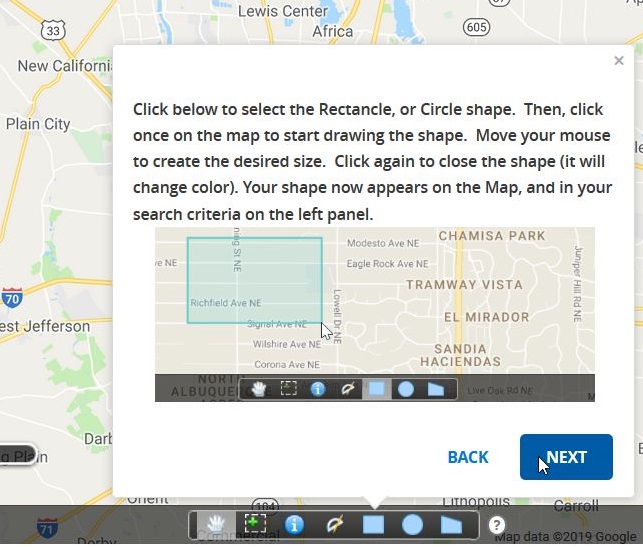
Guided Help Tours With Guided Help, you don’t have to wait around for answers or ask someone else how to do something in Flexmls. The new Guided Help tours put instruction just a click away, right on the MLS! Just select a topic to learn more about Flexmls. You will instantly be guided through the process, step-by-step.
Guided Help Smart Tips You’ll notice small question marks with a circle around them sprinkled throughout Flexmls. Click or hover on a smart tip to learn more about a particular feature. Want to preview Guided Help? Watch this short video presentation.
| ||||||||||||||||||||
|
Don’t Let Your Previous Clients Forget You! ePropertyWatch – New FREE MLS Member Benefit Looking for an easy way to stay in touch with past clients? ePropertyWatch™ is a now a FREE member benefit for all Columbus REALTORS MLS members! Don’t let your clients forget who you are. ePropertyWatch is a an automated email system that keeps you “front and center” in the minds of your past clients. It will send a monthly report full of information on their home and neighborhood, including information on their home’s value, nearby listings and transactions, local trends, and more.
Two ways to learn about ePropertyWatch NOW: Free, live online training Friday, January 18th: Watch a pre-recorded training video NOW: For Technical Issues or help activating ePropertyWatch: Activate Your ePropertyWatch Account Now: Watch a short video introduction to ePropertyWatch.
| ||||||||||||||||||||
|
Resolved 12:01PM – System Slowness – High system load Update: 12:01 – From FBS Service has recovered and we’re monitoring everything closely. As of 11:51am, our vendor, FBS, has notified that they are experiencing high system load for the Flexmls Web system. You will likely see slowness in browsing the website or preforming any standard action. At this time, no ETA has been given for the resolve.
| ||||||||||||||||||||
|
Realist Maintenance Downtime: Saturday, December 1 – 11pm CoreLogic has scheduled system maintenance and patching on several servers this weekend. During this time, Realist may be intermittently unavailable. Downtime Schedule:
| ||||||||||||||||||||
|
MLS NRDS Login Conversion has Completed The MLS NRDS login conversion is complete. License number-based logins will no longer allow access to MLS. FULL STORY: There is a change coming to the way you log into the MLS. You may have noticed the message on the FlexMLS Message Board regarding NRDS numbers. The login change is currently scheduled for Tuesday, November 27th 2018. Your password will not be changed on that day, only your login. Need help finding your NRDS number? Instructions at the bottom of this message. Brokers, Agents, and Appraisers currently login using their license number issued by the Ohio Division of Real Estate with a “cr.” prefix (e.g., cr.123456 or cr.2001123456). Assistants currently login with the license number of the agent for whom they work with a suffix (e.g., “a1”). This format is easy to remember but can cause problems if there is a change in your license number. This is common when moving from Agent to Broker or returning from Broker to Agent. Problems can be caused by these license number changes within the MLS system. Members may not be able to see their entire listing history, inventory and other production numbers. The contacts, saved searches and other items tied to the specific license number-based login will not appear if that login changes to the new license number. A new MLS account is created when the state changes a license number. We are moving to a more standardized login scheme (NRDS number) which will not need to be changed when the state changes a license number because of a change in license type. It won’t change even if there is a move to another state! The NRDS number was found to be the best option for the MLS login. NRDS number (pronounced NERDS). This number is used by the National Association of REALTORS® for your unique identification. Your NRDS number is assigned by the first Association that you joined. It is then uploaded to NAR for their records. Your NRDS number will not change throughout your career as a REALTOR®. Current MLS Login: cr.LICENSE# New MLS Login: (beginning November 27, 2018) cr.NRDS# Note: Assistant logins will continue to have a suffix (e.g., “a1”). The license number portion will be replaced by the NRDS number. Administrator logins (i.e., those beginning with “cr.admin…”) will not be affected by this change. Please remember that this change WILL NOT OCCUR until later this year on November 27th, 2018. You will receive several notifications prior to the NRDS login conversion. In addition to this and future emails, it is planned to send printed notices through the US Postal Service and Columbus REALTORS® e-Notes notifications. Each office will be provided a list of NRDS numbers for all Brokers and Agents in their office. Below is information previously provided regarding the upcoming MLS login change. There are several methods to locate your NRDS number. Questions? Please contact the MLS staff or Technical Support at (614) 475-4000 if you would like more information. Thank you for your patience and understanding during this conversion. The information below will help you locate your NRDS number.
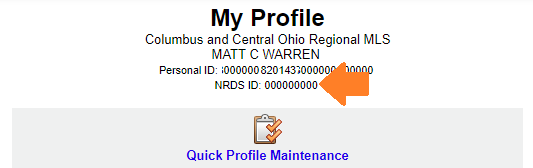
Original Announcement posted June 8, 2018: =-=-=-=-=-=-=-=-=-=-=-=-=-=-=-=-=-=-=-=-=-=-=-=-=-=-=-=- Have you memorized your NRDS number? You will need it soon. Your MLS login is currently your license number preceded by “cr.” For example, an agent whose license number is “123456789” would use “cr.123456789” to login to the MLS. The MLS login for all users will be changing later this year. You will continue to use your current, license-number-based MLS login until you are notified to use the new login. There will be several highly visible announcements prior to the new login requirement later this year. Office administrators: If your login begins with “cr.adminXXXXX”, this change will not affect your login since it does not contain your license number. Assistants: Assistant logins will continue to have a suffix (e.g., “a1”). The license number portion will be replaced by the NRDS number. The new login ID for all MLS users is planned no later than 4th quarter of 2018. It will replace license number with NRDS number. Current format “cr.LICENSENUMBER” will become “cr.NRDSNUMBER”. It is highly recommended that you memorize your NRDS number in advance of the switchover. Find your NRDS ID:
Verify your NRDS number in Flexmls:
View additional information about obtaining your NRDS ID on NAR’s website: https://support.realtor.com/dashboard/getting-started-dashboard/find-nrds/ If your NRDS ID on NAR and MLS do not match, please contact Membership at Columbus REALTORS® at 614-475-4000.
| ||||||||||||||||||||
|
Realist Release scheduled for October 24, 2018 Realist release 1.20 is scheduled for the evening of Wednesday, October 24, 2018 and will be available in the Realist product the following morning. Realist may be intermittently unavailable between 10:00 PM and 2:00 AM Pacific Time during the installation process. This update includes the following: • The large red pins will be removed from Property Map insert at the bottom of the Realist Property Detail report. • Map searches which exceed the 1000 max search limit will display the Exceeds Maximum search results message. • Additional behind-the-scenes security upgrades to protect and safeguard Realist.
| ||||||||||||||||||||
|
ColumbusRealtors.com Website is Down – Not MLS The ColumbusRealtors.com web site is down. This outage does NOT affect MLS functionality. To access the MLS directly: cr.flexmls.com
|