| ||||||||||||||||||||
|
Tech Tips: Listing Contingency Removal Every Realtor® hates it, but sometimes it happens. A deal in the final stages falls through and now your listing needs to be put back on the market, but for some reason the MLS will not let you. Here, we will go over how to fix that. Where to StartTo begin, we will need go to the Edit Listing section of the listing in question. To get there, we’ll go to the Menu button in the upper left corner, right below the Columbus MLS logo, as seen here. 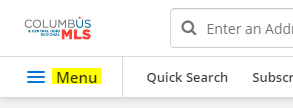 Click Menu and then click Edit Listing. Alternatively, you can click the MLS number if you’ve got the listing open and click Edit Listing, as seen below. 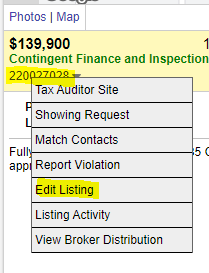 Removing the ContingencyThe first instinct for most is to click Edit Current Status and change their listing back to Active. This is where the MLS will stop you. The MLS counts contingencies as a separate status, and they need to be removed manually before you can go back to Active. It’s often overlooked but Add/Remove Contingency can be seen below. 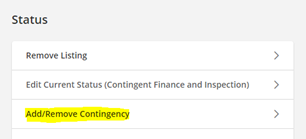 Click Add/Remove Contingency and change it to No Contingency. Once this is complete, your listing will kick back over to Pending. From there, you can click Edit Current Status and move it to Active. This works for all contingencies. Viola!Your listing is now back on the market for new buyers. Did you enjoy this MLS tip? Keep an eye out for new ones!
| ||||||||||||||||||||
|
Tech Tips: Removing or Adding Yourself to a Client Subscription. What does this mean?Sometimes you may want to receive the same email that your clients get with their email subscription. Doing this lets you see exactly what they see so you can better communicate and coordinate with them, like with especially high-profile clients. Other times you may decide that you do not need these emails, like with a client who is casually searching for a home with a very wide set of criteria, potentially meaning many emails. In this guide, we will teach you how to edit this setting inside the Columbus Realtors MLS. First, locate the Subscription that you want to edit email settings for.To do this, we’ll go to Subscriptions in the MLS, as seen below. 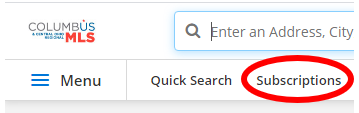 Your view may be different depending on your settings, but Subscriptions can always be found by searching in the Menu button. Simply open the Menu, click the search bar, and type “Subscriptions” to bring the option up Next, open the Subscription.Now, you simply need to click the Subscription name to open the editing page. From there, you will notice a few options at the top of the page like the Subscription name and where new notifications go to. Notice the checkbox labeled You (sender). If this is checked, you get the same listing emails your client does. If unchecked, you do not get the listing emails. By default, this is usually turned on. Once this is edited to your liking, click Save at the bottom of the page. Viola!Your email setting is now edited in just a few steps, giving you more control over your email box. Did you enjoy this MLS tip? Keep an eye out for a new one next week!
| ||||||||||||||||||||
|
Less Password Changes in MLS! The password reset requirement has been extended to 180 Days These are trying times. There is plenty of stress without having to change your MLS password 4 times every year. What if password changes only happened every 180 days instead of the current 90 days? Would that really hurt anything? No, probably not. Let’s do it. Recent studies in the technology and data security sector have pointed to a couple of recommendations regarding passwords. The first recommendation is that passwords be more difficult to hack. A short password consisting of a few letters and numbers is not enough. A longer password of nonsensical words is harder to guess or hack. The second is that frequent password changes don’t really help that much. In fact, they lead to simple passwords that are easier to remember and easier to steal. Your MLS login will no longer force-change your password every 90 days. You will still have to change your password, but only twice a year. Please make your new password longer and more secure as described below. This will make your password safer as you take advantage of the “less password changes per year”. What does an insecure, weak password look like?
What about stronger, more “secure” passwords?
Takeaways:
| ||||||||||||||||||||
|
Realist Video Available Did you miss the Realist 2020 webinar on April 13th? The webinar was recorded live on April 13, 2020 with an audience of central Ohio real estate professionals. Watch the recording to learn about the new features available now in the new version of Realist for 2020. Please note: You will be taken to a “registration” page that will require you to enter a name and email to watch the video. 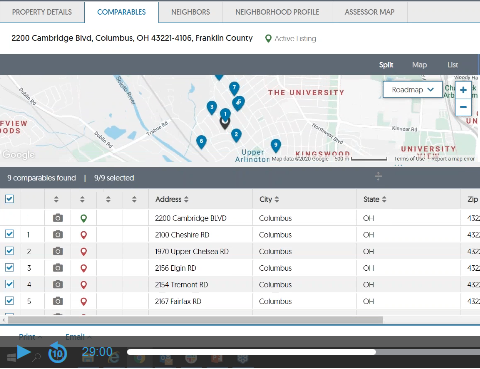
| ||||||||||||||||||||
|
Android Users: Flexmls Pro Login Issues *This only applies to Flexmls Pro used on Android Devices* We have had many reports recently of Android users having issues with Flexmls Pro. These issues have been reported to FBS and it is not just in our market the issue appears. If you are seeing an issue, please continue to some steps for a resolve. When FBS provides a fix, it will likely come as an update to the app you’ll simply download via your Play Store updates. The Issue If you are a user of FBS’s app, Flexmls Pro and are seeing white or blank screens when attempting to log into your app to view the MLS, here are some instructions that can help. Please note, with Android based devices, these instructions may not *exactly” match your particular device. Please use these instructions below as a basic guild line.
Here’s an example from a real device: The below is based off a Google Pixel 3A XL. Please note, your device may be similar but not exactly the same:
This link will take you to a generic page that goes over the generic steps for the process above. This link is NOT about Flexmls Pro specifically, but the general steps you can use on Android. This link provided for visuals. Link is also listed below:
| ||||||||||||||||||||
|
Realist 2020 Update is here! Realist 2020 – Improvements, New Features, and HTML Realist has released their 2020 edition of their system and it is live now here for Columbus and Central Ohio Regional MLS! The most notable update is the removal of Adobe® Flash®. The updated, Flash@-free Realist environment is expected to be more responsive and with a much more modern user interface. The basic navigation and functionality are very similar to the old versions. This will help maintain a familiarity which will make it easy to learn and use the new version. Realist has added several NEW features in additional to improvements and removing the Flash® install requirement. To Help with the transition, Realist has made available several video resources. As Realist releases additional help and resources, we will make these available on an updated version of this post. See the links below: An Introduction To The New Realist – Great place to start giving an overview over the new system. How To Use The Realist Search Tools Working with Realist Search Results Exports and Mailing Labels in Realist Understanding The Realist Property Detail Report Understanding The Realist Map Tools As with anything new, there will of course be bugs. If you see something, please let us know so we can provide feedback to Realist. You can reach out to us via email at techsupport@columbusrealtors.com
| ||||||||||||||||||||
|
Realist Update Coming: No More Flash Realist 2020 – Improvements, New Features, and HTML The Realist public records software is scheduled for a major update this year. Updates include a new user interface, improvements and new functionality. The current estimate for release is April of 2020. The most notable update is the removal of Adobe® Flash®. The updated, Flash@-free Realist environment is expected to be more responsive and with a much more modern user interface. The basic navigation and functionality are very similar to the old versions. This will help maintain a familiarity which will make it easy to learn and use the new version. Realist has added several NEW features in additional to improvements and removing the Flash® install requirement.
| ||||||||||||||||||||
|
Updated Member/Office Search User Interface. Our MLS Software vendor, FBS, has rolled out to our market their updated user interface for the Member/Office Search. The rollout began back in February and they slowly were updating each MLS they serve. See the link below for details direct from FBS on the new functionality of the search: https://flexmls.com/flexmls-academy/product-news/updated-ui-for-office-member-search/
| ||||||||||||||||||||
|
Association Contact Email Addresses – Reminder Due to the COVID-19 virus and Columbus REALTORS® staff members working from home, we are reminding our members of the best email addresses to utilize for assistance: Columbus and Central Ohio Regional MLS For MLS Technical Support/Questions on the Flexmls/Flexmls App or other MLS related software: Please contact techsupport@columbusrealtors.com For MLS Listing Questions or Corrections: Please contact mlscorrections@columbusrealtors.com For MLS Policy Related Questions/Violations: Please contact mlspolicy@columbusrealtors.com Columbus REALTORS® For Keybox/Supra: Please contact keybox@columbusrealtors.com For Membership/Billing: Please contact membership@columbusrealtors.com For Member Service Center/Store: Please contact memberservice@columbusrealtors.com
| ||||||||||||||||||||
|
Erroneous “SqFt Documented field is blank” Emails What is Happening?Over the last morning, you may have received an email stating that your listing has the SqFt Documented field blank even though you actually have a value supplied. We have been in touch with the vendor and are pressing them for a resolve on the issue. We expect an answer from them today. What should I do?If your listing has a value supplied for SqFT Documented, you can ignore the email. If your listing does not have a value entered, please take the steps provided in the email to notify MLS staff of a value to enter on your listing. History of the emailOur vendor, FBS, has an automatic script process to watch for listings that DO NOT have the field SqFT Documented filled out. If found the script will process the next morning and send out an email reminding our policy regarding SqFT Documented. The email states: MLS Policy requires the Sq Ft Documented field to be accurate for all listings. The listing agent must provide proof of taxable square footage from a professional source to the MLS within 15 days from the entry date. You must provide this proof by email in PDF format or by FAX. You cannot update the listing’s Sq Ft Documented yourself. The field is locked after initial entry. You will continue to receive this notification for 15 days or until the field is updated by MLS staff. After 15 days, the listing agent will receive a Data Maintenance Fee for late entry of Sq Ft Documented. This policy applies to all Residential and Res Rental listings. PROOF OF SQ. FT. SOURCE DOCUMENTS: MLS staff must update the Sq. Ft. Documented field for you based upon the source document you provide. Acceptable source documents include county auditor’s record, appraisals, builder statements and floor plans provided by a builder, architect or licensed appraiser. Please submit these documents to MLS so your listing can be updated immediately. You may submit documentation as a PDF by email or FAX. SUBMIT TO:
QUESTIONS? (614) 475-4000 (ask for MLS Corrections)
|
